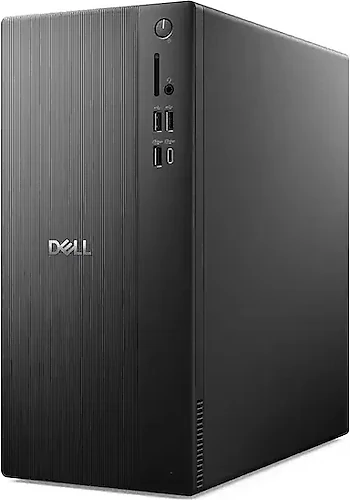
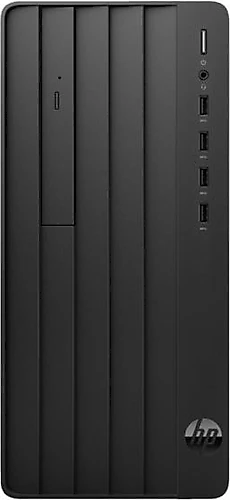
The Dell Tower ECT1250 and HP Pro Tower 290 G9 are monitor-free desktop computers designed for office work, education and everyday productivity. Both have 16 GB of memory, a 512 GB SSD and integrated Intel UHD Graphics 770. So your choice depends less on graphics performance and more on your processor priorities, memory type and how you want to handle operating system setup.
Processor: i7 priority or balanced everyday use?
The Dell’s Core i7-14700 processor is the most notable hardware difference between the two models. Dell is suited to those who need more processing capacity for tasks such as using many applications at once, working with large spreadsheets, compiling code or running processor-intensive workflows. For people who multitask heavily and plan to use their computer for a long time, this is the main reason to choose the ECT1250.
The HP’s Core i5-13500 provides a strong foundation for office applications, online meetings, schoolwork, web browsing and typical multitasking. For those who don’t need a top-tier processor for these tasks, the Pro Tower 290 G9 may be the more measured choice. If you mainly use email, documents and the internet, the Dell’s extra i7 capacity may not be enough on its own to sway your decision.
The choice shouldn’t be reduced to “i7 is always better.” What matters is whether your everyday tasks can benefit from more processing capacity. Dell is a better fit if your workload frequently taxes the processor; if you mostly handle general productivity tasks, the HP’s i5 may be sufficient.
Memory and storage: same capacity, different memory type
Both desktops come with 16 GB of RAM and a 512 GB SSD. This shared setup provides a similar starting point for office software, documents, applications and everyday files. SSD capacity also doesn’t make it easier to choose between the two on its own. If you plan to keep a large photo or video archive or many large files, you’ll need to consider your storage needs separately.
The difference is the memory type: the Dell uses DDR5, while the HP uses DDR4. The Dell’s newer memory type is one part of its hardware configuration, but you shouldn’t assume that this label alone will make a noticeable difference in every use case. Since both offer 16 GB, also consider your processor needs and overall usage when making your decision. If you’re considering a future RAM or storage upgrade, check the supported options for the configuration you plan to buy.
Graphics and monitor: shared limits, shared planning
Both computers use integrated Intel UHD Graphics 770, so they’re similarly suited to desktop applications, video playback, online meetings and light graphics work. Neither is in the right category if you’re aiming to play newer, graphics-intensive games, do professional 3D work or run demanding GPU-accelerated production tasks; a computer with a dedicated graphics card would be a better fit. The Dell’s more powerful processor doesn’t change this shared graphics limitation.
Both models are monitor-free tower systems. If you already have a monitor, keyboard and mouse, you can use them for setup; if this is your first desktop computer, include peripherals in your plans. It’s worth checking the connection list for the model you intend to buy to make sure it matches your preferred display.
Operating system and readiness for setup
The HP Pro Tower 290 G9 is listed with FreeDOS, so you’ll need to install your preferred operating system and obtain a license if necessary. The Dell product name mentions Ubuntu, while the technical specifications state FreeDOS. Since this discrepancy could affect your purchase decision, confirm in advance which operating system the ECT1250 will be delivered with.
Since both computers are sold without monitors and may require operating system setup, the delivered configuration matters if you want to start working right out of the box. If you already have a license and peripherals, it may be easier to add either computer to your workspace.
Final choice: which one suits which use?
If processor-intensive applications, heavy multitasking and greater processing capacity are your priorities, the Dell Tower ECT1250 is the better choice. Its Core i7-14700 and DDR5 memory are standout features, but its UHD Graphics 770 means you shouldn’t consider it a gaming or 3D workstation. Also, clarify the Ubuntu-FreeDOS discrepancy before buying.
If you’re looking for a balanced desktop for office work, education and everyday productivity, don’t need a dedicated graphics card and are comfortable installing the operating system yourself, the HP Pro Tower 290 G9 is a suitable candidate. Its Core i5-13500, 16 GB of DDR4 and 512 GB SSD fit this type of use. In short, consider the Dell if processing capacity is your priority, or the HP if you prefer an i5-level configuration for general work and home use. Before making a final decision, clarify your operating system and peripheral requirements for either model.