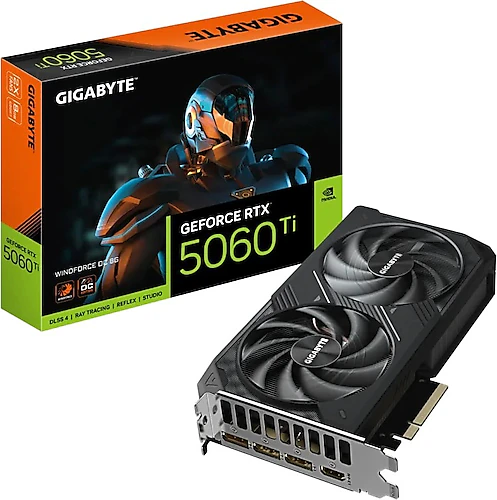
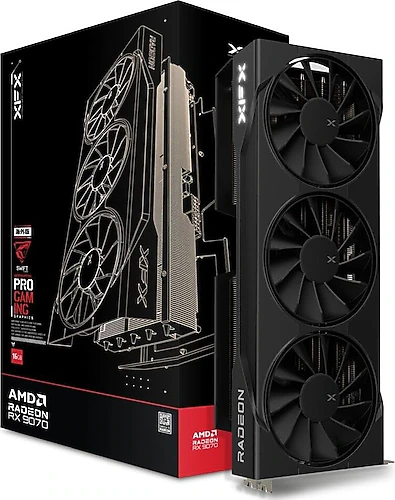
The Gigabyte RTX 5060 Ti Windforce OC 8G and XFX RX 9070 XT Swift Gaming Edition OC are gaming graphics cards designed around different priorities. Gigabyte targets 1080p and balanced 1440p systems with DLSS, G-Sync, and a dual-fan design. XFX stands out for higher resolutions and games that use more memory, with 16 GB of memory, a 256-bit interface, and triple-fan cooling.
Is resolution or memory capacity your priority?
Gigabyte’s 8 GB of GDDR7 memory and 128-bit interface provide a reasonable foundation for a system targeting high settings, particularly at 1080p. Depending on the game and settings, the card can also offer a balanced experience at 1440p; however, memory capacity is worth considering if you plan to use demanding ray-tracing settings or large texture packs at higher resolutions.
XFX’s 16 GB of GDDR6 memory and 256-bit interface leave more room for high-resolution textures and scenarios that use more memory. That makes the RX 9070 XT Swift Gaming Edition OC a more direct choice for 1440p gaming at high settings. 4K is also within its scope, but you should expect to choose settings on a game-by-game basis rather than assume the same settings and smoothness in every game. Memory capacity alone does not determine performance; the game and graphics settings also affect the results.
The difference shouldn’t be read as “more memory is always better.” If your priorities are 1080p gaming and current NVIDIA graphics technologies, Gigabyte’s 8 GB capacity may suit you. If you want to allocate more memory to textures at higher resolutions and keep the card for longer, XFX’s 16 GB offers more headroom.
DLSS and G-Sync, or FreeSync?
Gigabyte is aimed at users who want to build a system around NVIDIA features such as DLSS and G-Sync. In supported games, DLSS can help deliver a smoother experience while preserving image quality; this technology can expand the card’s capabilities, especially as graphics workloads increase. G-Sync support can also help reduce screen tearing and the sensation of stuttering with a compatible monitor. The card also supports VR.
On the XFX side, FreeSync support and the option to use AMD upscaling technologies such as FSR are available. With a compatible FreeSync monitor, you can match the display’s refresh rate to the GPU’s output. Both cards have HDMI and DisplayPort connections; which synchronization or upscaling technologies are supported by your monitor and the games you play may influence your choice.
Cooling, size, and overclocking
Gigabyte’s dual-fan Windforce design and stated dimensions of 120 mm in height and 40 mm in width may make it easier to fit in a case. XFX’s triple-fan cooler offers a larger cooling setup; its stated dimensions are 150 mm in height and 65 mm in width. Fan count alone does not guarantee quieter operation or a particular operating temperature. Check case compatibility for both cards; for the XFX model in particular, consider card length, nearby components, and available space inside the case.
Both products support overclocking. The XFX is listed with a standard clock of 1660 MHz and a boosted clock of 2970 MHz. Don’t treat the boosted figure as a fixed speed that the card will sustain in every game; operating conditions can vary. Gigabyte’s factory overclock is also intended to offer a more performance-focused character than the standard RTX 5060 Ti option.
Non-gaming use and system compatibility
Both cards are worth considering for video editing, 3D work, and GPU-accelerated creative applications. However, GPU support in your applications may affect your choice: Gigabyte may be a better fit for workflows that rely on specific NVIDIA tools or CUDA support. XFX’s 16 GB of memory can provide room for large graphics projects; consider in advance how AMD GPU support works in the software you use. So, account for the applications you regularly use as well as your gaming preferences.
Gigabyte’s dimensions make it the more compact option of the two, but the stated height and width alone don’t determine whether it will fit your case. For XFX, in addition to available case space, it’s important to check the recommended power supply, the card’s power connectors, and the PSU cable configuration. With either model, the monitor cable needs to be connected to the graphics card.
Final choice: Which card is right for whom?
If your priorities are high settings at 1080p, DLSS, G-Sync, VR support, and easier case installation, the Gigabyte RTX 5060 Ti Windforce OC 8G is a better fit. It also supports balanced 1440p gaming, but keep the limits of its 8 GB of memory in mind for demanding texture and ray-tracing scenarios.
If high-settings 1440p gaming, 16 GB of memory, and a wider memory interface are your priorities, the XFX RX 9070 XT Swift Gaming Edition OC is a stronger candidate. In return, you’ll need to carefully check case and power supply compatibility for the triple-fan card. In short, make your choice based not only on clock speed or memory type, but also on your target resolution, the technologies you use, and the physical compatibility of your system.