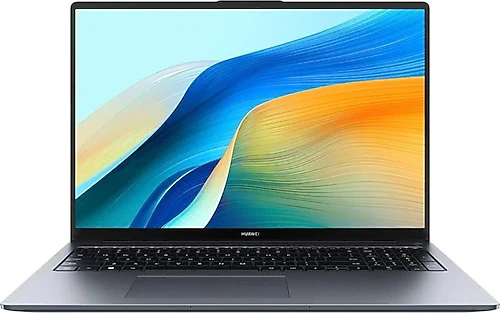
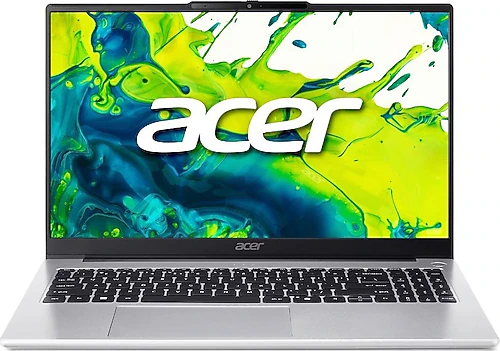
The Huawei MateBook D16 and Acer Aspire AL15-45P-R11D are two laptops with similar memory and storage capacities for everyday productivity. The main differences that may shape your choice are screen size, the Acer’s stated portability measurements, display panel, and processor platform. Both also have FreeDOS and shared graphics, so neither has an out-of-the-box advantage for operating system setup or demanding graphics work.
Do you prefer a larger screen or a lighter body?
The MateBook D16’s 16-inch WUXGA display is suited to people who want a spacious area for editing documents and spreadsheets or using multiple windows side by side. The Acer’s 15.6-inch Full HD display also provides ample space for everyday work and video viewing, though its screen is a little smaller. If you spend much of the day at your computer working across documents and windows, the Huawei’s extra screen space could be a meaningful reason to choose it.
The Acer has a clear advantage when it comes to carrying weight: despite its 15.6-inch screen, it weighs 1.49 kg and is 18.6 mm thick. These measurements may matter if you often take your laptop to class, the office, or the library. The Huawei’s weight is not specified here, so a more detailed comparison on this point is not possible. Still, the priorities are clear: choose the MateBook if you want more workspace at your desk, and consider the Acer if its portability measurements are especially important. The Acer’s low weight does not change the fact that it is a 15.6-inch device, so keep the screen size in mind when choosing a bag.
Processor and memory: similar capacity, different platforms
Both models offer 16 GB of RAM and a 512 GB SSD. This gives them a similar starting point in memory and storage capacity for working with many browser tabs, office apps, online meetings, and files. If you store large archives or numerous hefty project files, you may want to consider separately whether 512 GB is enough for your needs.
The Huawei has a 13th-generation Intel Core i5-13420H, while the Acer comes with an eight-core AMD Ryzen 7 5825U. Both are processors offered for everyday work and multitasking, but the information provided is not enough to say that one outperforms the other in every application. Make your choice based on the apps you use, your preferences regarding the processor platform, and how you plan to use the laptop. The Acer review notes that its processor is also suitable for heavier multitasking, while the Huawei focuses on office, education, and everyday productivity use alongside its larger screen.
Display and graphics work
The Acer’s display resolution is 1920×1080 pixels and its panel type is TN. TN panels can be limited in image and color consistency when viewed from different angles. This may matter less if you usually look at the screen head-on; consider the panel type for color-sensitive work or situations where several people view the same screen. The Huawei’s display is specified as WUXGA, but no panel type is given, so it would not be appropriate to claim a direct display-quality advantage for either model on this basis.
For graphics, the MateBook D16 uses shared Intel UHD Graphics, while the Acer uses shared Radeon Graphics. Neither is a model with a dedicated graphics card for gaming or 3D workstation tasks. They are intended for everyday interfaces, video, and light graphics workloads, so expectations should be limited for new games with demanding graphics requirements. If graphics performance is a key purchase criterion, check the requirements of the games or applications you use; the graphics solution’s name alone is not enough to determine a winner.
FreeDOS and everyday conveniences
Both laptops come with FreeDOS. Don’t expect to start using either one straight out of the box with Windows already installed; plan ahead for installing an operating system and, if needed, obtaining a license. This is manageable if you can do the installation yourself, but it means an extra step if you want a laptop with an operating system ready to use.
The MateBook D16 has a fingerprint reader and a card reader. In compatible use cases, these can help with tasks such as signing in and transferring files from a card. Bluetooth 5.1 is specified for the Acer, a useful detail if you use compatible wireless peripherals. These features do not make either model a better fit for everyone, but they may influence your choice if they match your everyday habits.
Final choice: workspace or portability?
If you spend long periods working with documents, spreadsheets, and multiple windows on a large screen, the Huawei MateBook D16 is the more natural choice. Its 16-inch WUXGA display and fingerprint reader support this kind of use. If you carry your laptop frequently and consider low weight a concrete priority in the 15.6-inch class, the Acer Aspire AL15-45P-R11D may be more appealing at 1.49 kg. Its TN panel may affect the decision of anyone with high expectations for color and viewing angles.
When comparing the processors, memory, and storage, don’t base your choice solely on core count or model name. Both products have the same 16 GB RAM and 512 GB SSD configuration, providing a similar starting point for everyday productivity. Make your final decision based on screen space, portability measurements, the Acer’s TN panel, and the FreeDOS setup required on both models. If your priority is a larger workspace, choose the Huawei; if you want a 15.6-inch laptop specified as lighter, the Acer may be a better fit.