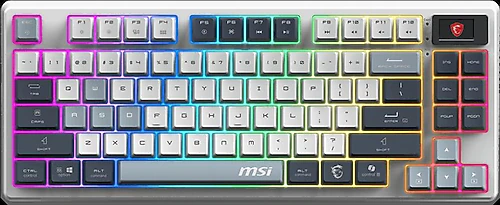
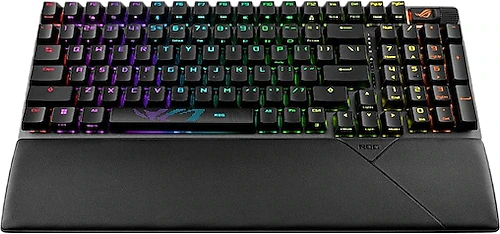
The MSI Forge GK600 and Asus ROG Strix Scope II 96 Wireless are aimed at people who want a more compact keyboard for their desk without giving up mechanical switches, RGB lighting, or wired and wireless use. The main difference comes down to the numpad: MSI opts for a simpler, numpad-free TKL layout, while Asus fits a numeric keypad into a tighter arrangement. This matters if you plan to use your keyboard for writing and data entry as well as gaming.
Numpad or a simpler TKL layout?
The MSI Forge GK600 has an 83-key layout without a numpad. Its 348 mm-wide body is a practical choice if you want more room for mouse movement. If you move your mouse widely while gaming, the extra space gained by removing the numpad may come in handy. Its Turkish language option is also a plus if you prefer a familiar layout.
The Asus ROG Strix Scope II 96 Wireless retains the numpad. Although its 377 mm-wide body is wider than the MSI’s, its 96% layout fits the numeric keypad into a tighter arrangement than a full-size keyboard. If you regularly work with numbers, spreadsheets, or calculations, you can choose a more compact model without giving up a dedicated numpad. In return, the positions of some navigation and function keys may feel different from what you’re used to, so it may take some time to adjust.
The MSI’s narrower size doesn’t automatically make it the better choice for everyone. If you never use a numpad, the TKL layout makes sense; if numeric keys are part of your workflow, the Asus’s wider body may be worth it. The two models also differ in depth: the MSI is 140 mm deep, while the Asus is 131 mm. When planning your desk space, account not only for width but also for keyboard depth and any room you’ll need for a wrist rest.
Key feel and comfort
The MSI’s linear mechanical switches are suited to those who don’t want a pronounced tactile bump or click when pressing a key. If rapid keystrokes and a smooth feel are priorities, this feature of the Forge GK600 may influence your decision. The manufacturer lists a key lifespan of 50 million keystrokes.
The Asus comes with ROG NX Snow mechanical switches. Since the available information doesn’t specify whether these switches are linear or tactile, they shouldn’t be assumed to feel directly equivalent or opposite to the MSI’s switches. When choosing, consider whether you specifically want linear keys and what switch characteristics you prefer.
For long sessions, the wrist rest included with the Asus may make typing more comfortable, but you’ll need to make room for it on your desk. The keyboard itself weighs 1,012 grams. The MSI weighs 943 grams, and no wrist rest is listed. Both are designed for use on a desk; if portability is a priority, neither is an especially lightweight option.
Wireless connectivity and lighting
Both keyboards offer wired and wireless use, a rechargeable lithium battery, and RGB lighting. For wired use, the MSI’s cable is 1.80 m long, while the Asus’s is 2 m. Your computer’s position relative to your desk may help you assess whether those cable lengths will work for you.
For wireless connectivity, the Asus offers 2.4 GHz alongside Bluetooth. Bluetooth suits everyday connections with different devices, while 2.4 GHz is listed as an option aimed at lower latency during gaming. Wireless connectivity is available on the MSI, but the information provided doesn’t distinguish its connection options as clearly as the Asus’s. So if you have a specific type of wireless connection in mind, the Asus’s listed options make for a clearer point of comparison.
Both models have RGB lighting. The Asus can synchronize its lighting with Aura Sync-compatible devices. Both keyboards also have a Caps Lock indicator light. RGB, then, isn’t the main differentiator; the numpad, connectivity priorities, and key feel are more important factors in the choice.
Final verdict: Which keyboard is right for you?
If you don’t use a numpad, want more room for your mouse, and prefer linear mechanical switches, the MSI Forge GK600 is the better fit. Its Turkish language option and listed lifespan of 50 million keystrokes are also notable features.
If you want to keep a numeric keypad and handle data entry and writing alongside gaming on a single keyboard, the Asus ROG Strix Scope II 96 Wireless is a better fit. Its Bluetooth and 2.4 GHz wireless options, along with the included wrist rest, round out its versatility. In short, the choice isn’t just about compactness; it’s about which keys you don’t want to give up: choose MSI for a simpler TKL layout, or Asus for a compact layout that retains the numpad.