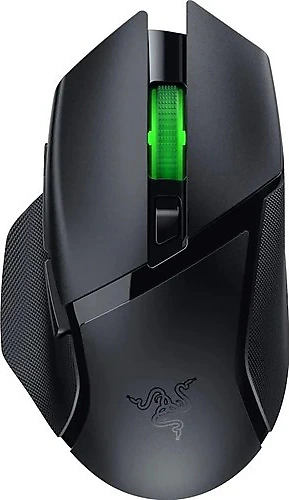
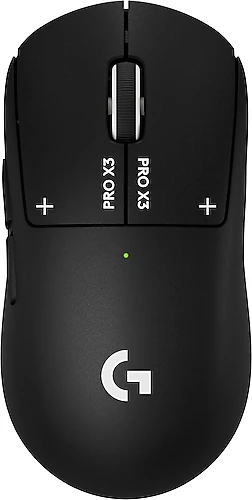
The Razer Basilisk V3 X HyperSpeed and Logitech G Pro X3 Superstrike are aimed at right-handed users looking for a wireless gaming mouse, but they emphasize different priorities. Razer offers flexible connectivity, ergonomic support, and more programmable buttons, while Logitech’s much lighter body and high polling rate are geared toward fast, nimble control. Rather than focusing on the highest technical figures, consider which of these features you’ll actually use.
Lightweight or a fuller, more supported grip?
The most noticeable physical difference is weight: the G Pro X3 Superstrike weighs 61 grams, while the Basilisk V3 X HyperSpeed weighs 110 grams. In games where you frequently lift and reposition your mouse, or make wide movements at low sensitivity, Logitech’s lightweight body may feel more nimble. If you prefer an ultra-light mouse, the difference between the two models may be decisive.
Razer’s heavier build isn’t a disadvantage for everyone. Players who want a fuller, more balanced feel or aren’t used to lightweight models may find the Basilisk a better fit. Its right-handed shape and thumb rest offer support, especially for palm-grip users. Logitech is also designed for right-handed use, so your hand size and grip habits matter when choosing between the two. Neither model stands out as a suitable option for left-handed use.
Connectivity flexibility and battery options
The Basilisk V3 X HyperSpeed offers two wireless connection options: HyperSpeed 2.4 GHz for gaming and Bluetooth for added flexibility in everyday use. Its 1,000 Hz polling rate provides a wireless connection suited to fast-paced gaming. The G Pro X3 Superstrike stands out with a higher polling rate of 8,000 Hz. This means position data is sent to the computer more frequently, which may matter to players seeking a high polling rate, particularly in competitive games and with a suitable system setup. However, not every player will benefit equally from the difference.
Battery preference also affects how you use the mouse. Razer uses a replaceable AA battery, which you can swap out when it runs out rather than waiting for the mouse to charge. Logitech has a built-in rechargeable lithium battery. If you prefer the convenience of a rechargeable battery, the G Pro X3 Superstrike may appeal more; if you prefer replacing batteries, the Basilisk may be a better fit. Since no battery life duration is provided, it wouldn’t be appropriate to compare these products by how long they last between charges or replacements.
Buttons, customization, and sensor figures
The Basilisk’s seven programmable buttons give you more on-mouse commands than the G Pro X3 Superstrike’s five-button layout. If you want frequently used game commands or everyday shortcuts close at hand, Razer offers a more flexible starting point. With Razer Synapse, you can adjust the buttons, DPI levels, and RGB effects. Logitech’s programmable buttons also allow customization; five may be enough if you prefer a simpler control layout. For players who want plenty of shortcuts, Razer’s two additional buttons are more useful.
The G Pro X3 Superstrike’s maximum figures of 44,000 DPI and 888 IPS exceed the Basilisk’s 18,000 DPI and 450 IPS. These broader technical ranges may appeal to those interested in sensitivity options and the ability to track fast movements. Still, higher DPI doesn’t mean better aim for every player; what matters in practice is choosing a sensitivity that suits your games and screen setup. The DPI button on the Basilisk makes it easy to change settings during a game.
The Basilisk has RGB lighting, which may be another reason to choose it if you want lighting on your desk and adjustable effects through Razer Synapse. If visual customization isn’t important to you, this difference may not affect your decision.
Which one is better suited to your needs?
If fast movement, frequent mouse lifting, and low weight are your priorities, the Logitech G Pro X3 Superstrike is a better match. You can also factor in its 8,000 Hz polling rate if your games and system setup can make use of it. Its five-button layout suits players who want simpler, more nimble controls.
The Razer Basilisk V3 X HyperSpeed stands out if you want to switch between Bluetooth and 2.4 GHz, use more programmable buttons, and prefer a design with a thumb rest. Its replaceable AA battery is also an advantage if you prefer that approach to a rechargeable built-in battery.
Final verdict
Neither mouse is better for every user. If you prioritize low weight, a rechargeable battery, and a high polling rate, choose the Logitech G Pro X3 Superstrike. If you want more buttons, Bluetooth connectivity, RGB, and supportive right-handed ergonomics, the Razer Basilisk V3 X HyperSpeed is the better choice. If you’re undecided, start by choosing your preferred weight and button layout, then consider connectivity and battery options.