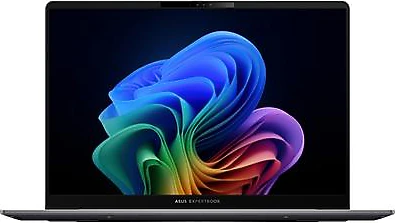
The Asus ExpertBook P5 P5405CSA brings together a portable 14-inch chassis, a high-resolution WQXGA display, an Intel Core Ultra 5 226V processor, and Arc Graphics 130V. Its 16 GB of RAM and 512 GB SSD provide a balanced starting point for everyday work and study. Since it comes with FreeDOS, you’ll need to install an operating system yourself; for those willing to take that step, it offers a laptop profile suited to carrying between work, meetings, and travel.
More room to work on a small screen
The 14-inch display’s 2560 × 1600 pixel resolution keeps text and interface elements sharp while helping you fit more content on screen at once. WQXGA resolution makes a difference especially for users who edit documents, work across spreadsheets, or read source material while taking notes. The 16:10 aspect ratio provides more vertical workspace than traditional 16:9 displays, which can mean less scrolling through web pages and long documents.
The display’s anti-glare coating is intended to make it more comfortable to use in bright offices or places where it’s difficult to control the light, such as near a window. While this feature helps reduce reflections, it doesn’t by itself tell you about screen brightness or color coverage. If you do work where color accuracy matters, such as photo editing, it’s worth checking separately before buying whether the display meets your expectations.
The 14-inch size is a reasonable middle ground for those looking to balance portability and work comfort. It won’t replace a large external monitor, but offering a high-resolution workspace in a laptop you can carry in a bag makes it easier to work without being tied to a desk. Its 16.4 mm thickness also points to a practical design for daily carrying and use in tight spaces.
Processor and memory for everyday workflows
The Intel Core Ultra 5 226V is an 8-core processor listed at 2.10 GHz in this model. From the Intel Core Ultra Series 2 family, it’s positioned for tasks such as office applications, numerous browser tabs, online meetings, and everyday content creation. The processor isn’t the only factor that determines how responsive the computer feels when switching between apps; its 16 GB of RAM is also an important part of supporting this kind of use.
This amount of memory provides a solid foundation for ordinary workflows such as researching in a browser, joining a meeting, and taking notes while documents and email are open. For scenarios that need a lot of memory, such as working with very large datasets, running demanding virtual machines, or handling large-scale video projects, assess your needs carefully. These details don’t specify whether the model’s memory can be upgraded, so check the configuration before buying if you think you may need more in the future.
The 512 GB SSD provides space for work files as well as the operating system and essential software. Still, those who build up large video archives, game collections, or numerous high-capacity project files may fill the storage more quickly. Planning to use external storage or cloud space can help in that case. PCIe Gen4 support indicates the generation of interface supported by the product; it doesn’t by itself guarantee the installed SSD’s operating speed.
What is Arc Graphics 130V suitable for?
Intel Arc Graphics 130V is an integrated graphics unit that works alongside the processor. It offers a practical solution for tasks that don’t require a discrete graphics card, such as everyday interface use, video playback, and applications that benefit from graphics acceleration. You can also use this computer for light photo editing, basic visual design, and video editing in suitable software; the size of the project and the applications you use will ultimately determine the results.
This graphics unit isn’t a substitute for gaming laptops with a separate, powerful graphics card. Lighter esports games or titles played with reduced graphics settings may be an option, but those seeking to play new, demanding games at high graphics settings should look at a different class of laptop. In return, the ExpertBook P5 focuses on handling everyday graphics needs without including the large, heavy graphics card that most users may not need in a work computer.
Working on the go with battery and connectivity
The 63 Wh battery offers a capacity aimed at supporting work away from an outlet during the day in a 14-inch computer. Actual battery life will vary with screen settings, workload, network connection, and the applications in use, so you shouldn’t infer a precise runtime from capacity alone. Lighter tasks centered on documents and web apps won’t use the same amount of energy as processor-intensive work. When deciding whether to bring the charger on a long travel day, take your own usage habits into account.
Bluetooth 5.3 support makes it easy to connect compatible headphones, mice, and other peripherals wirelessly. However, if you need to connect an external display or another device, check the computer’s ports and compatibility with your peripherals separately before buying; the types and number of ports aren’t specified here. This quick check can help you determine in advance whether your desk setup will require an adapter or converter.
FreeDOS setup and buying decision
This configuration comes with FreeDOS, meaning Windows or another operating system isn’t preinstalled. For those who can install their own operating system, this may have the advantage of not starting out with an unnecessary software bundle. If you’re installing an operating system for the first time, prepare the installation media in advance and check the license and driver support for your preferred operating system. If you want to start using your computer as soon as you take it out of the box, an option with an operating system installed may be more convenient.
The ExpertBook P5’s main appeal is its combination of 14-inch portability with a high-resolution, anti-glare display. The Intel Core Ultra 5 226V, 16 GB of RAM, and 512 GB SSD also make for a configuration capable of meeting most office and study needs. If you prioritize WQXGA resolution and a 63 Wh battery over more basic displays in similarly sized models, paying a price premium for these features may make sense. Since no actual price is specified, it isn’t possible to give a definitive price-to-performance ranking; when comparing options, consider display resolution, battery capacity, memory, and operating system costs together.
In short, this model is suited to users who travel frequently, do most of their work in browsers and productivity apps, and want more screen space in a 14-inch computer. If demanding 3D work, high-end gaming, or a ready-to-use Windows experience straight out of the box is your priority, consider an alternative with a discrete graphics card or a preinstalled operating system.