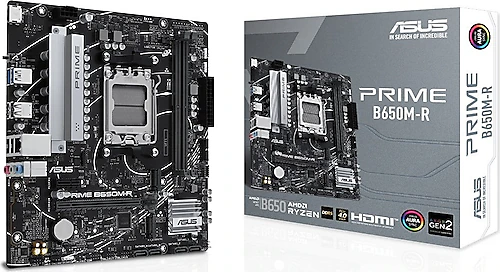
The Asus Prime B650M-R pairs AMD AM5 processors with DDR5 memory in a compact Micro-ATX form factor. Its features are geared toward everyday use and building a well-rounded gaming system. Two M.2 slots, four SATA connections, and BIOS Flashback provide a practical foundation. However, with only two RAM slots, it’s important to plan the system’s memory capacity and upgrade path when you buy it.
A straightforward starting point for compact AM5 systems
The B650 chipset and AM5 socket make this motherboard a suitable choice for building a system around a processor compatible with AMD’s platform. DDR5 memory support is a natural part of that package. If you’re moving from an older AM4 system, you can’t carry over your existing processor and DDR4 memory; you’ll need to plan for processor and memory compatibility together. For that reason, the Prime B650M-R makes more sense as a starting point for a new AM5 PC.
Measuring 22.1 × 23.6 cm, this Micro-ATX board can fit into a smaller case layout than a full-size ATX motherboard. Its dimensions help make efficient use of space when building a compact gaming PC or work system. Still, fitting the motherboard into the case isn’t the only thing to consider: check your chosen case against the graphics card’s length and thickness, the CPU cooler’s height, the power supply, and cable routing. You can also use a Micro-ATX motherboard in a larger ATX case, but the case itself determines how much room you have for expansion.
Plan your memory and storage from the start
Two DDR5 memory slots and a maximum capacity of 96 GB can provide a reasonable configuration for gaming and general-purpose use. However, unlike a board with four slots, there’s no flexibility to increase capacity later by adding memory to empty slots. For example, if you start with two memory modules, you may need to replace them with a higher-capacity kit when you want more memory. When choosing your initial capacity, consider how you use your system—gaming, streaming, heavy multitasking, or content creation—so you’re less likely to need a complete memory replacement later.
For storage, the two M.2 slots make room for fast SSDs for your operating system and frequently used applications, while a second drive can help you keep games or work files separate. In addition, four SATA 3 connections offer flexibility if you want to keep using existing SATA SSDs and hard drives. You can start with a single M.2 drive and expand your storage later with different types of drives as needed. When buying an SSD, also compare its form factor and supported connection features with the requirements of the drive you plan to install.
Connections, video output, and ease of setup
The board has six USB connections in total, four of which are USB 2.0. The Type-A connections are useful for common peripherals such as a keyboard and mouse. If you plan to use many high-speed USB peripherals or external storage devices, it’s worth checking whether the port types and your case’s front-panel connections meet your needs. The motherboard also has an HDMI output. Using it for video requires a processor with integrated graphics; if you’re using a discrete graphics card, you’ll generally connect your display to the card’s outputs.
BIOS Flashback can be useful when a BIOS update is needed during setup. It’s a handy option that lets you update using a compatible USB drive and can reduce the need to start the system with a processor installed. Even so, you should follow the motherboard manufacturer’s update instructions. If you’re building with a newer processor in particular, checking BIOS compatibility and how to use Flashback before installation can help avoid unnecessary setup problems.
Who should consider it?
The Prime B650M-R is a good fit if you want a compact board with essential connections and two M.2 slots for an AM5 gaming PC, home or office system, or everyday productivity computer. Four SATA connections let you make use of older storage drives, while HDMI can provide basic video output through the processor’s graphics unit without a discrete graphics card. However, for high-end systems that place heavy demands on the processor, you should also assess the motherboard’s power design and cooling capacity; it wouldn’t be right to infer this model’s performance limits with a particular processor based on the chipset name alone.
When comparing it with similar B650 Micro-ATX motherboards, the main points to consider are the number of memory slots, M.2 expansion, USB connections, and ease of BIOS updates. The Prime B650M-R’s two M.2 slots and BIOS Flashback are tangible advantages if you want to expand storage and make setup easier. Alternatives with four RAM slots or a wider range of connections may be better for those who want to expand memory gradually or connect more peripherals. So weigh any price difference against the slots and connections you’ll actually use: this board may be a good fit for a compact system planned around two memory modules and two M.2 drives, while a more fully featured model may be worth the extra cost if you have broader upgrade plans.
Before buying, check processor and DDR5 kit compatibility, the case’s Micro-ATX support, clearance for the cooler and graphics card, and the number of USB connections you need. With these checks, the Prime B650M-R is a measured, straightforward option for building an AM5 system without paying for expansion room you don’t need.