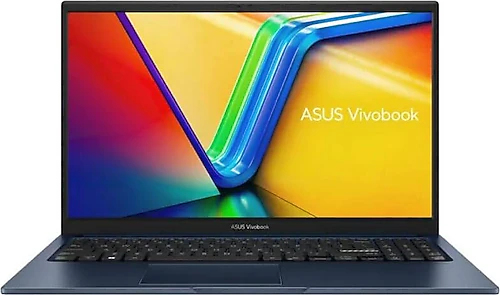
The Asus VivoBook 15 X1504VA-BQ5456 brings together a Core 7 150U processor, 16 GB of memory, and a 512 GB SSD for users who want to handle everyday tasks comfortably. With a 15.6-inch Full HD display and a weight of 1.7 kg, it’s a laptop suited to both desk work and carrying in a bag. However, it comes with FreeDOS, so you’ll need to install Windows or another operating system of your choice before using it.
Quick for everyday tasks, comfortable for multitasking
The Intel Core 7 150U is a 10-core processor with 12 MB of cache. Pairing it with 16 GB of RAM is useful for people who keep many browser tabs open, switch between office applications, and join online meetings. For common tasks such as preparing documents, editing presentations, email, web-based work, and watching videos, the system’s core components complement one another. The laptop doesn’t rely on the processor name alone; it also provides enough memory and fast storage for everyday use.
The 512 GB SSD provides a reasonable amount of starting space for applications and files. Compared with models that use traditional hard drives, an SSD laptop feels more responsive when starting the system and opening applications. There may be enough room for class files, work documents, presentations, and frequently used programs. If you keep a large video archive or many sizeable projects, consider your storage needs in advance; an external drive or cloud storage plan could make things easier.
This hardware combination means the laptop isn’t limited to email and writing documents. Online learning, research, video calls, basic photo editing, and light content creation are also within its scope. Keeping several applications open at once is more comfortable thanks to the 16 GB of RAM. On the other hand, the model’s shared Intel Graphics unit is not a dedicated graphics card designed for gaming or demanding 3D work. It’s capable enough for everyday visual tasks and media consumption, but if new, graphically demanding games or professional 3D workflows are a priority, a laptop with a dedicated graphics card would be a better fit.
Large, matte Full HD display
The 15.6-inch display’s 1920 x 1080 pixel resolution provides a comfortable workspace for documents and web pages. Full HD makes text and interfaces clear enough for everyday use, while the large screen makes working with side-by-side windows more convenient than on smaller laptops. The LED display runs at a 60 Hz refresh rate, a familiar choice for standard office and entertainment use. If you consider a high refresh rate an important part of the gaming experience, this display may not meet your expectations.
The anti-glare surface helps reduce reflections from bright light sources. This is a practical plus in a library, classroom, or brightly lit workspace. Still, it’s best not to point the display directly at sunlight; an anti-glare coating can’t eliminate reflections in every lighting condition. Since the display specifications don’t state the panel type or color coverage, don’t make a decision based only on resolution and size if you need to do color-sensitive work such as professional color editing.
Portability and connectivity expectations
At 1.7 kg and 17.9 mm thick, the VivoBook 15 is reasonably portable for a laptop with a 15.6-inch display. It isn’t as compact as smaller, lighter models for people who carry a laptop all day, but it retains the comfort of a larger screen. The three-cell battery has a capacity of 42 Wh. Since actual battery life depends on screen brightness, open applications, and workload, it wouldn’t be accurate to infer a specific runtime from capacity alone. If you need to work away from an outlet for a long time, take your routine and access to charging into account.
Bluetooth support is handy for connecting wireless headphones, a mouse, or other compatible accessories. Before buying, though, check which wired connections you need as well: if you need a particular video output for presentations, a card reader, or a specific port, verify the product’s connectivity specifications separately. Likewise, if you plan to upgrade the RAM or SSD later, check this model’s upgrade options before purchasing; don’t assume that upgrades are possible based only on the current capacity.
FreeDOS setup and buying decision
FreeDOS is an important detail for anyone accustomed to receiving a laptop with Windows installed and ready to use. You’ll need to install the operating system yourself, prepare the installation media, and obtain the appropriate license. If you haven’t done this before, it can take extra time and cost more; on the other hand, if you already have a license or plan to use a different operating system, avoiding payment for a preinstalled system can be an advantage. Before buying, plan for your preferred operating system’s requirements, installation steps, and the drivers you’ll need.
The VivoBook’s most notable strength is its combination of a processor suited to everyday tasks, 16 GB of RAM, and a 512 GB SSD with a large Full HD display. Compared with more affordable basic laptops, its memory and processor hardware may make it a more comfortable choice for multitasking and extended everyday use. However, it doesn’t offer the graphics power of models with dedicated graphics cards designed for gaming or creative professional use. Compared with lighter 13–14-inch laptops, it gives you more screen space at the expense of some portability.
If its price is close to that of options with similar hardware, it’s worth considering for students, office workers, and home users who prioritize a large display, 16 GB of memory, and an SSD. If FreeDOS setup, shared graphics, or portability are deal-breakers for you, compare the total cost and how well your needs are met by alternatives with an operating system installed or a different graphics card. In short, the X1504VA-BQ5456 is a well-balanced 15.6-inch laptop for everyday productivity; the strongest reason to choose it is wanting a large display and comfortable multitasking for work and education rather than demanding gaming.