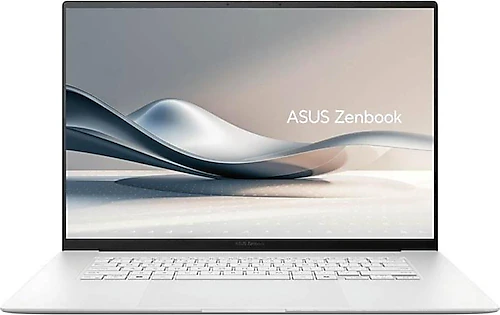
The Asus Zenbook S 16 OLED UM5606WA-RK295W aims to fit a large screen, a powerful processor, and a vibrant OLED panel into a slim, lightweight chassis. A Ryzen AI 9 HX 370, 32 GB of LPDDR5x memory, and a 1 TB SSD provide a solid foundation for work, education, and creative projects, while the 16-inch 120 Hz display also makes everyday use more enjoyable. Its main appeal is offering a spacious workspace that approaches a desktop-like feel in a laptop weighing 1.5 kg.
How the large OLED display makes a difference day to day
The 2,880 × 1,800-pixel OLED panel renders text and interfaces sharply, while delivering deep blacks and vivid colors in photos and videos. The 16-inch area reduces the need to constantly split and shrink your screen when working with two windows side by side or navigating a large spreadsheet. For anyone who frequently switches between documents, presentations, and browser tabs, this means not just a larger picture, but a more comfortable workflow.
The 120 Hz refresh rate makes scrolling and window movement feel smoother with compatible content. You’ll notice the difference especially when browsing web pages for a long time, quickly scanning documents, and navigating the interface. The anti-glare feature helps manage reflections; even so, as with any screen, the position of the display and light sources still matter in bright conditions. The OLED image quality also makes watching movies and browsing photos a welcome pleasure during work breaks.
Ryzen AI 9 and Radeon 890M: from productivity to light gaming
The 12-core AMD Ryzen AI 9 HX 370 is central to the Zenbook’s appeal for workloads that put the processor under strain and for keeping many applications open at once. Everyday professional tasks such as working with large spreadsheets, browsing with many tabs, editing images, and software development are among the areas this hardware is suited to. The 32 GB of LPDDR5x memory also makes it easier to switch between applications, an important advantage for users who don’t want memory to fill up quickly during multitasking.
The Radeon 890M is an integrated graphics processor that shares system memory. So the Zenbook S 16 shouldn’t be thought of as a gaming laptop or 3D workstation with a discrete graphics card. That said, it offers a solution capable of handling everyday graphics tasks, media playback, image editing, and lighter games without carrying a separate GPU. Its ability to remain slim and portable without being limited to only basic display tasks is one of this laptop’s key balancing points.
The AI branding in the model name also comes from the Ryzen AI platform. For those who want to use AI-powered features, this hardware provides a valuable foundation compatible with current applications; however, which features are available depends on the software you choose and Windows updates. For that reason, it’s better to base your purchase decision not just on the AI label, but on the combination of processor, memory, and display that meets your actual workload.
Slim chassis, connectivity, and everyday portability
At 12.9 mm thick and weighing 1.5 kg, this 16-inch computer is much more practical to carry in a bag. For those who travel between home, the office, or campus every day, taking a large screen with you can reduce the need to work on a smaller laptop and connect it to an external display at your desk. The backlit keyboard makes the keys easier to see in dim environments, while Bluetooth 5.4 lets you connect compatible headphones, a mouse, and other wireless accessories.
The built-in card reader can help those who use a camera or other cards transfer files without needing an extra adapter. However, it’s a good idea to check which card formats the reader supports against the equipment you use. The type and number of ports may also matter for your setup: if you use an external display, wired networking, or multiple peripherals, check that the connections you need are available before buying; plan for a suitable adapter or dock if necessary.
Battery, audio, and setup expectations
The 78 Wh battery capacity supports the goal of working away from a power outlet during the day in a slim chassis. Fast charging can also make it easier to top up the battery during a short break. Actual battery life varies depending on screen brightness, the selected refresh rate, open applications, and processor load, so it’s best not to expect one specific runtime. Especially on days with long meetings or travel, plan to bring the charging adapter and assess it based on your own usage habits.
The Harman Kardon sound system supports everyday uses such as watching videos and online meetings through the laptop’s own speakers. For more personal listening, you can connect compatible headphones over Bluetooth 5.4. Windows 11 Home comes preinstalled, so you can complete updates and install your preferred applications after the initial setup. The 1 TB SSD provides ample starting space for documents, applications, and personal files; those with large video libraries or many demanding projects should review their storage plans accordingly. The SSD supports PCIe Gen4.
Who should consider it, and who should look at another category?
The Zenbook S 16 is a strong candidate for professionals, students, and content creators who want to work on a large screen but are reluctant to carry a 16-inch computer every day. Users who switch between photo editing, office work, research, online meetings, and multitasking can appreciate the combination of a spacious display and 32 GB of memory. Movie and TV fans who frequently use an OLED panel’s image quality are also among those who’ll use the laptop for more than just work.
On the other hand, if your priority is playing the latest games at high graphics settings, creating demanding 3D scenes, or doing work that relies on professional GPU acceleration, it makes more sense to look at thicker, heavier models with discrete graphics. The Zenbook’s approach is to combine portability with integrated graphics performance; the natural limitation of this category shows up under the most intensive graphics workloads. While 32 GB of memory is generous for everyday productivity, anyone planning to upgrade the memory later for very large projects should check the upgrade options for this specific model.
Price assessment and close alternatives
Since no specific price is given for this model, it wouldn’t be right to rank its value based on a single figure. If it costs more than a similarly sized laptop with a standard display and more modest hardware, that difference gets you a 120 Hz OLED panel, Ryzen AI 9 HX 370, 32 GB of memory, and a slim 1.5 kg chassis together. If you’ll use the display quality, portability, and processor capacity every day, these features may make the price difference worthwhile. If you mainly do basic office work, use an external monitor, or prioritize gaming performance, options that allocate the same budget to different components may be a better fit.
The Zenbook S 16 stands out by combining a large OLED display with a slim, lightweight chassis. Some 16-inch performance laptops offer more powerful discrete graphics options, but generally sacrifice portability; lighter ultrabooks may not offer the screen area or processor class found in this model. The choice depends on what matters more to you: a large, high-quality display you’ll carry with you all the time, or more graphics power in a heavier chassis? If the first option is your priority, the UM5606WA-RK295W is a well-balanced premium laptop whose features you can put to real use.