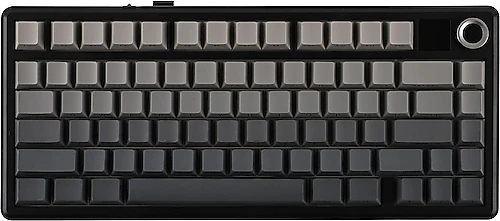
The Aula F75 Max RGB is aimed at people who don’t want the number pad of a full-size keyboard but don’t want to give up arrow or function keys either. With its 81-key 75% layout, Reaper mechanical switches, and wired or wireless use, it can fit in just as well on a gaming desk as in an everyday workspace.
Less desk space, useful keys
The F75 Max’s main advantage is that it offers a compact size without sacrificing too much functionality. It has no number pad, but it does include function keys, arrow keys, and multimedia controls. This layout gives your mouse more room to move while keeping the keys you need for tasks such as editing documents, browsing the web, and using in-game shortcuts close at hand. People who enter numbers frequently may want a separate numpad, but for those looking to make efficient use of desk space, this is a worthwhile trade-off.
The listed depth of 143 mm can help you plan how much desk space to set aside for the keyboard. Since no width measurement is provided, it’s a good idea to check the model’s full width separately before buying if you plan to fit it on a narrow tray or in a keyboard tray. Its 44 mm height is also worth considering when assessing wrist position and compatibility with any wrist rest you may have.
Mechanical typing and RGB lighting
Its mechanical design and Reaper switches are for those looking for a different key feel from a membrane keyboard. Since the actuation force and sound profile of the switches aren’t specified, it’s best not to make a definite judgment about how they feel; if possible, try similar switches before buying. Anti-ghosting support helps the keyboard register multiple simultaneous key presses more reliably in games. This can be useful, especially for players who use direction keys alongside ability or equipment shortcuts.
RGB lighting adds a colorful look to the keyboard and may also make the keys easier to find in a dark room. You can use the lighting as part of your personal desk setup, but the product information doesn’t explain how to adjust its effects or colors. So it’s best not to expect any particular software, effects, or per-key lighting controls.
Wired or wireless use
The Type-C interface offers a convenient option for wired connection and charging, and the keyboard can easily fit into your desk setup when used with a cable. Its rechargeable design and Bluetooth wireless connectivity also let you use the keyboard without being tethered by a cable. Switching between connection modes can make it easier to use the same keyboard for gaming, work, or a tidier desk setup. Before buying, check the product’s own description for the exact wireless pairing method and supported connection options.
The English Q layout may feel familiar to people who use a standard QWERTY layout, but it may take some adjustment for users who want to see Turkish characters printed on the keys. You can type using Turkish input settings, but the physical key legends are in English, so people who type frequently should take this difference into account.
Who is it right for?
The F75 Max RGB is a good choice for gamers and desk-based workers who want mechanical keys, RGB lighting, and the flexibility of wired and wireless use in one compact keyboard. If you don’t regularly need a number pad, its smaller footprint is a major advantage. When comparing it with similar compact mechanical keyboards, consider whether the price difference is worthwhile for your use of the Reaper switches, Bluetooth connectivity, and RGB features. Without pricing information, it isn’t possible to make a definitive value-for-money ranking; if you’ll genuinely use these features, paying extra for the flexibility offered by the F75 Max may make sense.