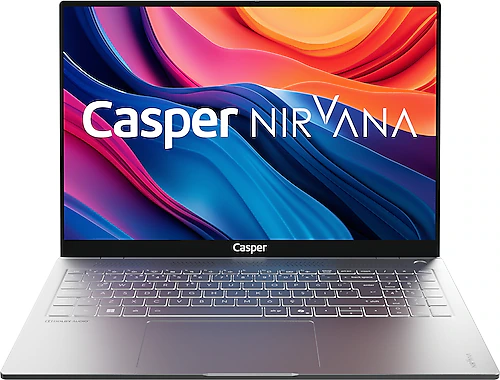
The Casper Nirvana S100.1362-BF00X-G-F combines a large display and a fast processor in a portable chassis designed for everyday tasks. The Intel Core i7-13620H, 16 GB of DDR5 memory, and 1 TB SSD are aimed at comfortably handling work with multiple applications, storing large files, and demanding office use. On the graphics side, however, it uses shared Intel UHD Graphics, so make sure productivity and general use are your priorities when choosing this model.
A large display and fast performance for everyday work
The 16-inch IPS display has a 1920x1200 WUXGA resolution. Its 16:10 aspect ratio offers more vertical workspace than standard Full HD displays, which can mean less scrolling through long documents, spreadsheet rows, and web pages. This extra space will be especially useful if you like keeping a video meeting open while taking notes, or working with two windows side by side. The IPS panel also makes it easier to view the screen from different angles.
The display size is also an advantage for watching movies and following course material. However, the 1920x1200 resolution and IPS designation alone do not tell you enough about brightness, color gamut, or professional color accuracy. If you need critical color accuracy for photo or video work, compare those display details separately before buying. For general office use, online learning, and everyday content consumption, the 16-inch workspace offers a roomier experience than smaller laptops.
What the Core i7 and 16 GB of DDR5 offer
The 10-core Intel Core i7-13620H, with 24 MB of cache, is the computer’s main strength for processor-intensive tasks. Use cases suited to this hardware include keeping numerous browser tabs open while preparing a presentation, working with large spreadsheets, and running other applications in the background during an online meeting. The processor speed is listed as 3.60 GHz. Actual performance varies depending on the task and power management, but this is a processor class that goes beyond simple everyday duties.
The 16 GB of DDR5 memory is a good starting point for most people using several common applications at once. The 5600 MHz memory speed is also a modern specification; however, if you are considering adding more memory, check the model’s upgrade options and memory configuration before buying. Capacity and memory type alone do not confirm this information. Upgrade options may be particularly important if you plan to keep the machine for a long time, run virtual machines, or work on large creative projects.
Make room for files with a 1 TB SSD
The 1 TB SSD provides ample storage for work documents, educational materials, photos, and offline content, in addition to the operating system and frequently used software. This lets you build an organized work archive without needing an external drive or cloud storage from day one. PCIe Gen4 support is listed for the SSD, but the supported PCIe version alone does not guarantee that the installed drive will operate at a particular speed in every situation. If you regularly work with large files, compare the SSD’s actual specifications as well.
This capacity is a meaningful benefit for people who want to use one computer at home and at work. For example, project folders, presentations, and frequently used media files can all stay on the same machine. As your photo or video archive grows, remember to plan for backups too: 1 TB offers convenient storage, but keeping the only copy of important files on your computer is not a good backup strategy.
Understand the limits of UHD Graphics
Graphics processing is handled by the processor’s shared Intel UHD Graphics. This setup is suitable for tasks such as editing documents, watching videos, making presentations, and everyday interface use, but it is no substitute for a laptop with a dedicated graphics card. If your priorities include playing new, graphically demanding games at high settings, creating 3D scenes, or using professional applications that rely heavily on GPU acceleration, a model with a discrete graphics card would be a better choice.
It can handle lighter games, basic image editing, and everyday creative tasks, though the workload of the game or software will determine the performance you can expect. The S100’s main appeal is not its graphics card, but its combination of an i7 processor with generous memory and storage. When comparing it with a similarly priced model that has a dedicated graphics card, consider which tasks you do most often: if you need graphics performance, the competing model may be a better fit; if multitasking, documents, and general productivity matter more, the S100’s component balance may make more sense.
Portability, build, and everyday-use details
With an aluminum chassis, a thickness of 18.3 mm, and a weight of 1.8 kg, this model offers a large display in a form that can still be carried in a bag. It is not as light as a small ultrabook for people who commute every day, but it strikes a reasonable balance for those who want to carry a 16-inch computer between work and school. This combination will suit people looking for more screen space at their desk and the convenience of working on a single device while on the go.
The backlit keyboard makes the keys easier to see in dim surroundings, while the fingerprint reader can make signing in more convenient. Bluetooth lets you pair wireless headphones, a mouse, or compatible peripherals. Since the type and number of ports are not specified, check separately that it has the connections you need if you use an external monitor, wired network, or particular accessories. The listed battery capacity is 54.72 Wh, and it has three cells; this information is not enough to determine a precise battery life. If you often work away from an outlet, consider your expectations for portable use in light of battery performance.
FreeDOS setup and the buying decision
This computer comes with FreeDOS, which means it does not include a preinstalled operating system such as Windows. During initial setup, you will need to install your preferred operating system, obtain a license if necessary, and prepare the basic drivers. An alternative with an operating system already installed may be more convenient if you do not want to deal with installation. Users who already have a license or know how to install a system themselves may appreciate the flexibility to choose their preferred software environment. Also remember to plan for any keyboard-layout and application settings you need to configure after installation.
The Casper Nirvana S100.1362-BF00X-G-F is worth considering for students, office workers, and multitasking home users who want a 16-inch WUXGA display, Core i7-13620H, 16 GB of DDR5, and a 1 TB SSD in one computer. When comparing its price with alternatives featuring similar processor and memory capacities, also consider its large display, aluminum chassis, backlit keyboard, and fingerprint reader. If these features matter in your daily use, they make a stronger case for choosing it. If your priorities are high gaming performance, professional graphics power, or a ready-to-use system that requires no installation, look for a more suitable alternative in terms of graphics card and operating system.