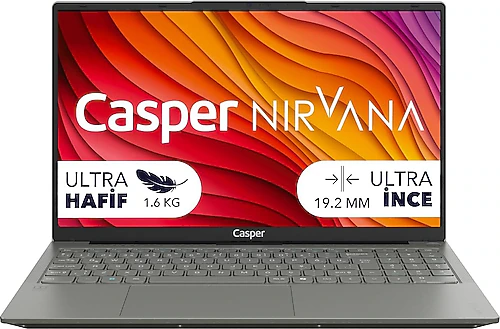
The Casper Nirvana X650.1342-BV00X-G-F offers a 13th-generation Intel Core i5 processor, 16 GB of DDR5 memory, and a 500 GB SSD for everyday computing. Its 15.6-inch IPS Full HD display provides plenty of room for work and content consumption, while its 1.6 kg weight makes it a reasonable choice for people who regularly carry a laptop with them. This model is not focused on gaming performance; its aim is to be a fast, practical computer for school, office, and home use.
Smooth performance for everyday tasks
With its 8-core design and 12 MB of cache, the Intel Core i5-13420H is suited to tasks such as editing documents, working with numerous browser tabs, video calls, and online research. Listed with a processor speed of 3.40 GHz, this hardware provides a good foundation for users who switch between different applications throughout the day rather than sticking to a single basic task. Preparing a presentation while keeping class notes open, using email and office apps at the same time, or editing photos and uploading them to the cloud are all natural use cases for this computer.
The 16 GB of DDR5 RAM also plays an important role here. With a frequency of 4800 MHz, the memory offers comfortable capacity for applications that remain open during everyday use. You can work without having to close apps as soon as you open a few tabs. The SSD also helps the system and applications launch quickly and lets you access files faster. The 500 GB capacity is useful at first for school documents, work files, applications, and personal content; however, if you plan to keep large video archives or many demanding games, take storage space into account from the outset.
IPS Full HD display: plenty of room for work and content
The 15.6-inch IPS panel’s Full HD resolution is suitable for comfortably viewing text, spreadsheets, and online content in everyday use. The spacious screen is especially useful when working with windows side by side: you can have source text open on one side and notes or a presentation on the other. An IPS panel makes it easier to view the screen from different seating angles, which is practical when you use the computer without keeping it fixed in one spot at a desk.
This combination of display and processor works well for online classes, watching films, video meetings, and basic photo editing. Users doing professional color work should not make a decision based only on resolution and panel type; it is also worth considering their specific color accuracy needs. Since the graphics are Intel UHD Graphics, visual tasks should be kept to basic and intermediate levels; a model with a dedicated graphics card would be more suitable for professional 3D workflows or demanding video effects.
What can UHD Graphics handle?
Intel UHD Graphics is an integrated graphics unit that accompanies the processor. It handles desktop use, video playback, online content, and applications with light graphics demands. Older or graphically lightweight games may be playable with modest expectations, but modern games at high graphics settings are not this device’s strong suit. If gaming is your priority, choosing a laptop with a dedicated graphics card makes much more sense.
The same limitation applies to intensive 3D modeling and creative applications that rely on GPU acceleration. On the other hand, UHD Graphics is suited to tasks such as writing, presentations, online learning, basic image editing, and general computer use. This distinction matters: the Nirvana X650 should not be treated as a gaming laptop based solely on its “Core i5” name. Its strength lies in the processor and memory handling everyday multitasking; graphics performance is limited to basic needs.
Portability, battery, and connectivity details
At 1.6 kg, this 15.6-inch notebook offers a reasonable balance for people who plan to carry it regularly. You can take it between school and home, to office meetings, or to shared workspaces. While it is not as compact as models in the ultraportable class with smaller screens, you do not have to give up portability entirely in exchange for more screen space. The 54 Wh battery capacity allows you to work away from an outlet while on the move. Actual battery life depends on factors such as screen brightness, open applications, and workload, so anyone expecting to use it unplugged for a full day should consider their usage habits.
The card reader is a useful bonus for photography enthusiasts and content creators who transfer files from compatible memory cards. Before buying, however, check the product details to make sure its connections meet the needs of your peripherals and that the box includes any adapters you require; the types of ports are not specified in the technical details here. Also, if you plan to use the 500 GB SSD for photo and video archives, you may need to supplement it with external or cloud storage.
FreeDOS setup and planning before purchase
This model comes with FreeDOS, so you should not expect a ready-to-use Windows installation straight out of the box. You will need to install the operating system you plan to use, obtain a license if necessary, and complete the initial setup. If you have not done this before, include setup assistance or the license cost in your total budget. FreeDOS can provide flexibility for those who want to choose and install their own operating system; for those who prefer a ready-to-use device, it means an extra step.
Also consider how you will use it when it comes to portability: the 15.6-inch display gives you more workspace but takes up more room in a bag. This size is suitable for people who mostly work at a desk but occasionally carry their computer with them. Those looking for a device to carry long distances on foot every day and fit into smaller bags may want to consider more compact models. The available technical information does not say whether the RAM or SSD can be upgraded later, so if you are considering increasing capacity in the future, check the upgrade options before buying.
Who is it for, and how does it compare with similar options?
The Casper Nirvana X650 is a sensible candidate for students, office workers, and anyone looking for a general-purpose home computer. Its combination of 16 GB of DDR5 memory, a 13th-generation Core i5 processor, and an IPS Full HD display may make it preferable for everyday multitasking over models in the same price range with basic processors and less memory. The card reader is another practical addition. It is especially suited to people who want to use their computer for both work and content consumption without needing a dedicated graphics card.
Laptops in a similar class with dedicated graphics cards are more capable for gaming and graphics work; if you are choosing a computer for gaming, it is better to look directly at that category. On the other hand, slimmer models with smaller screens may be easier to carry, though screen space and connectivity options vary from model to model. The Nirvana X650’s appeal lies in bringing these features together in a standard 15.6-inch form and focusing on the needs of school, work, and everyday use. If its price is close to that of alternatives with similar processors and memory, practical details such as the IPS display and card reader are worth considering; if there is a significant difference, consider whether it corresponds to features that matter to you.