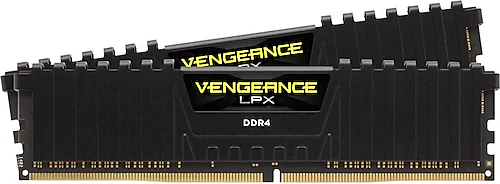
Corsair Vengeance LPX CMK32GX4M2E3200C16 is a kit of two 16 GB DDR4 DIMMs for anyone looking to add 32 GB of memory to their computer. With a 3200 MHz operating speed and CL16 latency, it suits a wide range of systems, from gaming PCs to multitasking-focused desktops. The heat spreaders and understated design prioritize compatibility and function over flashiness.
What does 32 GB of capacity offer for everyday use?
A 32 GB capacity split across two modules provides plenty of room for modern desktop use. It is better suited than an entry-level setup with a single, lower-capacity module to keeping a browser, chat app, and game launcher open while gaming, working with large photo libraries, or using several applications at once. When memory usage climbs, the system may need to rely less on storage as temporary memory, which can benefit users who work on several things at the same time.
For gaming, 32 GB leaves room not just for the game itself, but also for streaming software, voice chat, and other applications running in the background. Capacity also matters for tasks such as video editing, software development, and working with virtual machines: a 16 GB setup can reach its limits sooner when large projects or several development tools are open. Of course, memory capacity alone does not make the processor or graphics card faster; its benefit is helping prevent workloads that do not fit in memory from putting more strain on the system.
A balanced combination of 3200 MHz and CL16
The kit’s 3200 MHz speed and CL16 latency complement each other for DDR4 systems. Frequency affects the memory’s data-transfer capacity, while the latency value affects how quickly it responds to commands. These numbers alone do not promise a noticeable speed increase in every application, but they offer a meaningful option for users who want better memory performance than standard speeds on a DDR4 platform without stepping up to much more ambitious speeds.
When memory is first installed, the motherboard may start it at a lower default speed for compatibility. You may need to enable XMP, or a similar memory profile used by the motherboard manufacturer, in the BIOS/UEFI to reach 3200 MHz. The processor and motherboard need to support this speed, and the result depends on the system components and BIOS settings. Those who would rather not adjust settings can start with the current defaults, but it is worth checking whether the target speed will be available on your system before buying.
What to check for installation and compatibility
This is a DDR4 DIMM kit for desktop computers; it is not compatible with the smaller SO-DIMM slots in laptops. DDR4 and DDR5 memory slots are also not interchangeable. The key checks are that your motherboard supports DDR4, has enough memory slots for the modules, and that both the processor and motherboard support the target frequency. Checking the motherboard’s memory compatibility list is also a good step before installation, especially on older systems.
To get the most out of the two modules, install them in the paired slots specified in the motherboard manual; this allows the system to use a dual-channel memory configuration. If the system does not start, checking that the modules are fully seated, trying one module at a time, and reviewing the BIOS settings may help. The 1.35 V operating voltage should also be considered when checking compatibility and profile settings. The heat spreaders protect the modules and give the RAM area a tidy look; those using a large CPU cooler should still check the physical clearance around the memory slots.
Who should consider it?
The Vengeance LPX’s strength is its straightforward combination of everyday benefits rather than complex features: 32 GB capacity, two modules, 3200 MHz, and CL16. Gamers upgrading an existing DDR4 computer, users who keep many applications open at once, and people building a new DDR4 desktop are the target audience for this kit. In particular, the 2x16 GB configuration is a clear starting point for anyone who wants a balanced system from the outset using both memory slots, rather than planning to add a single module later.
Compared with higher-frequency DDR4 kits, this Corsair model is aimed not at those seeking the highest memory speed, but at users looking for a reasonable latency and a widely used 3200 MHz option. A higher-frequency kit may offer an advantage in some workloads with a suitable motherboard and processor, but if there is a price difference, consider whether you will benefit from it in your own use. If its price is close to alternatives with similar capacity and speed, the Corsair Vengeance LPX’s established product line and heat-spreader design may make it appealing. If a cheaper DDR4 kit offers the same capacity and similar timings, consider whether the difference you would pay for the brand or appearance is worthwhile for you.
Buying decision
Corsair Vengeance LPX 32 GB (2x16) 3200 MHz CL16 is a good fit for anyone looking to add memory to a DDR4 desktop or build a balanced kit for gaming and productivity. If its price is competitive with alternatives offering similar specifications, its 32 GB capacity and two-module configuration make it a solid choice. First check your motherboard’s DDR4 slots, physical clearance, and support for a 3200 MHz profile; if you are building a new DDR5 system, this is not the right kit.