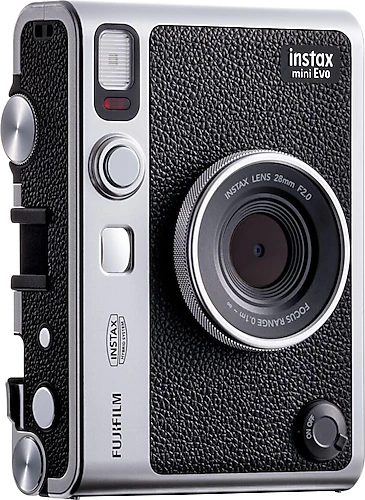
The Fujifilm Instax Mini Evo brings together the convenience of a digital camera and the tangible, shareable result of an Instax Mini print. You don’t have to print every shot right away: first, choose an image on the LCD screen, shape its look with effects, and then print the shots you really want to keep using the print lever. This approach is especially appealing if you want to keep the fun of instant photography while reducing film waste.
Shoot, choose, then turn the print lever
The Mini Evo’s hybrid operation sets it apart from a classic instant camera. With traditional models, pressing the shutter uses up film and the photo comes out immediately; here, the image is first captured digitally. The 3-inch LCD screen helps you review the photo and see your choice of effect before sending it to print. When you’re happy with the result, turn the print lever on the body to the right to start printing. This tactile movement turns the transition between digital preview and the pleasure of holding a moment in your hand into a small but memorable ritual.
This freedom of choice comes in handy when you take lots of photos, such as at a birthday, on a trip, at a school event, or during an evening with friends. Instead of giving everyone a photo right away, you can pick the best moments, try a few different looks, and print only the ones you like. Instax Mini film is required for printing; since film is a consumable that runs out, factor its cost into the overall cost of use if you plan to use the camera regularly.
Creative control with 100 different looks
The Mini Evo’s creative side is built around two separate effect dials. Lens effects include Normal, Vignette, Soft Focus, Blur, Fisheye, Color Shift, Light Leak, Mirror, Double Exposure, and Half Frame. The film dial offers looks such as Vivid, Pale, Canvas, Monochrome, Sepia, Yellow, Red, Blue, and Retro; with Normal included, there are 10 choices on each dial. Combining the two groups gives you 100 effect combinations. Turning the dials makes it easy to change the mood of a photo without getting lost in menus.
These options are more than just fun filters; they let you capture the same scene with a different feel. Monochrome or Sepia can give a family album a more nostalgic look, while Vivid makes colors appear livelier. Lens effects such as Light Leak and Double Exposure can make an everyday portrait feel more experimental. Seeing the result on the LCD before deciding makes trial and error more controlled, especially for shots you plan to print. Instax Rich and Instax Natural modes also offer two different starting points for anyone who wants a brighter or more classic print character.
The camera also offers exposure, white balance, flash, and macro settings. The built-in flash is handy for close-up shots in dim settings, while the self-timer lets you set the camera down and join a group photo. The selfie mirror on the body helps you roughly check the framing when taking a photo of yourself. Separate shutter buttons for portrait and landscape shots also make it quicker to choose an orientation when you pick up the camera.
More than a camera: it’s also a phone printer
Pairing with an iOS or Android phone over Bluetooth 4.2 gives the Mini Evo more flexible uses with the compatible app. Printing an image from your phone as an Instax photo means the camera isn’t limited to its own shots. You can also turn a travel photo taken on your phone, an old digital image, or a photo you want to share into a small print. The app’s remote shutter feature is also useful when you want to set up the camera and join everyone in a group photo.
The option to transfer digital copies of images taken with the camera to your phone via the app makes printed photos a complement to digital sharing rather than an alternative. You can give the print to a friend and keep the same image on your phone to share later. This two-way use means you can think of the Mini Evo not only as an instant camera to bring out at events, but also as a small printer that adds a physical copy to your phone photos.
Portable body, simple setup
At 285 grams and measuring 8.7 × 12.3 × 3.6 cm, the Mini Evo is compact enough to carry in a bag. The 3-inch LCD is not a touchscreen; you make selections using the dials and buttons on the body. This means using the camera’s physical controls rather than tapping through an interface as you would on a phone. The visible, direct controls also make playing with the settings part of the fun.
Digital shooting resolution is 5 MP. The ISO range is 100–1600, while the shutter speed ranges from 1/8000 sec to 4 sec. These values let you adjust settings for different lighting conditions, but the Mini Evo shouldn’t be thought of as a high-resolution camera focused on capturing detail in every situation. Its main purpose is not to produce large prints, but to print selected moments in Instax Mini format and make the process enjoyable.
There’s a Micro SD card slot for storage, with support for cards up to 16 GB. The USB connection is used for charging. If you plan to use it while traveling or at an event, checking the film and charge level beforehand can help keep your shooting uninterrupted. Since the body is not water-resistant, you’ll need to protect it in places such as in the rain, by a pool, or in sandy environments. It doesn’t offer video recording, so it’s a photo-and-instant-printing-focused device rather than a main camera for shooting moving images.
Who is it right for, and who should consider another model?
The Mini Evo is aimed at people who don’t want their photos to stay on a screen, enjoy sharing instant prints with friends, and value being able to choose before printing. It can be a fun tool for weddings, celebrations, travel journals, creative hobbies, or putting together a small photo wall. The dial controls and print lever offer a more hands-on camera experience than printing photos from a phone, while app support complements that physical approach with digital convenience.
If your priority is getting a print immediately with as few settings as possible, a simpler analog Instax model may suit you better. With those kinds of cameras, shooting and printing are more direct; the Mini Evo offers more control in exchange for the flexibility to preview and choose an image, mix effects, and print photos from your phone too. When comparing it with options in the same hybrid class, make your decision based on this difference: the extra features are more valuable if you’ll regularly use print previews, a variety of effects, and phone printing. If you only print a single photo from time to time, paying more for this flexibility may not be worthwhile.
In short, the Fujifilm Instax Mini Evo’s most compelling feature is how it combines the freedom to choose that comes with digital photography and the sharing experience of instant printing in one body. The effect dials and phone connection make this combination genuinely useful, while the print lever turns every shot from a simple printout into a small moment.