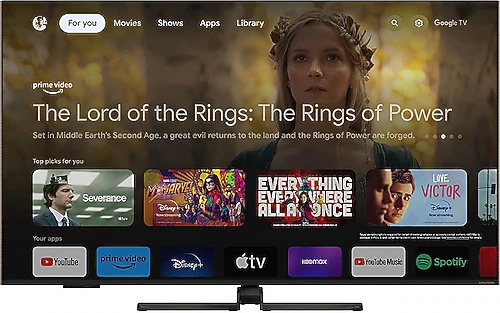
The Grundig 65 GQ 950 A is aimed at anyone looking for a large-screen TV for the living room who also cares about smooth motion and smart TV features. It combines a 65-inch QLED panel with 4K resolution, while its 120 Hz refresh rate and support for HDR10, HDR10+, and Dolby Vision make for a compelling package for movies, shows, sports, and gaming. The Google TV interface, built-in satellite receiver, and various connectivity options also reduce the need for separate devices in everyday use.
4K and QLED on a big screen
The 165 cm screen makes it easier to get immersed in what you’re watching, especially with movies and shows. Its 3840x2160-pixel resolution keeps fine details clear across the large screen when watching 4K content. With a TV of this size, it’s important to consider your viewing distance rather than sitting too close: Leave an appropriate distance from the screen to enjoy the wide viewing area and make longer viewing sessions more comfortable.
Using a Quantum Dot layer, QLED technology focuses on delivering vivid colors across a wide range. Nature documentaries, animation, and sports broadcasts can particularly showcase this approach. Support for HDR10 and HDR10+ alongside Dolby Vision also makes it easier to enjoy compatible content across different platforms and productions. Since the actual effect of HDR varies depending on the content and scene, these features shouldn’t be taken to mean that every image will look different in the same way.
Smoother sports and gaming with 120 Hz
A 120 Hz refresh rate helps make scenes with lots of fast movement look smoother. It can be easier to follow the action when the camera moves quickly during broadcasts such as soccer and motorsports, and fast transitions in action movies can also benefit from the higher refresh rate. This makes the TV a suitable option not only for movie watchers but also for people who regularly follow live sports.
Gaming with a connected console or computer is another natural use for the screen. The high refresh rate can make for a smoother gaming experience with compatible content and devices. However, don’t assume that 4K and 120 Hz will be available together in every game just because of the panel’s refresh rate: Before buying, check your console or computer’s capabilities and whether the HDMI connection meets your needs. There are three HDMI inputs, so it’s useful to plan how to connect equipment such as a game console, streaming device, and sound system.
Google TV and connectivity options
Google TV provides a smart TV experience designed to help you find and watch apps and content through a single interface. You can connect to your wireless network over Wi-Fi or use Ethernet to connect the TV to your router with a cable. A wired connection can be convenient in setups where the TV is close to the network equipment. Bluetooth provides an option for connecting wireless accessories, while screen mirroring makes it easy to send content from compatible devices to the TV.
Having a satellite receiver built into the TV reduces the need for a separate receiver box to watch satellite broadcasts. When planning the connection area behind the TV, also consider access to the satellite cable, power cable, and any other devices you’ll be using. Two USB ports provide connection options for external storage or compatible accessories; the optical audio output can also be useful for connecting the TV to suitable audio equipment. Three HDMI and two USB inputs accommodate most basic living-room setups, though anyone planning to connect many devices at once should consider the number of ports in advance.
Sound, setup, and room planning
The 36 W RMS audio output provides a strong foundation for watching everyday broadcasts and shows through the TV’s built-in speakers. Dolby Digital and Dolby Atmos support also provide flexibility with audio formats when used with compatible content and equipment. If you want fuller or more immersive sound for movies, you can pair the TV with an external sound system; the optical audio output is one of the connection options for this setup.
The body is listed as 1457.6 mm wide, 307.5 mm deep, and 900.5 mm high; it weighs 18.3 kg. Before buying the TV, measure not only the space available for the screen, but also the area taken up by the feet, the stand’s weight capacity, and the space needed for cables. If you plan to mount it on the wall, also check mounting compatibility and whether the wall is suitable. A 65-inch screen can take up much of the viewing area in a small room, while its size may feel more balanced in a spacious living room.
Who is it a good choice for?
The Grundig 65 GQ 950 A is a good fit for families who want a large 4K screen, vivid colors, smooth motion, and a built-in smart TV experience in one device. Those who want to watch satellite broadcasts as well as stream shows and movies through apps can easily switch between these uses thanks to the built-in satellite receiver and Google TV. Sports fans can benefit from 120 Hz, while viewers with an HDR movie collection can take advantage of Dolby Vision, HDR10, and HDR10+ compatibility.
If its price is higher than that of basic 4K TVs of a similar size, consider whether the difference is justified by the 120 Hz refresh rate, QLED color technology, and wide HDR format support. The extra cost may be worthwhile if you’ll use these features regularly, especially if you care about fast motion and compatible HDR content. If you’ll mostly use the TV for standard broadcasts and don’t expect to benefit from its advanced picture features, a simpler 4K model may also meet your needs. OLED options offer different advantages, such as deeper blacks and pixel-level light control, while the 65 GQ 950 A’s distinguishing feature is that it combines QLED, 120 Hz, and multiple HDR formats in one product. Also keep in mind that it has an F energy rating when considering running costs.
In short, the Grundig 65 GQ 950 A is a strong contender for anyone looking for more than just a large screen and wanting to bring smooth motion, a wide range of colors, smart content access, and satellite broadcasts together in one TV. When deciding whether to buy it, consider your living-room dimensions, the connection needs of your devices, and how much you’ll benefit from its 120 Hz and HDR features.