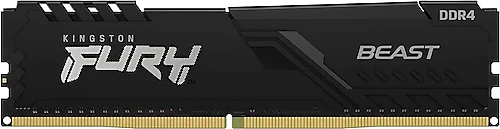
The Kingston Fury Beast KF432C16BB/16 is a single 16 GB DDR4 memory module designed for desktop computers. Its 3200 MHz operating speed and CL16 timings make it a balanced match for gaming and everyday DDR4 systems. If you want to upgrade your memory by adding one module to your system, or move to a dual-channel configuration later by adding another module of the same capacity, this is a straightforward option.
16 GB in a single module: a flexible starting point for upgrades
The key detail about this model is that it offers 16 GB of capacity in a 1x16 GB configuration. You can add capacity to your existing system using one of its memory slots; if you have a free slot, you can also add a second module later to increase the total capacity. For a computer used for gaming, browsing with many tabs open, video calls, and office applications at the same time, 16 GB is a useful starting point for many people.
The other side of choosing a single module is the channel configuration. When used on its own, the memory system usually runs in single-channel mode; it won’t provide the memory bandwidth available from two matched modules. Since memory bandwidth can affect performance, especially in systems with integrated graphics, compare dual-module options such as a 2x8 GB kit if you’re planning to build a new system from scratch. The flexibility of a single module makes more sense if you already have a compatible 16 GB module or plan to upgrade in stages.
What do 3200 MHz and CL16 offer for everyday use?
With a speed of 3200 MHz and CL16 latency, this memory sits at a reasonable middle ground for gaming and general use in DDR4 desktop systems. Paired with a compatible processor and motherboard, it serves as system memory for gaming, multitasking, and memory-intensive tasks such as photo editing. A faster memory kit won’t make a noticeable difference on every computer: results depend on the processor, the memory settings supported by the motherboard, and the program you use. So, instead of replacing your current memory based on frequency alone, first consider whether your system’s capacity or speed limit is actually affecting your use.
The module’s 1.35 V voltage and CL16 timings are part of its technical profile. The motherboard and processor must support these settings for the memory to run at its target speed; on some systems, it may start at a lower default speed unless a memory profile is selected in the BIOS. Checking the memory settings in the BIOS after installation is a practical way to make sure the capacity and speed are being used as expected. If stability is your priority, you can use the system’s automatic settings; if you change performance settings, follow the instructions in your motherboard manual.
Heatsink and physical compatibility
The Fury Beast’s heatsink gives the module a protective cover, while its 34 mm height is a useful concrete measurement when checking clearance in systems with large CPU coolers. Still, check not only the overall space in your case but also how close the CPU cooler’s fan comes to the memory slots. This product is designed for a desktop DIMM slot; it won’t fit the shorter SO-DIMM slots found in laptops. Your system also needs to use DDR4 memory: DDR4 and DDR5 modules differ physically and electrically, so they can’t be used interchangeably.
If you’re considering an upgrade with a second module, choosing one with the same model and specifications makes it easier to match them. Memory modules with different capacities or speeds can work together, but the system generally uses settings that are common to both and supported; the same result isn’t guaranteed in every configuration. Checking the motherboard’s memory slot layout and supported total capacity is also a good step before buying.
Who is it better suited to than similar options?
Compared with 16 GB DDR4 3200 MHz CL16 modules in the same class, Kingston’s standout features are its heatsink and 34 mm-tall single-module design from the well-known Fury Beast series. These features alone don’t guarantee higher performance; products with similar specifications can deliver similar results in real-world use. It’s better to make your decision based on price, warranty terms, system compatibility, and whether you plan to find and match another module of the same type later.
If its price is close to alternatives with similar speed and timings, it could be a sensible choice for anyone who wants to buy 16 GB in a single module and spread out their upgrades over time. On the other hand, if using dual-channel memory right away is your priority, consider 2x8 GB or 2x16 GB kits with a total capacity that meets your needs. I’d only consider moving to more expensive memory worthwhile if your system supports it and your use can benefit from the speed difference; paying extra just for a more impressive product name won’t give most users a tangible benefit. In short, this Kingston is a good fit for people who want to add capacity to a compatible desktop and expand later with a matching module; just be aware that starting with one module doesn’t automatically provide dual-channel operation.