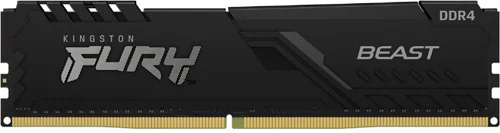
The Kingston Fury Beast KF432C16BB/8 is a single-module DDR4 RAM stick designed for desktop computers and running at 3200 MHz. With 8 GB of capacity and CL16 latency, it’s aimed at anyone looking to refresh an older or entry-level system. Its standout feature is that it offers respectable speed specifications in a heat-spread-equipped module that’s just 34 mm tall; the main question when buying is whether 8 GB will be enough for your needs.
A practical upgrade for an older DDR4 computer
This module is intended for desktop computers with a DDR4 DIMM slot; it cannot replace the shorter SO-DIMM memory used in laptops. If your compatible system has a free slot, adding 8 GB can help with basic office work, web browsing, online classes, and light content creation. If you tend to have many tabs, large files, or several applications open at once, keep in mind from the outset that a single module’s capacity may fill up quickly.
The KF432C16BB/8’s 3200 MHz speed and CL16 latency make it a good choice for anyone looking for a more responsive profile than basic DDR4 memory offers. The difference may not always be striking in everyday tasks, but when the processor and motherboard support the memory settings, these specifications provide a good starting point for gaming and memory-sensitive applications. It can be used in a gaming PC, but 8 GB on its own may be limiting for modern games and background applications. For that reason, it’s better to think of it as a first step toward increasing memory rather than a complete gaming-system upgrade.
The advantages and limitations of a single module
The product comes as 1x8 GB, making it easy to install and expand later: if there’s a free slot, you can add a compatible second module to increase the total memory. Using two modules together can also provide the benefits of dual-channel memory on systems that support it. Memory configuration can affect performance, especially on computers using integrated graphics, so pay attention not just to total capacity but also to how the modules are paired.
However, a single 8 GB module does not provide the dual-channel configuration offered by two-module setups such as 2x4 GB or 2x8 GB. Buying one module and matching it later offers flexibility, but it’s important that the module you add is compatible in capacity and speed, as well as timings. When different memory modules are used together, the system may fall back to settings that both support. If you want dual-channel performance and more capacity right away, a suitable kit or a two-module setup would be a better fit.
Speed, voltage, and installation considerations
Memory speed doesn’t depend only on the value printed on the RAM. Check that your motherboard and processor support DDR4-3200; on some systems, you may need to select a memory profile or speed setting in the BIOS to reach this speed. Without that setting, the memory may run at a lower speed. Before buying, it’s a good idea to check the motherboard’s supported capacity and module configurations, as well as the specifications of your existing RAM, to ensure a smooth upgrade.
The module’s voltage is 1.35 V and its latency is CL16. Its heat spreader covers the memory chips, while its black design gives the inside of a system a tidy look. At 34 mm tall, it may be easier to fit alongside large CPU coolers in many desktop builds; still, it’s worth checking how far the CPU cooler extends over the RAM slots. The module is 133 mm wide and uses the standard desktop DIMM form factor. Before installing it, shut down the computer and disconnect it from power; insert the module in the slot specified in the motherboard manual, in the correct orientation, and press until the latches click into place.
Who should consider it?
The Kingston Fury Beast makes the most sense as an affordable first step toward increasing capacity in a DDR4 desktop, or as a replacement for a faulty or old module. Its heat-spreader design, 3200 MHz speed, and CL16 rating set it apart from memory with very basic speed specifications. When comparing it with options in a similar speed and latency class, such as the Corsair Vengeance LPX, the deciding factors are often the right capacity, motherboard compatibility, number of modules, and price at the time of purchase rather than the brand name. This model’s single-module 8 GB configuration is an advantage for some systems and a limitation for some uses.
If its price is close to that of a two-module 16 GB solution, it may be wiser to consider the option that offers greater capacity and dual-channel operation for the same budget. On the other hand, if you have a computer with a free slot and can complete its capacity with a compatible 8 GB module, this one offers an affordable and easy-to-expand upgrade. When deciding, consider not only the 3200 MHz and CL16 specifications but also your total capacity target and your system’s current memory configuration.