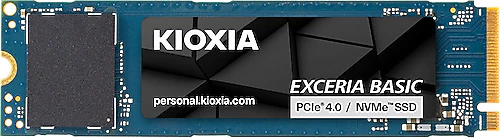
The Kioxia Exceria Basic LSF10Z002TG8 is a 2 TB M.2 SSD for people who want both ample storage and fast file access on their computer. It delivers read speeds of up to 7300 MB/s and write speeds of up to 6800 MB/s over a PCI-Express 4.0 interface. These figures focus on speeding up storage in computers used for large game libraries and demanding files.
Less juggling for space with 2 TB of capacity
2 TB of space is a welcome advantage for anyone who wants a computer that can hold more than just the operating system and a few essential apps. Modern games, high-resolution video projects, and large photo collections can fill up storage quickly. The Exceria Basic helps keep this kind of content on a single SSD, potentially reducing the need to move frequently used games or work files to an external drive.
This capacity also makes sense for users who don’t want to add a second storage device to a desktop, or who are considering upgrading the existing SSD in a laptop. Before upgrading, however, check that the computer supports M.2 SSDs and PCIe 4.0, how many slots are available, and the physical dimensions of the drive you plan to install. “M.2” describes the connection form factor; it doesn’t mean that every M.2 slot will work with the same type of SSD or at the same speed. Checking the motherboard or laptop manufacturer’s compatibility information can help clarify your buying decision.
What do PCIe 4.0 speeds offer in everyday use?
Kioxia specifies sequential read speeds of 7300 MB/s and write speeds of 6800 MB/s. These speeds can be beneficial for tasks such as transferring large files, loading sizable game files, and moving bulky content like video from one location to another. Users who frequently open project files, keep games on their SSD, or work with large archives can get more out of the smooth storage experience offered by a fast NVMe drive.
Still, these figures shouldn’t be treated as fixed speeds that you’ll see in every situation. Actual transfer performance depends on the PCIe generation supported by the computer, the workload, and the software being used. If the SSD is installed in a system with an older PCIe connection, the connection’s limitations may reduce the speed you can achieve. Everyday tasks involving small files also behave differently from sequential speed tests. So this model’s clearest advantage is that it combines fast, high-capacity storage with a suitable PCIe 4.0 system.
Gaming, creative work, and everyday computing
For a gaming PC, 2 TB of space will appeal to anyone who wants to keep several frequently played titles on their SSD at once. Downloading and updating new games also benefits from fast storage, but an SSD alone won’t increase frame rates. Loading times and overall game performance also depend on the system’s other components and the game itself.
The combination of capacity and transfer speed can also be useful for people working with video editing, large photo libraries, and extensive project folders. On a home or office computer that doesn’t regularly handle large files, the benefits of these sequential speeds may be more limited. In that kind of scenario, a more affordable or lower-capacity SSD may meet your needs. The Exceria Basic makes the most sense when you genuinely need a lot of space and fast PCIe 4.0 storage can contribute to your everyday workflow.
Buying decision and alternatives
The strongest reason to choose this model is that it combines 2 TB of capacity with near-top-tier PCIe 4.0 sequential speeds in a single M.2 SSD. More basic NVMe drives with similar capacity may be enough for most everyday use, while the Exceria Basic’s speed figures are aimed at people who want more performance for large file transfers and demanding storage workloads. PCIe 5.0 SSDs target a newer connection standard, but this model’s PCIe 4.0 performance is already fast for many current systems. The extra cost of moving to PCIe 5.0 may not be worthwhile if your computer and workload won’t benefit from the difference.
Since no price is provided, it isn’t possible to make a definitive price-performance comparison. If the Exceria Basic is priced close to other 2 TB PCIe 4.0 options, it becomes an appealing choice for anyone who wants both high speed and ample space. If it’s considerably more expensive, consider whether the difference is worthwhile for your large-file work or regular demanding use. Also check whether a heatsink is included and how the M.2 slot is positioned in your case; physical compatibility and enough clearance are part of a trouble-free installation.