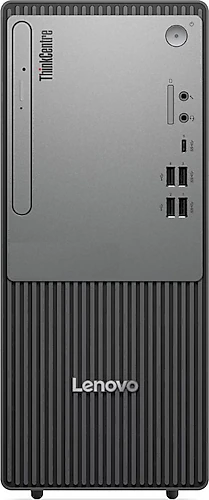
The Lenovo ThinkCentre neo 50t Gen 6 13BD007UTR combines the easily upgradeable design of a desktop computer, suited to long-term use in a fixed workspace, with the modern Intel Core Ultra 5 225 processor. Its 16 GB of DDR5 memory and 512 GB SSD provide a balanced starting point for office applications, multitasking, and everyday productivity. Keep in mind that a monitor is not included and the system comes with FreeDOS: this model is better suited to users who want to choose their own display and handle the software installation themselves.
A fast, organized companion for everyday work
The Core Ultra 5 225 belongs to the Intel Core Ultra Series 2 family and is listed with a processor speed of 3.30 GHz in this system. Paired with 16 GB of DDR5 RAM, this configuration aims to deliver a comfortable experience with typical desktop tasks such as preparing documents, working with large spreadsheets, joining online meetings, doing research, and keeping multiple applications open at once. The amount of memory also gives users a reasonable starting point for switching between browser tabs and messaging apps while preparing a presentation.
The 512 GB SSD helps you get the computer started and open frequently used applications without waiting. It offers a good starting capacity for an operating system, productivity software, and everyday files, though large video archives or extensive game libraries can fill it up more quickly. For users who keep their files in the cloud or on external storage, this capacity may be sufficient for a work computer without paying for an unnecessarily large drive.
This configuration makes particular sense for people who work from home, small businesses, office workers, and students. It is a good fit for a desktop setup used for word processing, online classes, accounting and inventory software, web-based work, and basic photo editing. If you’re looking for a computer that stays in one place, you can set up your desk, keyboard, and monitor to suit your needs without having to compromise on a laptop’s battery or screen size.
Intel Graphics has clear strengths and limitations
In this configuration, Intel Graphics handles visual tasks, sharing system memory for graphics. For users looking for a simple office computer, this is a sensible choice: it can handle everyday desktop tasks without the power consumption, cost, and space requirements of a dedicated graphics card. Watching videos, working with multiple windows, and basic image editing are among the tasks this system is designed for.
On the other hand, the shared graphics unit does not make this a computer for modern games or intensive 3D work. If gaming performance, professional video editing, or graphics-intensive workflows are priorities, it would be better to consider a desktop with a dedicated graphics card. Intel Graphics is not an unnecessary drawback here; it reflects the system’s focus on everyday productivity and general use rather than high graphics performance.
If you think you may need more graphics performance in the future, check the graphics card dimensions that fit the case and the power supply’s capacity before buying. Compared with small mini PCs, the desktop form factor may make replacing parts and maintenance more convenient, but which upgrades are possible depends on the system’s internal components. So don’t assume an upgrade will be possible based on the case type alone.
Setup and planning before you buy
The ThinkCentre neo 50t Gen 6 comes as a ready-made system, but it is sold without a monitor. If you don’t already have a display, add a monitor, keyboard, and mouse to your computer budget. If you have existing peripherals, checking their connections and deciding on a suitable screen resolution for your needs in advance will make it easier to choose the right monitor. A desktop computer also requires more desk space and cable management than a laptop, since it is designed to stay in a fixed workspace.
FreeDOS does not mean that Windows is installed and the computer is ready to use as soon as you turn it on. You’ll need to obtain and install your preferred operating system, then install the necessary drivers and applications. For users who are comfortable with installation, this gives them the flexibility to choose their preferred system; for someone buying their first computer or looking for a system that works straight out of the box, it means extra setup. Including the cost of a license and installation in your total budget will help you make a fair comparison with similar ready-made systems.
When is it worth the price?
Whether this model makes sense depends not only on its price but also on the additional components you need. If you already have a monitor and peripherals, or want to choose your own display, the monitor-free configuration saves you from paying for a bundle you don’t need. FreeDOS can also offer flexibility if you plan to install the operating system yourself or use a different one. However, if you also need to buy a Windows license and a monitor, include those costs when comparing the total price with complete computers offering similar specifications.
Mini PCs at a similar price may take up less desk space; the ThinkCentre neo 50t’s desktop case, however, may be more appealing for fixed use and potential component replacements. Form factor matters if portability or a very small footprint is your priority. Desktop options with dedicated graphics cards also offer a stronger focus on gaming and graphics work, but the budget spent on a graphics card may be unnecessary if you don’t use those workloads. The most useful comparison is not just the processor name, but the computer’s total setup cost and whether it meets the needs of your work.
Who is it for, and who should look elsewhere?
The Lenovo ThinkCentre neo 50t Gen 6 13BD007UTR is a balanced option for users who want a fast SSD, DDR5 memory, and a Core Ultra 5 processor in a desktop setup, without making gaming performance their top priority. It provides a useful foundation for office work, education, online communication, and everyday multitasking. This package is a better fit for people who want to choose their own monitor, install an operating system through FreeDOS, and use the computer in a fixed workspace.
If your priority is high graphics performance, extensive gaming capabilities, or a complete package that needs no setup, consider other desktop options as well. The main appeal of this Lenovo is that it meets basic work-computer needs with a modern Core Ultra processor, 16 GB of DDR5 RAM, and fast storage, while leaving the choice of display and operating system up to the user.