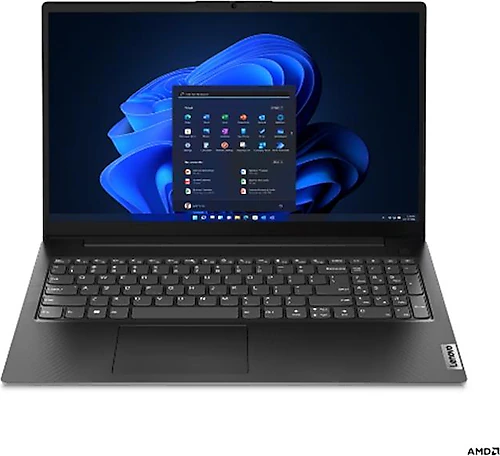
The Lenovo V15 G4 AMN 82YU0123TX offers a Ryzen 5 7520U, 16 GB of LPDDR5 memory, and a 512 GB SSD for people who want to handle everyday tasks on a laptop with a large screen. Its 15.6-inch Full HD display provides a comfortable workspace, while the FreeDOS operating system leaves preparing the computer for use to the buyer. This hardware is best suited to office applications, education, web browsing, and basic content creation—not demanding gaming or professional graphics work.
A fast, practical foundation for everyday tasks
The Ryzen 5 7520U’s four-core design and 2.80 GHz processor speed are intended to provide the processing power needed for common tasks such as editing documents, working with numerous browser tabs, attending online meetings, and preparing presentations. With 4 MB of cache, this processor doesn’t limit the computer to a single task: listening to music, checking email, or doing research while work applications are open are all natural use cases for this class of laptop.
The 16 GB of LPDDR5 memory is particularly valuable here. It provides comfortable capacity for students and office users who keep several applications open at once, while the 5500 MHz memory frequency complements the system’s fast memory infrastructure. The memory is also one of the system resources shared with the Radeon 610M’s graphics memory. So rather than continually pushing the computer with numerous demanding applications or graphics workloads, it’s better to think of it as an everyday multitasking and productivity laptop.
The 512 GB SSD provides a useful amount of starting space for work files, course materials, applications, and offline content, in addition to the operating system. An SSD makes everyday tasks such as opening files and launching applications feel more responsive than they would with a traditional hard drive. If you plan to keep large video archives or extensive game libraries, consider the capacity from the outset; storing files on external storage is another option if needed.
The benefits and trade-offs of the 15.6-inch Full HD display
The 15.6-inch display with a 1920x1080 resolution makes work documents and web pages easier to view than on a smaller screen. Its size is convenient for working with side-by-side windows, taking notes while watching an online lesson, or reviewing spreadsheets. Full HD resolution also provides a sufficiently clear viewing area for videos and everyday visual content.
However, the panel is TN. This means the screen shouldn’t be considered on the same level as IPS alternatives for work where color and viewing angles matter. It’s better suited to viewing documents and browsing the web straight on; the image may look different when viewed from the side. If photo editing, color-consistent design work, or presentations where you’ll frequently share the screen with others are priorities, consider IPS-panel options before buying. On the other hand, if your use is mostly text, spreadsheets, lessons, and video, the limitations of a TN panel may matter less.
Set the right graphics expectations for the Radeon 610M
The AMD Radeon 610M is an integrated graphics unit that comes with the processor. It’s suitable for everyday interface use, video playback, and basic visual tasks; it isn’t designed for intensive 3D rendering or high graphics settings in new games like a dedicated graphics card would be. Light games and older or less graphically demanding titles may be within its scope, but gaming performance should be assessed for each game and its settings. This computer’s strength isn’t gaming hardware—it’s bringing everyday tasks together in a single portable device.
Basic photo cropping, editing presentation visuals, and simple content preparation can also fit within this use case. However, if you regularly do professional video editing, complex 3D work, or high-resolution content creation, a model with a more powerful processor and a dedicated graphics card would be a better fit. Keeping this distinction in mind can help you avoid choosing the V15 for the wrong kind of work and later being disappointed with its graphics performance.
FreeDOS setup and connectivity
This configuration comes with FreeDOS, so you shouldn’t expect to find a ready-to-use Windows desktop when you turn on the computer. You’ll need to install Windows or another compatible operating system, and plan separately for the required license and installation media. If you have experience with installation, this flexibility lets you choose the system you want to use. For first-time laptop buyers or anyone who wants to start working as soon as they take the device out of the box, however, setup means extra time and cost. Include the operating system in your purchase budget.
Bluetooth 5.1 support is handy for pairing compatible wireless headphones, a mouse, and similar accessories. You can create a tidier workspace with wireless peripherals or use the computer with your personal audio equipment. However, wireless connectivity features don’t automatically guarantee compatibility with every accessory you need; it’s a good idea to check operating system support, especially for peripherals that require specialized software.
Who should consider it?
The V15 G4 AMN’s hardware configuration is aimed at people looking for a single laptop for school and office work. Students can use its 15.6-inch screen for research, online learning, assignments, and presentations. For people working from home, it offers enough memory to use documents, email, and web-based applications together, along with SSD space for everyday files. It also provides a suitable setup for watching videos and basic internet use around the home.
Those looking for a smaller, more portable computer should consider how much space a 15.6-inch model will take up in a bag and how heavy it will be; since the product’s weight and dimensions aren’t listed here, frequent travelers may find it useful to check those figures before buying. Also, if memory and storage upgrade options are important to you, verify the upgrade possibilities for this configuration and chassis. The 16 GB of memory is a good amount to start with, but anyone planning to expand later should look beyond the capacity available today.
When comparing it with entry-level and mid-range laptops in a similar price bracket, start by looking at the display panel and operating system cost. A rival with an IPS display may be a better choice for color and viewing angles; a model with a dedicated graphics card makes more sense for gaming or graphics-intensive workloads. On the other hand, the V15’s 16 GB of LPDDR5 memory and 512 GB SSD may be an advantage when choosing among models with more limited base configurations. Since no price is provided, it isn’t possible to give a definitive price-to-performance ranking: this Lenovo is a reasonable contender if its price reflects this memory and SSD capacity, the operating system cost doesn’t strain your budget, and your use remains focused on everyday productivity. If the TN panel or FreeDOS requires an additional compromise, compare the total cost with options that have an IPS display or come with an operating system installed.
In short, the main reason to consider the Lenovo V15 G4 AMN 82YU0123TX is its combination of 16 GB of memory and a 512 GB SSD with a Ryzen 5 processor suited to everyday tasks. It has appropriate capacity for school, office, and home use; those looking for gaming performance, color-critical work, or a hassle-free setup may find more suitable alternatives. Clarify two points before buying: does a TN display suit your needs, and are you prepared to handle the FreeDOS installation?