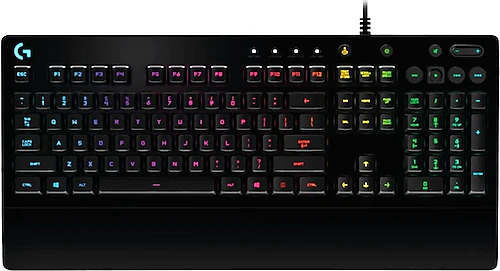
The Logitech G213 Prodigy is aimed at people moving to a gaming keyboard who don't want the loud sound and different key feel of mechanical keyboards. With Mech-Dome keys, RGB lighting, a wrist rest, and media controls built into the keyboard, it’s a practical choice for everyday use as well as gaming.
A balanced feel for gaming and typing
The G213’s full-height Mech-Dome keys aim to deliver a mechanical feel, but that doesn’t mean the keyboard is built like models with mechanical switches. Key travel is 4 mm, and actuation force is 50 grams. These figures give the keys a distinct sense of movement, while their quieter operation is an advantage for people gaming in shared rooms or using the keyboard for work and messaging as well. It makes room for quick commands in games and familiar full-size keys for everyday typing.
Its response-focused design is suited to fast inputs in action and competitive games. Still, it’s important to consider key feel rather than choosing a keyboard based only on speed claims: if you want the more pronounced feedback of mechanical switches or a choice between different switch types, the G213 doesn’t offer the same experience. Combining a mechanical feel with quieter typing is one of the main reasons to choose this model.
LIGHTSYNC and media keys at your fingertips
RGB lighting can be customized with different colors and effects using LIGHTSYNC support; you can tailor the lighting to your personal preferences or game profiles through Logitech G HUB. That means the keyboard doesn’t just add color to your desk—it can also help visually distinguish between different game profiles. If you don’t want to spend time adjusting the lighting, you can simply use the RGB as part of your desk setup.
Dedicated media controls are handy while gaming or listening to music: you can adjust the volume, change tracks, or pause playback from the keyboard. There’s no need to leave your game or the application you’re using to access these controls. The Caps Lock indicator also makes it easy to check the key’s status at a glance.
Consider how much desk space it takes up
The built-in wrist rest provides a place to rest your hands at the front of the keyboard during long gaming or typing sessions. Its adjustable feet also let you change the keyboard’s angle to suit your needs. This combination is valuable if you want to fine-tune wrist position and how the keyboard sits on your desk; however, because the wrist rest is integrated into the body, you can’t position or remove it like a separate piece.
The G213 measures 452 mm wide, 218 mm deep, and 33 mm high, and weighs 1000 grams. Before buying, check that you’ll still have enough room to move your mouse around on your desk. The wired USB connection keeps setup simple, and the 1.80 m cable gives you flexibility in positioning the keyboard relative to your computer. On the other hand, this model won’t meet your needs if you want wireless use. The Q layout is also worth considering in terms of how well it matches the keyboard layout you’re used to.
Who is it right for, and when?
The G213 makes sense for users who want a gaming-focused model without switching to a mechanical keyboard, value relatively quiet keys, and want a wrist rest and media keys in a single unit. It can be used for gaming as well as everyday typing, chatting, and controlling music. Compared with simpler keyboards in a similar class, its RGB customization and integrated wrist rest stand out; compared with alternatives featuring actual mechanical switches, it’s less suited to people looking for mechanical switch feel and a variety of switch options.
The G213’s price makes sense depending on how much you value RGB, G HUB customization, and a wrist rest compared with a basic keyboard. If you’ll use these features regularly, they may be worth the extra cost; if you only need a keyboard for typing and basic gaming controls, a simpler model may be enough.