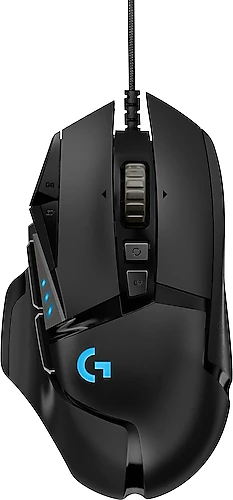
The Logitech G502 HERO is a wired, right-handed mouse for those who want quick access to commands while gaming and the ability to adjust the feel of their mouse to suit their preferences. With 11 programmable buttons, a HERO sensor that reaches 25,600 DPI, and additional weights, it’s geared toward players who value control options rather than those looking for a simple, lightweight mouse.
Controls at your fingertips
The G502’s most notable advantage is that its 11 buttons can be programmed for games and everyday tasks. Assign frequently used abilities, equipment changes, or macros to the extra buttons to reduce switching between keyboard and mouse. This setup is especially useful in MMO and strategy games where shortcuts are important; with different profiles, it can also serve as a shortcut mouse for apps outside of games. The DPI button keeps sensitivity controls close at hand, so you don’t need to open a menu to switch from quick camera movement to more controlled aiming.
The HERO 25K optical sensor has a stated range of 100–25,600 DPI and a tracking speed of 400 IPS. This wide range gives options both to players who prefer high sensitivity and to those who want slower, more controlled cursor movement on the desktop. Of course, the highest DPI setting isn’t best for everyone; what matters is that the sensor’s range can accommodate different games and usage habits.
Customize its weight and appearance
The mouse weighs 121 grams. If you’re used to lightweight mice, the G502 may feel heavy at first; if you prefer a more substantial feel in motion, this design can be an advantage. The five included 3.6-gram weights let you adjust the mouse’s balance to your liking. Compared with models that have a fixed weight, this gives you more room to change how the mouse moves.
LightSync RGB lighting can add color to your setup and can also be matched with other compatible gear. Its visual contribution is separate from gaming performance, and it doesn’t need to factor into your decision if you don’t want RGB. Since the body is shaped for right-handed use, left-handed users should pay particular attention to how it fits their grip before buying.
Wired use and trade-offs
The 2.10-meter cable is long enough to make connecting to a desktop computer convenient, and it eliminates the need to manage battery charging or a wireless connection. On the other hand, a cable limits freedom of movement compared with wireless models. Using a mouse bungee or positioning the cable so it can extend freely across the desk can help keep your play area organized.
The G502 HERO stands apart from simpler, lighter mice in a similar class by bringing many controls together in one hand and allowing you to adjust its weight. For example, compared with the Logitech G402, it has more programmable buttons and adjustable weight; the G402 offers fewer customization options. On the other hand, the G502’s 121-gram body and cable may be less appealing if you prioritize light weight and wireless freedom of movement.
Since no price is provided, the value-for-money decision depends on the price at the time of purchase. If you’ll really use the extra buttons, take advantage of the DPI options, and want to adjust the weight, paying more than you would for similar basic models may be worthwhile. If you only need basic clicking and scrolling, all of the G502’s customization options may be unnecessary. In short, this model is a versatile control tool for right-handed players who will use its settings; it’s not the first choice for those looking for wireless use or the lightest possible body.