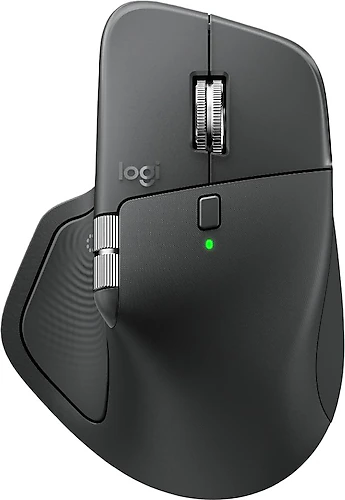
The Logitech MX Master 4 is aimed at people who value comfort and control during long workdays more than gaming-focused lightness. With Bluetooth connectivity, a rechargeable battery, and quiet clicks, it is suitable for use at home or in a shared office. Its eight buttons and optical sensor with sensitivity up to 8000 DPI also offer room to customize it for different workflows.
Comfort and quiet for everyday work
Its low click noise is one of the MX Master 4’s most immediately noticeable advantages. Whether you’re taking notes during a meeting, working in an open office, or using your computer late at night in a quiet room, the mouse is less likely to be distracting. This feature doesn’t eliminate the feel of the clicks; it simply offers a quieter experience for people who don’t want click noise to stand out.
Wireless Bluetooth connectivity reduces cable clutter on your desk. At 150 grams, this mouse stands apart from lightweight models: if you want to quickly toss it into a bag and carry it with you all day, you may prefer a lighter option. On the other hand, those looking for a body that feels substantial in the hand and lends itself to controlled movements may not mind the weight. Its design is shaped for right-handed use, so left-handed users should pay particular attention to ergonomics before buying.
Eight buttons for different workflows
With eight programmable buttons, the MX Master 4 is more than just a tool for browsing pages. You can assign frequently used shortcuts, app commands, or recurring tasks to the buttons, reducing the need to reach for the keyboard. People who work across documents, manage browser tabs, or repeat commands in creative apps may benefit from this customization. Setting up the functions requires using software and settings for customizing the buttons; the default layout may not suit everyone’s habits.
Sensitivity up to 8000 DPI lets you adjust pointer speed to suit different screens and preferences. This can offer control to designers making precise selections, or make it easier to cover more ground with small hand movements on wide or high-resolution screens. The DPI value alone doesn’t guarantee accuracy or gaming performance; the main benefit here is being able to adjust sensitivity to suit your needs.
Choosing based on surface and price
Compatibility with glass surfaces is a practical plus for people who don’t always use a mousepad. If you have a glass desk, it may reduce the need to carry a separate mousepad because of the surface. Still, the construction and cleanliness of the desk surface can affect tracking, so you shouldn’t expect the same results on every glass surface.
Its rechargeable lithium battery eliminates the need to replace batteries, but it’s not possible to give a definitive figure here for battery life or charging time. When buying, it’s worth checking your charging routine and whether your existing cable is suitable. When comparing it with options in a similar price range, consider the difference in terms of the convenience that quiet clicks, programmable buttons, glass-surface support, and right-handed design offer you. If you’ll use these features every day, the customization offered by the MX Master 4 may be worthwhile. If your priorities are the lightest mouse possible, equally comfortable use with either hand, or basic pointing functions, a simpler model may meet your needs.