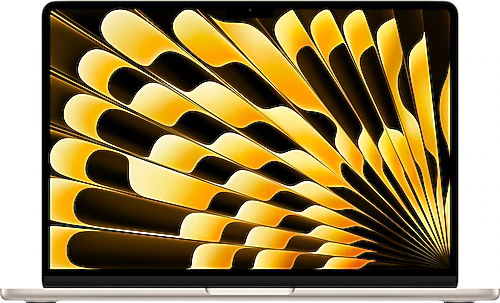
The MacBook Air M2 is designed for people who want a lightweight, quiet computer they can rely on for everyday tasks. This Starlight model brings together a 13.6-inch display, an Apple M2 processor, and 16 GB of memory in a portable chassis, making it suitable for a range of needs, including classes, office work, web browsing, and photo editing. The key consideration is its 256 GB SSD: it may be enough if most of your work stays in the cloud, but if you keep large archives on your computer, you’ll need to plan for storage from the outset.
Smooth everyday performance, easy to carry
The eight-core Apple M2 processor handles everyday tasks with ease, including editing documents, working with many browser tabs open, attending online meetings, and switching between apps. The 16 GB of RAM is also a significant plus for students and professionals who keep several apps open at once. This configuration doesn’t just feel fast for basic use; it also helps the computer handle larger work files and moderately demanding tasks such as photo editing more comfortably.
The MacBook Air’s fanless design is a clear advantage for anyone who values quiet operation. You won’t hear a fan while working in a library, during a meeting, or in a quiet room. In return, you shouldn’t expect the same sustained high performance as laptops with active cooling when the processor and graphics unit are under heavy load for a long time. It’s a balanced choice for everyday productivity, software development, and short creative tasks; for hours of intensive video processing or demanding 3D work, a cooler-running Pro-class device may be more suitable.
A 13.6-inch display and a comfortable workspace
The 13.6-inch display, with a resolution of 2560×1664 pixels, renders text sharply while providing useful space for web pages, documents, and side-by-side windows. Compared with older Air models with smaller displays, the screen-to-body ratio makes the workspace feel more spacious. Still, it’s worth remembering that a 13.6-inch laptop isn’t as wide as a desktop monitor. If you spend long hours working on spreadsheets, timelines, or projects with many open windows, adding an external display can improve productivity.
This model makes good use of its portable screen size for writing, preparing presentations, online learning, and consuming content. The display space and M2 processor also make browsing and basic photo editing comfortable. However, for professional color work, your external equipment and the rest of your workflow matter too; don’t assume the display will meet every specialist need based on resolution alone.
The backlit keyboard makes the keys easier to see in dim environments, while the fingerprint reader simplifies unlocking the computer and confirming supported actions. The Starlight color also adds a warmer tone to the understated aluminum design. If appearance matters to you, it’s worth checking photos of the actual product when choosing a color; depending on the lighting, it may look pale gold or close to silver.
macOS, Apple M2, and connected use
macOS provides a suitable environment for everyday needs, including Safari, office apps, video-calling tools, and creative software. Those who use an iPhone or iPad can turn file and content sharing between Apple ecosystem devices into a smoother workflow. The computer’s Bluetooth 5.3 connection supports pairing with wireless accessories, so you don’t need to rely on cables for a keyboard, mouse, or headphones.
The MacBook Air M2 has a MagSafe charging port, two Thunderbolt/USB 4 ports, and a 3.5 mm headphone jack. Connecting the charging cable via MagSafe leaves both USB-C ports free for peripherals or an adapter. That said, if you often need ports such as HDMI or USB-A, or an SD card reader, you should factor a USB-C hub into your budget and what you carry in your bag. For external displays, the M2 Air supports one external display while its own screen is active; this limitation matters before purchase if you need to work with several monitors at once.
Plan carefully for 256 GB of storage
With this configuration’s 256 GB SSD, less free space remains for your files after macOS and your apps are installed. This capacity is manageable if you keep documents, presentations, and small projects in the cloud or use external storage. Those who store large video files, games, photo archives, or many creative projects should expect the space to fill up more quickly. You can archive files on an external SSD, but a configuration with more internal storage may be more convenient if you want access to every file while on the move.
The memory and storage aren’t user-upgradeable after purchase. That makes choosing 16 GB of RAM a sensible decision for long-term use; consider the SSD capacity alongside how long you plan to keep the computer. It shouldn’t be treated as a component that can easily be added later. The 52.60 Wh battery capacity and fast-charging support make this computer, designed for mobile use, well suited to working away from an outlet; actual battery life varies with screen brightness, open apps, and workload.
Who it makes sense for, and how it compares with rivals
The MacBook Air M2 is a strong contender for students who travel often, office workers, writers, and anyone who wants a quiet computer for light to moderately demanding creative work. Its 16 GB of memory makes it easier to use more apps at once than entry-level configurations do. The efficiency of the Apple M2, combined with the fanless design, makes for a quiet, portable work computer. Its uses can also include software development, light video editing, and managing a photo library, alongside everyday tasks.
Compared with Windows laptops in a similar class, the Air’s standout qualities are macOS, quiet operation, and its integration with Apple devices. Some Windows models may offer more ports, upgradeable memory, or more internal storage; if those are priorities for you, compare the specifications one by one. A newer-generation MacBook Air may offer more in areas such as processor performance and external-display support. If the price difference stretches your budget, the M2 remains more than capable for everyday tasks; if the difference is reasonable, the newer model’s long-term usability and connection flexibility may be worthwhile for you.
The best reason to choose this device is if you want 16 GB of memory and an M2 processor in a quiet, portable MacBook Air. If you can manage 256 GB of storage, accept the limit on external displays, and avoid heavy, sustained workloads, it can be a well-balanced work companion. Before buying, check that your apps support the macOS version, and consider the adapters you need and how you’ll manage storage.