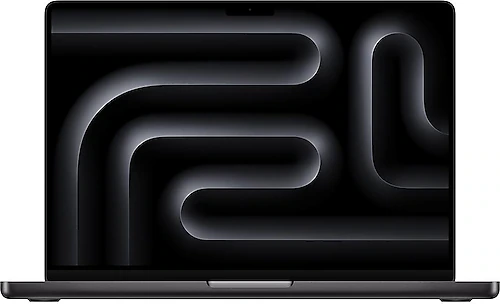
The MacBook Pro M5 is aimed at people looking for a powerful processor, plenty of storage, and a high-resolution display in a compact body. Its 14.2-inch display makes it easier to work on the go, while the 1 TB SSD provides plenty of room for large projects and files. The model’s main appeal is bringing together a range of tasks—from everyday work to creative apps—in one portable computer running macOS.
A balanced display and hardware for working on the go
The 14.2-inch display is compact enough to make carrying the computer in a bag easy, while still offering useful space for working with documents, timelines, and multiple windows. Its 3024 x 1964 pixel resolution helps text and interface elements look sharp. Anyone who wants to inspect details while editing photos, read long documents comfortably, or view more content at once while editing video can benefit from this resolution. However, the screen size is no substitute for a larger desktop monitor if you’re used to keeping many panels open side by side; this model is designed first and foremost for a portable work setup.
The Apple M5 processor’s 10-core design makes this more than a computer limited to email and web browsing. Everyday tasks such as office apps, numerous browser tabs, video meetings, and working with large files can all be handled in the same setup. For more demanding use, photo editing, software development, content creation, and video projects are also natural use cases for this class of computer. Of course, performance in each app depends on its workload and macOS support; the key point is that the M5 processor lets you bring different kinds of work together on one computer.
The 16 GB of RAM is a useful starting point for multitasking and many creative apps. It’s a practical amount for everyday use if you regularly switch between documents, a browser, communication tools, and a productivity app. If you work with large video projects, extensive software development environments, or keep many demanding apps open at once, consider your programs’ memory requirements before buying. RAM capacity becomes even more important if you plan to keep the computer for a long time.
The 1 TB SSD keeps projects close at hand
The 1 TB SSD is one of this model’s standout advantages. Photo libraries, video files, apps, and documents you need to work with offline can be stored more comfortably on the same computer. It won’t eliminate the need for an external drive or cloud storage altogether, but it can reduce the need to constantly move frequently used files or delete things as soon as you need to free up space. This capacity can be a real convenience if you work on large projects, don’t want to rely on an internet connection while traveling, or plan to keep your computer for a long time.
The shared graphics designation means that graphics processing uses the system’s shared resources rather than a separate graphics card. This provides integrated graphics that can be sufficient for interface use, image editing, and many productivity tasks, but it’s best not to think of the computer as comparable to models with powerful dedicated gaming graphics. If your priority is playing the latest games at high graphics settings or working extensively with professional 3D scenes, compare alternatives with discrete graphics hardware as well. On the other hand, if portability, macOS apps, and everyday creative work matter more, shared graphics alone are not a good reason to rule out this model.
macOS and compatibility: think about your workflow before buying
macOS is the operating system available on Apple computers, so your choice depends not only on hardware but also on the software you use and how you work. People who use macOS versions of apps for photo, video, and audio production, as well as software developers and those already in the Apple ecosystem, can benefit from this environment. If your organization relies on specialized software, plugins, or peripherals, it’s wise to check their macOS compatibility in advance. If you depend on a program made only for Windows, factor in the additional steps involved in switching.
Bluetooth 5.3 provides a current connectivity standard for pairing compatible wireless headphones, mice, and other accessories. Fast charging can also make charging breaks more convenient; however, since the product information does not specify a charging time or adapter power, check what’s included in the box and the charging setup you plan to use. Similarly, listing the connection requirements for external displays, storage devices, and other equipment you need to connect can help you determine whether the setup on your desk will meet your expectations.
Who should consider it?
People who create content regularly, carry their computer with them, and like to keep files in local storage can benefit especially from this setup. The 1 TB SSD offers breathing room for anyone who wants to keep photo and video projects, work documents, and apps together, while the 14.2-inch display makes working on the go easier. Students and professionals can also use one device for writing, research, presentations, coding, and meetings. If your main needs are web browsing, email, and office documents, you may not need all of these features; in that case, a more affordable computer or an option with less storage could make better use of your budget.
Nearby alternatives include lighter Mac models geared toward everyday use, such as the MacBook Air, as well as high-end Windows laptops. The MacBook Pro M5’s meaningful distinction is that it combines the Pro-series approach with a high-resolution 14.2-inch display and 1 TB of storage. An Air-class model may be enough for simpler tasks; the extra cost for the Pro is worthwhile if demanding app use, a greater need for local storage, and the workspace provided by this screen size really matter to you. On the Windows side, gaming, specific professional software, or hardware options may take priority. Prices and configurations vary, so make your decision based not just on product names but on the overall features of options with the same RAM and storage requirements.
The strongest reason to choose this MacBook Pro is if you want an Apple M5 processor with 10 cores, 16 GB of RAM, a 1 TB SSD, and a 3024 x 1964 resolution display in a portable computer. The price difference makes sense when these capabilities and the display will be useful in your workflow every day. If you’ll only use it for basic tasks or prioritize demanding 3D and gaming performance, it would be more appropriate to look at models in other categories.