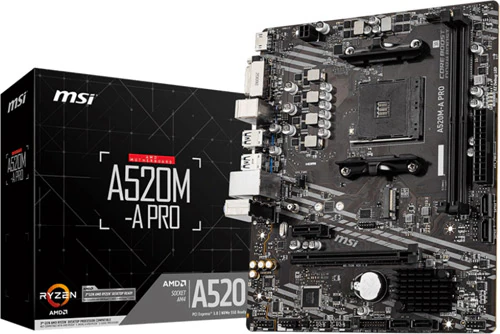
The MSI A520M-A Pro is a Micro-ATX motherboard for AMD processors with an AM4 socket and DDR4 memory, focused on essentials rather than flashiness. With one M.2 slot, four SATA connections, and video outputs, it can be a suitable starting point for home, office, and entry-level gaming systems. However, this model is most appealing to those who understand its upgrade limitations and want to build a simple system.
A design suited to compact systems that covers the basics
Measuring 20 × 23.6 cm, this Micro-ATX board is easy to fit in compatible small and mid-sized cases. Since it takes up less space than a full-size ATX motherboard, it suits anyone looking to build a compact desktop computer. Still, when choosing a case, check that it supports Micro-ATX and has enough room for other components such as a graphics card; a smaller motherboard does not automatically make the whole system small.
The AMD A520 chipset and AM4 socket provide a familiar platform for anyone looking to build a DDR4-based Ryzen system. Don’t assume processor compatibility based on the socket alone: the supported Ryzen models and required BIOS version can vary by processor. Before buying components, check MSI’s processor compatibility list and the motherboard’s BIOS requirements, especially if you’re choosing a newer Ryzen processor.
The board has two memory slots and supports up to 64 GB of memory. That may be enough for everyday use, multitasking, office applications, and many gaming systems. Two slots limit memory upgrade options compared with motherboards that have four: for example, once both slots are occupied, you may need to replace the existing modules to increase capacity. It’s worth planning your RAM capacity and module configuration in advance.
Storage and connectivity: enough flexibility, but a limited number of slots
One M.2 slot lets you install a fast storage drive on the board for your operating system and frequently used applications. It’s accompanied by four SATA 3 connections, so you can expand storage with additional SATA SSDs or hard drives. The single M.2 slot is a limitation for anyone planning to use multiple M.2 drives. If you need several high-speed drives, a motherboard with more M.2 slots may be a better fit.
Six USB connections provide basic connectivity for peripherals, external storage, and other accessories. Two are specified as USB 2.0 and four as USB 3.2. Port placement on the case and front-panel connector support can affect setup, so compare the motherboard’s connector layout with the devices you use frequently and your case’s front-panel cables.
The rear I/O includes DVI and HDMI video outputs, which can provide a picture without a dedicated graphics card when paired with a processor that has a compatible integrated graphics unit. This can reduce both cost and system complexity in office and everyday-use computers. The key point: HDMI and DVI outputs do not produce a picture on their own; the processor you choose must have integrated graphics. If you use a dedicated graphics card, you’ll generally connect your monitor to that card.
What choosing A520 means and who it suits
This motherboard makes the most sense for building an AM4 computer with well-defined basic components and a controlled budget. That includes home and office applications, web browsing, media playback, and entry-level gaming with a compatible processor. With memory and storage chosen to meet basic needs, it can be a straightforward solution for users who don’t need the advanced features of more expensive motherboards.
The A520 chipset does not aim to offer the same expansion options as B550 motherboards. In particular, anyone looking for PCIe 4.0 support, more M.2 slots, or broader upgrade options should consider B550 alternatives. You also shouldn’t expect CPU overclocking using the processor multiplier on the A520 platform. For this reason, it may not be the first choice for a system built around a high-end processor and graphics card, with extensive upgrades planned for the future. If you’re building a more basic system, an A520-class board can be a sensible choice that helps you avoid paying extra for features you don’t need.
Since no price is provided, it wouldn’t be right to claim that this model has a definite price advantage over its current competitors. Make your decision by comparing its cost with a B550 system using the same AM4 processor and memory: paying the difference may be worthwhile if you need more expansion room or PCIe 4.0; if one M.2 drive, a limited number of SATA drives, and basic connectivity are enough, the simpler approach of the A520M-A Pro may work for you. The MSI A520M-A Pro’s strengths are its compact form factor and collection of essential connections; its main compromises are limited upgrade options and the more basic feature set of the A520 platform.