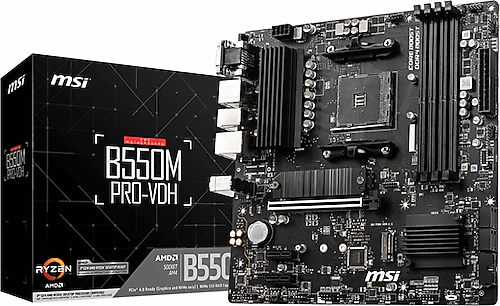
The MSI B550M PRO-VDH is a motherboard for building an AM4 processor and DDR4 memory system that fits in smaller cases without cutting back too much on upgrade options. Features such as four RAM slots, two M.2 connections, and BIOS Flashback make it worth considering not only for a basic office PC, but also for gaming, productivity, and general home use. The key is to make sure it is compatible with your current processor and that it meets the connectivity needs of your Micro-ATX case.
Upgrade room in a compact case
At 24.4 cm wide, the Micro-ATX design makes it easier to build a system in a more compact case than a full-size ATX motherboard would require. Even so, having four memory slots is a significant advantage: You can start with two memory modules and use the remaining slots later, expanding total capacity to 128 GB. This flexibility is useful if you want to adapt your computer over time for larger projects, virtual machines, or demanding multitasking.
The AMD B550 chipset and AM4 socket make it possible to build a DDR4-based system with a compatible Ryzen processor. However, don’t assume every processor in the AM4 family is compatible just because it has the right socket: processor support may depend on the motherboard’s BIOS version. If you’re moving an existing processor to a new motherboard or plan to use a particular CPU right out of the box, it’s worth checking support for the exact processor model before buying.
BIOS Flashback offers a practical safeguard here. It provides a way to update the BIOS using a USB drive, which can make it easier to resolve installation issues related to processor compatibility. That’s especially helpful for people building their own systems who may need a BIOS update for processor support. Be sure to follow the update steps in the order given in the motherboard manual.
Storage and connectivity options
The two M.2 slots let you use a fast SSD for your operating system and frequently used applications alongside a second drive for your game library or work files. Four SATA 3 connections also make it easy to keep using existing SATA SSDs and hard drives. That means you don’t have to replace your old storage drives right away when building a new computer. Check the specifications of the SSD you plan to use against the motherboard manual for details such as M.2 slot speeds and drive compatibility; the two slots don’t necessarily have to use the same connection standard.
PCIe 4.0 support is useful if you want to build a system that can take advantage of newer expansion cards with a compatible processor and components. It doesn’t mean every SSD or graphics card installed on the motherboard will automatically run at PCIe 4.0 speeds; the result depends on the processor, the slot used, and the installed hardware. So consider this feature a source of flexibility for future upgrades as well as when choosing parts for your current needs.
Type-A USB ports on the rear make it easy to connect keyboards, mice, external drives, and other common peripherals. The listed connectivity includes two USB 2.0 ports and four USB 3.0 ports. Along with four SATA connections and two M.2 slots, this provides a useful foundation for a home computer or entry-to-midrange workstation with several storage drives.
Display outputs, gaming, and everyday use
The VGA, HDMI, and DisplayPort outputs on the motherboard’s rear panel offer flexibility for connecting different monitors. However, to get an image from these outputs, you’ll need a compatible Ryzen APU with integrated graphics; when you install a discrete graphics card, you’ll generally connect the monitor to the graphics card’s outputs. These options can be useful if you want a system with integrated graphics for office work, web browsing, and basic display needs. Gaming performance depends on the selected processor’s graphics unit—the motherboard’s display ports don’t provide graphics power on their own.
With a discrete graphics card and a suitable Ryzen processor, the B550M PRO-VDH can also serve as the foundation for a gaming PC. The B550 chipset’s overclocking support gives users room to adjust settings with compatible, unlocked processors. Results depend on the chosen processor, cooler, and other components, so it’s best not to think of overclocking as a performance boost the motherboard can deliver on its own. Its RGB support also helps you personalize your system’s appearance with compatible lighting components.
Who should consider it?
This model is aimed at AM4 users who want to reuse their existing DDR4 memory, people building a new Micro-ATX system, and anyone planning to spread storage or memory upgrades over time. Four RAM slots, two M.2 connections, and BIOS Flashback make it easier for users who want more than the basics and plan to upgrade later. With the right processor and memory, it can also handle photo editing, software development, or running many applications at once, alongside gaming and everyday home use.
Compared with simpler A520 motherboards in a similar class, the B550 chipset offers more flexibility through features such as PCIe 4.0 and overclocking support. On the other hand, full-size ATX models may suit systems that need more expansion room; the B550M PRO-VDH’s Micro-ATX size saves space in the case but offers less card and connection space than the ATX class. Wireless networking isn’t listed among the motherboard’s stated features, so plan on a separate adapter or card if you need Wi-Fi.
If it remains affordable compared with similar B550 models and is compatible with your AM4 and DDR4 components, bringing the essential connectivity and upgrade options together on one board is a strong reason to choose it. If you’re planning to move to a newer platform, also consider the long-term upgrade options you’ll have by staying with AM4. In short, the MSI B550M PRO-VDH is a balanced choice for users who want a compact case, DDR4 memory, and reasonable storage flexibility, and who check component compatibility in advance.