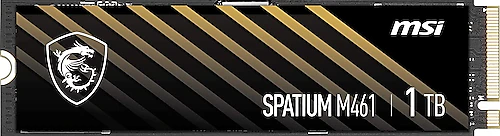
The MSI Spatium M461 is a 1 TB M.2 SSD for anyone looking to speed up their computer or add ample primary storage to a new system. It offers read speeds of up to 5000 MB/s and write speeds of up to 3200 MB/s over a PCI-Express 4.0 interface. These figures make it a strong starting point for users who want their operating system and apps to launch quickly, and who want to keep their games and work files on a single drive.
What does it offer for everyday use and gaming?
The M461’s high sequential read speed is especially useful when opening large files and using applications that rely heavily on storage. It also delivers the core benefits of switching to an SSD for everyday tasks, from starting up your computer to loading programs: wait times are reduced, and the system feels more responsive. Of course, real-world results vary depending on the computer’s processor, other components, and the task at hand; a 5000 MB/s rating does not mean every application will run at that speed.
Its 1 TB capacity is also a practical amount of space for moving your game library to an SSD. You can make room for several large games while still leaving space for the operating system and frequently used programs. Since game loading times depend on the rest of the system as well as storage, this drive alone does not promise a specific load time or an increase in in-game performance. Still, when upgrading from a mechanical hard drive or a slower SSD, the benefits of fast storage can be noticeable in tasks such as loading and transferring files.
Creative work and file transfers
Write speeds of up to 3200 MB/s provide a solid foundation for tasks such as copying large archives to the drive, moving high-capacity project files, and keeping frequently used work materials in local storage. Users working with photo archives, video projects, software development files, or large numbers of documents can make flexible use of the 1 TB of space. Its speed is most valuable in workflows that regularly move large files or involve frequent storage access by applications. Don’t expect to see the same peak speed in every operation involving small files; the file type and computer configuration affect the results.
Rather than being a drive designed for top-tier professional workstations and targeting the highest possible write speeds under all conditions, this model stands out as a fast, high-capacity, general-purpose storage solution. Users who constantly write very large datasets or place storage performance at the center of their work can also compare options in the same PCIe 4.0 class with higher peak speeds. For everyday productivity, gaming, and personal archives, however, the M461’s speeds directly meet many needs.
Compatibility and installation considerations
Before buying, check that your motherboard or laptop has a slot that supports M.2 SSDs and that the slot is compatible with a PCIe/NVMe drive. M.2 refers to the drive’s physical form factor; not every M.2 slot supports the same connection type. In a compatible system without PCIe 4.0 support, the drive may operate at a lower connection speed. So check not only that the slot is present, but also the protocol and PCIe generation listed in your device’s specifications.
Before installation, check the location of the motherboard’s M.2 slot and whether it has a heatsink cover; physical clearance can be important, especially in smaller cases. If you plan to install the operating system on the new drive, it’s a good idea to select the correct disk during setup and back up your old data beforehand. When deciding whether you need an additional heatsink or accessories included with the product, also check your system’s requirements and the product package.
Who is it for in terms of value for money?
The M461’s main appeal is that it combines 1 TB of capacity with the high read speeds of PCIe 4.0. Users with a compatible M.2 slot who want to upgrade to faster storage can get ample space for games, work, and everyday files on a single drive. If its price is close to that of PCIe 4.0 models with similar capacity, its 5000 MB/s read speed and broad range of uses make it a sensible contender. Cheaper PCIe 3.0 options may meet basic storage needs; the extra cost of the M461 makes sense for those who value higher connection speeds on a compatible system and want to move up to the PCIe 4.0 class.
Compared with top-tier Gen4 SSDs, the M461’s 3200 MB/s write speed is worth considering for anyone seeking the highest performance. But not everyone needs a more expensive model focused on peak speeds. If your goal is to make your computer feel more responsive, create plenty of space for games and apps, and use fast storage for large files, the MSI Spatium M461 is a balanced option. When making your decision, consider the price difference, your computer’s PCIe support, and the capacity you actually need.