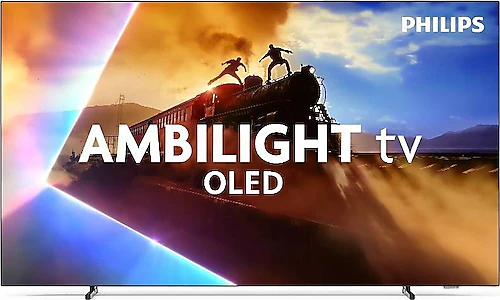
The Philips 65OLED760 is a model designed to make watching movies and playing games at home more engaging, with a 65-inch 4K OLED screen and Ambilight, which casts light from behind the TV onto the wall. Its 120 Hz refresh rate, Dolby Vision support, and four HDMI inputs also make it appealing to those who want more than just a TV for watching shows, and plan to use a console and other video sources in the same setup. The main question is whether you also want Ambilight and Philips’ Titan OS operating system alongside OLED picture quality.
OLED picture on a spacious 65-inch screen
With a resolution of 3840x2160 pixels, the 65OLED760 is a 4K TV designed to preserve fine details on a large screen. Since OLED pixels produce their own light individually, dark areas can look deeper in dark scenes, giving movies and shows watched at night a strong sense of depth. A scene where shadows, subtitles, and bright objects appear in the same frame is one example of when this characteristic of OLED becomes noticeable.
A 65-inch screen is large enough to make movies more immersive in a living room, but you’ll want to consider how much space the TV will take up before deciding where to put it. Its listed dimensions are 1449 mm wide, 852 mm high, and 248 mm deep. If you plan to mount it on the wall, choose a mount compatible with its 300x300 mm VESA support and make sure there is enough room on the wall. The TV weighs 23.5 kg, so it’s also important to mount it on a sturdy supporting surface. If you plan to place it on a stand, check the depth of the space and how much room it will take up with its feet attached.
HDR support includes Dolby Vision, HDR10, and HDR10+. When used with compatible content and players, these formats can adapt brightness and color presentation to each scene. This means you’re not limited to a single HDR format when watching content from different platforms or external devices. Ambilight projects light around the screen onto the wall, visually extending the boundaries of the picture. This lighting can change the room’s atmosphere, especially during evening movie sessions; placing the TV close to a wall can make the effect more noticeable.
Ambilight, sound, and smart TV use
Ambilight is one of the most distinctive features that sets Philips apart from similar OLED TVs. When light that matches the colors on screen spreads across the wall, the picture can feel as though it extends beyond the panel’s physical frame. This feature doesn’t replace picture quality; instead, it adds a different character to the viewing environment. Placing the TV in front of a brightly colored or heavily patterned wall may change how the lights appear. So, if you want to get the most out of Ambilight, it’s worth considering the wall behind the TV and its placement.
Titan OS manages the TV’s smart features and app use. You can access online content over Wi-Fi and cast images from compatible devices to the TV using screen mirroring. The built-in storage is 8 GB; since this space is used by apps and the system, anyone planning to install many apps should check whether the services they need are available on Titan OS and consider their storage requirements before buying. Bluetooth 5.2 allows you to connect wireless devices, while the headphone output offers another option for those who want to use wired headphones.
The built-in satellite receiver may reduce the need for an external satellite receiver box with compatible broadcast setups. This can help you create a tidier setup with fewer devices and cables on your TV stand. Two USB ports and four HDMI inputs provide flexibility for connecting broadcast equipment, a gaming console, a media player, and other sources. It’s a good idea to check which HDMI input to use and what connection features you need based on the devices you’ll connect; the number of inputs alone doesn’t explain which video modes each port supports.
For sound, the TV offers 20 W RMS output power and Dolby Atmos support. Its built-in speakers may be sufficient for everyday broadcasts and shows; those who want fuller sound or a more pronounced surround effect in movies may want to consider a compatible sound system or soundbar. Dolby Atmos support alone doesn’t mean every piece of content will provide the same audio experience: the result depends on the audio format of the content and the sound system being used. Bluetooth connectivity also adds convenience for those who want to use compatible wireless audio equipment.
120 Hz refresh rate and gaming
A 120 Hz refresh rate provides the basis for smoother presentation in scenes with fast motion. This can be useful for following rapid camera movements in sports broadcasts and action-packed scenes in games. Game Mode, VRR, FreeSync, and G-Sync support are also useful features for compatible gaming setups that benefit from variable frame rates. This makes the 65OLED760 more than just a large OLED for watching movies: it’s also an option to consider with a gaming console or computer.
Still, when setting up for gaming, don’t assume that every connection detail is automatically taken care of just because the TV has a 120 Hz panel. Check the target resolution and refresh rate of your console or computer alongside the capabilities of the HDMI connection you plan to use. Four HDMI inputs make it easier to keep multiple devices connected, but you’ll need to check which input supports which picture modes for your setup. This is especially important if you’re choosing a TV for a current-generation console or gaming PC.
Who is it for, and when does it make sense?
The Philips 65OLED760 is a good fit for those who want to watch movies and shows on a large screen, enjoy OLED’s picture characteristics in dark scenes, and give their room a different viewing atmosphere with Ambilight. Its 120 Hz refresh rate and variable refresh technologies strengthen its feature set for users who also play games. The satellite receiver, Bluetooth, screen mirroring, and multiple HDMI inputs can also make everyday setup easier in homes that use a variety of sources.
When comparing it with OLED TVs in a similar size and class, don’t make your decision based on resolution alone; 4K is one of the basic expectations in this segment. Philips’ Ambilight is a clear differentiator for those who want a viewing experience enhanced by light in the room. On the other hand, the apps you need on Titan OS, the connection requirements of your gaming devices, and whether you plan to use an external sound system can also affect your choice. Compare the operating system, connection details, and gaming features of competing models with your own devices.
Its price makes sense when you consider it as a package that includes Ambilight and the HDR formats you want, compared with similar OLED alternatives. If you’ll actually use these features, the price difference may be worth it; if you only watch regular broadcasts and don’t care about Ambilight, it’s worth comparing more affordable options too. Since it has an F energy rating, consider the energy label and how long you expect to use the TV when making your decision. In short, the 65OLED760’s strongest appeal is its combination of a large OLED picture, Ambilight, and gaming-focused features in one TV. Before buying, check that Titan OS has the apps you need, and make sure the connection options and installation space suit your use.