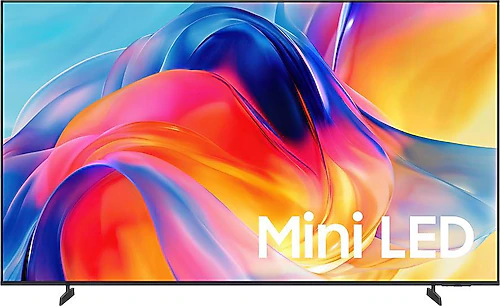
The Samsung 55M70H is aimed at people who want to bring films, TV series, and broadcasts together on one device, with its 55-inch 4K Mini LED display and Tizen smart platform. Having a built-in satellite receiver reduces the need for extra boxes and cables during setup, while the 60 Hz refresh rate positions this model particularly well for everyday viewing and more relaxed-paced gaming.
55-inch screen, 4K resolution, and Mini LED
The 3840x2160-pixel display is designed to deliver a sharp picture for TV series, films, and sports broadcasts on a 55-inch screen. 4K content can show its fine details; with lower-resolution broadcasts, however, the final picture depends on the quality of the source and the TV’s processing capabilities. This size provides an impressive viewing area in a spacious living room, while it can also work in smaller rooms if you set the distance between the sofa and screen appropriately.
Mini LED backlighting is an approach that allows light to be controlled in smaller zones than on traditional LED TVs. Its potential to control bright areas in dark scenes and create a more pronounced sense of contrast comes into its own, especially when watching films. That said, the Mini LED name alone does not guarantee a particular brightness level or number of dimming zones. When assessing this model’s HDR performance, it is best to consider the screen in light of your expectations for real-world content and room lighting, rather than judging it by the technology name alone. HDR10 and HDR10+ support are intended to deliver a wider range of brightness and color information with compatible content.
The bezel-less design also makes the large screen’s viewing area look more seamless. When wall-mounted, the edges draw less attention, creating a clean look that works particularly well for movie nights. If you plan to use the TV in a bright room or one with light-colored walls, also consider screen reflections and the direction of incoming daylight when setting it up.
Tizen, broadcasts, and everyday use
The Tizen operating system lets you access online content services and the TV’s smart features from a single interface. You can connect to a wireless network over Wi-Fi, or use Ethernet if the TV will stay in one place. A wired connection can be useful, especially in rooms where the Wi-Fi signal is weak during streaming. The quad-core processor supports the smart features and interface, though experiences such as app-switching speed can vary depending on usage conditions and software.
With the built-in satellite receiver, a separate box is not essential for satellite broadcasts. This can reduce clutter in your TV unit and the need for an extra remote control. During setup, making sure the satellite dish cable reaches the TV and that the connection is compatible with the equipment used by your broadcast provider are important parts of planning. Screen mirroring is also useful for sending photos and videos from compatible mobile devices to the big screen, making it practical to share content from your phone with family.
Bluetooth 5.3 lets you connect compatible wireless audio devices or accessories to the TV. This feature may be handy if you want to use headphones for a late-night film or get rid of cables. Check that the device you want to connect is compatible with the TV and consider your expectations for audio latency; for fast-paced games, a wired connection may be more suitable for some users.
Gaming and connectivity options
VRR support helps match the screen’s refresh rate to the variable frame rate coming from a compatible gaming source. This can help reduce the perception of image tearing or stuttering. However, the 60 Hz refresh rate does not provide the smoother motion offered by 120 Hz TVs. The 55M70H may therefore suit single-player console games, racing games, and everyday use; competitive gamers who prioritize high frame rates should look at models with faster panels.
Three HDMI inputs provide a reasonable number of connections for devices such as a game console, media player, and sound system. If you do not want to keep switching connections when adding a new device, count your needs in advance to see whether three inputs will be enough. There is only one USB port, which may be restrictive for anyone who needs multiple USB connections at the same time for external storage, media playback, or peripherals. Listing the type and number of devices you want to connect before buying can reduce the chance that you will need to look for an adapter or switch later.
Sound, placement, and mounting
The 20 W RMS audio output provides a built-in audio solution for everyday TV viewing and dialogue-heavy content. If you want fuller movie sound, stronger bass, or a wider soundstage, adding an external sound system can noticeably improve the experience. When buying a sound system, check connection compatibility between the TV and your devices. Although the catalog lists the number of HDMI inputs, not all audio connection details are specified here, so make sure to verify separately that it has the connections you need.
The TV is 1224 mm wide, 760 mm high, and 199.1 mm deep, and weighs 10.3 kg. Measure the width of your TV unit and the weight capacity of the surface where you plan to place it. If you are considering wall mounting, choose a bracket compatible with the 200x200 mm VESA support. The wall structure, the mounting bracket’s weight capacity, and space for cables should also be included in your plans. Measurements may differ depending on whether the TV is mounted on its stand or on the wall, so check the installation requirements when planning clearances.
Who is it a good choice for?
The Samsung 55M70H brings together a large 4K screen, a built-in satellite receiver, and smart apps in a package that does not require separate boxes. It can meet basic needs in a home where people watch films and TV series, follow everyday broadcasts, and occasionally play console games. Mini LED backlighting is one reason to choose it if you are looking for a different picture approach from standard LED options; HDR10 and HDR10+ support also make it possible to enjoy compatible content.
If it is available at a reasonable premium over standard LED TVs of a similar size, the combination of a Mini LED screen, 4K resolution, and smart features may make that premium worth considering. When comparing prices, however, look beyond the screen type and also consider competing models’ refresh rates, number of connections, and audio options. A more expensive 120 Hz-class competitor may be the better choice for smoother gaming, while a cheaper standard LED model may be enough for someone who does not prioritize the Mini LED picture approach and HDR support.
The energy class is listed as F. If you keep the TV on for many hours a day, factor its energy consumption into your overall cost of use. Ultimately, the decision depends on how much you value Mini LED picture features and the convenience of Tizen. For those who are comfortable with the 60 Hz limit and want one device to handle broadcasts, apps, and everyday gaming, the 55M70H is a balanced option when chosen for the right use.