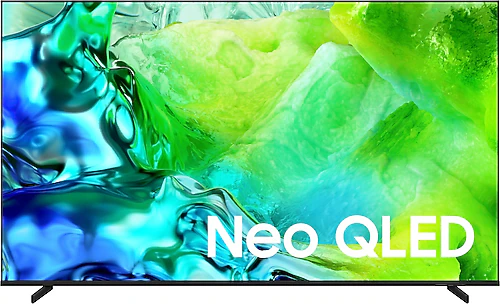
The Samsung 75QN80H combines a 75-inch Neo QLED screen with 4K resolution, a 100 Hz refresh rate, and smart TV features. It’s designed for people who want to enjoy movies and sports broadcasts in a more immersive way in a spacious living room, or connect a console or computer to a large screen. The focus here isn’t on a small TV, but on a large display that defines the room’s viewing experience.
What a large screen really means
A 75-inch screen measures approximately 190 cm diagonally. This size can make movies and sports feel more immersive, especially in spacious living rooms where viewers sit far from the screen. The 3840 × 2160 pixel resolution also helps keep details clear across the large display. You can enjoy fine image details in high-resolution films and series, while several people watching together can all benefit from a generous viewing area.
When choosing a screen size, consider not only the wall where the TV will go, but also your seating arrangement. A 75-inch panel can take up a large part of your field of view in a small room. That may be enjoyable if you like a cinema-like experience, but it won’t suit every viewing habit. The model is listed as 1666.6 mm wide, 993.8 mm high, and 319.8 mm deep, with a weight of 23.5 kg. Compare these measurements with your installation space, and make sure there’s adequate support for carrying or wall-mounting it. For those planning to mount it on a wall, 400 × 300 mm VESA support also helps clarify the installation requirements.
Neo QLED picture and 100 Hz smoothness
Samsung’s Neo QLED and Quantum Dot technologies are among the main features that define this model’s picture. Combined with 4K resolution, they’re aimed at viewers who want more detail from a large screen when watching high-resolution broadcasts, films, and games. HDR10 and HDR10+ support provide HDR picture when viewing compatible content. Since the HDR experience can vary depending on the content, viewing environment, and personal preferences, look not only at which HDR formats a TV supports, but also whether the content you watch is compatible with them.
A 100 Hz refresh rate can help make motion look smoother during sports broadcasts and games where fast movement matters. Game Mode, VRR, and FreeSync support also help match the picture to changes in motion when used with compatible sources. This gives console and PC gamers useful tools for a more consistent experience in fast-moving scenes. However, when planning your gaming setup, check your devices’ output connections, the cables you use, and the picture features supported by your games. These specifications alone don’t guarantee the same gaming performance with every source.
Four HDMI inputs make it easy to keep several sources, such as a game console, media player, and streaming device, connected to the TV. Two USB ports provide connection options for compatible peripherals. The number of inputs is a practical advantage if you’d rather not keep switching HDMI connections. Ethernet and Wi-Fi let you connect the TV to your home network, either by cable or wirelessly.
Tizen, broadcasts, and everyday use
With the Tizen operating system, the 75QN80H is more than a screen for displaying pictures from external devices: it’s also a smart TV. An internet connection lets you access apps and services for watching series, films, and other online content directly on the TV. The smart remote makes everyday use easier, while screen mirroring lets you share content from compatible devices on the large display. Bluetooth support (version 5.3) adds another connection option for those who want to use compatible wireless accessories.
Thanks to the built-in satellite receiver, you may not need a separate receiver box for satellite broadcasts; an antenna connection and channel setup may be all that’s needed. Still, checking your existing broadcast infrastructure and the connections you’ll use in advance can make setup easier. The feature described as AI-powered also contributes to the TV’s smart functions, but that description alone doesn’t guarantee a particular picture-enhancement result or compatibility with every app.
Sound, connectivity, and uses
The TV has a sound output power of 30 W. This lets you start with the built-in speakers for news, everyday programmes, and most typical viewing situations. Dolby Atmos support provides another audio format option with compatible content and setups, but support alone won’t create the surround effect of an external sound system. If you want fuller sound or audio that fills more of the room, consider adding a compatible soundbar or audio system. An optical audio output is another way to connect suitable audio devices.
This model offers a wide range of uses, including watching films and series, live sports, online content, and games. You can also connect a computer via HDMI to display content or share presentations on the large screen. The 100 Hz refresh rate and variable refresh support are notable gaming features, while multiple HDMI inputs make it easier to use different sources in the same setup. So it’s suitable not only for people who watch TV broadcasts, but also for those who want to build a home entertainment system around one large screen.
Who should consider it?
The strongest reason to choose the Samsung 75QN80H is if you want a 75-inch Neo QLED screen along with 4K resolution and a 100 Hz refresh rate. People who watch films on a large screen, care about smooth motion during sports, or use their TV with gaming and streaming devices will get more from the model’s features. Tizen, the built-in satellite receiver, wireless networking, and the smart remote can also reduce the need for separate devices in everyday use.
On the other hand, if you’re looking for a more compact screen for a small room, 75 inches may be larger than you need. When comparing it with smaller 4K TVs, consider the price difference not just in terms of resolution, but also screen area and features such as Neo QLED and Quantum Dot technologies, a 100 Hz refresh rate, VRR, and FreeSync. Prices can change, so the value of this difference depends on your priorities: if you game often, watch sports or films on a large screen, and connect multiple devices, the feature package becomes more worthwhile. If you only watch basic TV broadcasts, a smaller or simpler model may be enough for the same budget.
Before installation, check not only the TV’s width and weight, but also that the wall mount is compatible with the 400 × 300 mm VESA measurement. The energy class is listed as E; if you plan to use the TV frequently and for long periods, include energy efficiency among your selection criteria. In short, the 75QN80H is a well-equipped option for anyone who wants a large screen with gaming and smart TV features. Whether it’s the right choice depends first on the size of your living room and how much you’ll use these features.