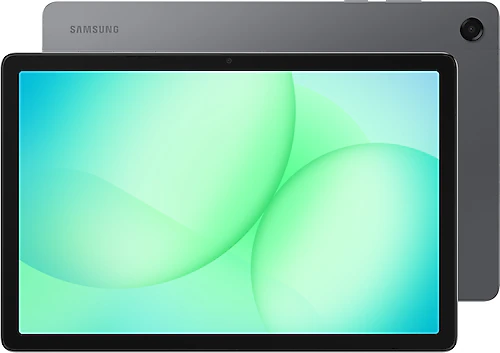
The Samsung Galaxy Tab A11 Plus SM-X230 brings together a range of needs in a single 11-inch tablet, from watching videos and browsing the web to online classes and everyday tasks. Android 16, 6 GB of RAM, and 128 GB of storage provide a practical foundation for daily use, while the 90 Hz display makes scrolling and navigation feel smoother. Expandable storage is another important advantage for anyone planning to use the device for a long time.
A spacious tablet that feels smooth in everyday use
The 11-inch display offers more comfortable space for working and watching than a phone screen, while remaining a manageable size to carry in your hand or bag. Shows and videos look larger, and recipe, news, and social media pages feel less cramped. The display uses TFT technology. As a result, the Galaxy Tab A11 Plus may appeal particularly to users who value a spacious viewing area and smoothness but don’t place the image characteristics of an OLED display at the top of their priorities.
The 90 Hz refresh rate makes a noticeable difference when navigating menus and scrolling through long pages. This figure alone doesn’t guarantee a certain level of gaming performance or the same smoothness in every app, but it helps make movement across the tablet’s interface look more fluid. It’s also one of those small but consistently noticeable everyday improvements for people who frequently scroll through e-books, web pages, and social media feeds.
Versatile enough for study, work, and entertainment
The octa-core MTK processor and 6 GB of RAM provide a hardware setup intended to handle common tasks such as browsing the web, playing videos, messaging, and online meetings. For example, you can watch a class video while checking your notes, or open a document during a meeting. For demanding tasks such as running many heavy apps at once or editing video professionally, a higher-end tablet with more performance and memory may be a better fit. The A11 Plus is primarily designed to bring everyday tasks and entertainment together in one device with a sensible level of simplicity.
Android 16 offers a tablet environment with a wide range of apps. It can accommodate many uses, from online learning apps and video calls to reading documents and using cloud services. Compared with a phone’s smaller interface, the screen size makes it easier to review study materials or spreadsheets. Bluetooth offers the option of using headphones, a keyboard, or other compatible accessories, while USB Type-C is the port used for everyday connections and charging. Before choosing a specific accessory, it’s worth checking that its connection type and functionality are compatible with the tablet.
Storage and connectivity options
The 128 GB of internal storage provides useful space to start with for apps, downloaded documents, and content saved for offline viewing. Expandable storage is also valuable for users with growing photo and video libraries or those who download a lot of content to their device before traveling. This may make it possible to meet storage needs without starting with a model that has more internal storage. When choosing a card, check the type and capacity limit supported by the tablet; these details aren’t specified in the provided hardware information.
Wi-Fi provides internet access at home and in other places with a wireless network. Bluetooth 5.3 can be used to connect wirelessly to compatible headphones and other peripherals. Wi-Fi Direct offers a direct wireless communication option with compatible devices. GPS is also useful in apps that use location information; however, if you plan to use navigation while on the move, consider whether the tablet’s connectivity and usage setup will meet your needs before buying.
Battery, cameras, and use cases
The 7040 mAh battery capacity is one of the main features to consider for users who carry their tablet throughout the day. This figure alone doesn’t indicate how many hours of use you’ll get; screen brightness, connections, and the apps you run all affect power consumption. Still, it’s a meaningful hardware specification for anyone who considers battery capacity important in a large-screen device. The Type-C connection also keeps charging and wired use practical.
The 5 MP front camera can be used for video calls and online classes. The 8 MP rear camera is handy for basic tasks such as quickly capturing a document, notes, or a detail in your surroundings. It’s best not to judge a tablet camera by the same expectations as a phone camera; the main benefit here is being able to join a call or take a simple snapshot when needed. Camera resolution alone doesn’t determine image quality.
Who should consider it?
The Galaxy Tab A11 Plus SM-X230 is a suitable option for people who want to watch videos, browse the web, attend online classes, read documents, and handle light everyday tasks. It can also work well as a shared family tablet, thanks to its large display, variety of Android apps, and expandable storage. The 90 Hz display strengthens its appeal, especially for people who spend much of the day navigating menus and content feeds. Users who want a Samsung tablet and don’t need higher-end features for basic use may also want to consider this model.
When deciding whether to buy, it’s important to compare its price with tablets of a similar screen size. If the price difference is small, the 90 Hz display, 6 GB of RAM, and expandable storage may prove worthwhile in everyday use. If the gap is large and your usage mostly involves watching videos, browsing the web, and using simple apps, a more affordable model may be enough. On the other hand, if you specifically want an OLED display, strong graphics performance, or more advanced productivity features, it would be better to look at higher-end alternatives. The A11 Plus makes sense if you want a large-screen tablet with a current version of Android without paying for those more expensive features.