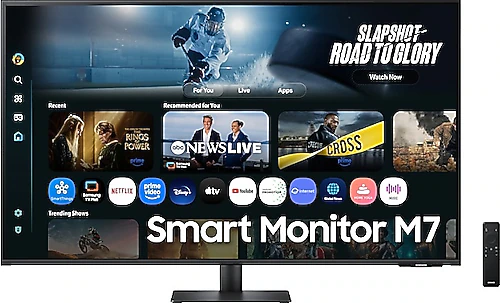
The Samsung M7 LS43FM700UUXUF is aimed at people who want more than a conventional desktop monitor, with its 43-inch 4K screen and smart features. You can use its generous workspace for watching movies and shows, bringing different screen-based activities together in one device without needing a separate TV. Its 60 Hz refresh rate points to a use profile focused more on work, everyday use, and entertainment than on high-frame-rate competitive gaming.
A spacious workspace with 43 inches and 4K
The 3840x2160-pixel resolution makes it easier to work with multiple windows at once across the spacious 43-inch screen. For example, you can keep a document open on one side and a browser or video-call window on the other; you may also need to zoom in and scroll less when reviewing large spreadsheets. The 16:9 aspect ratio offers compatibility with common formats, from desktop applications to videos.
This size requires more desk space and viewing distance than conventional desktop monitors. At a narrow workstation where you sit very close to the screen, 43 inches may feel larger than necessary, so it’s worth considering your seating position and desk depth in advance. On the other hand, the large viewing area is a clear advantage for watching from a distance, following presentations, or sharing a computer with multiple people. Its horizontal orientation also calls for planning a wide surface when arranging it on a desk or wall.
Work, content, and smart features on one screen
The M7’s smart functionality is useful for anyone who wants to use the screen even when no computer is connected. This lets you use the monitor for watching content or similar everyday entertainment outside working hours. Its AI-powered feature is also part of the product’s smart-use approach. However, the available apps and smart functions may vary by country of use and software version, so check that the specific services you need are available on the device before buying.
The built-in speakers can reduce the need to keep a separate sound system on your desk. They offer a practical starting point for joining meetings, watching the news, or listening to content in the background. Those who want fuller sound or stronger bass can choose external speakers or headphones. This approach is especially useful for home-office users who want to limit cable and equipment clutter on their desk.
The VA panel’s image characteristics
The VA panel and 5000:1 contrast ratio help distinguish light and dark areas in darker scenes. This is one of the panel’s notable qualities for anyone who values contrast when watching movies or working in a dim environment. LED display technology and a typical brightness of 300 cd/m² provide a solid foundation for everyday indoor use; in a very bright room, positioning the screen away from a window makes it easier to manage reflections and brightness needs.
The 60 Hz refresh rate offers sufficient smoothness for office work, web browsing, video, and casual gaming, while being more modest than screens with refresh rates of 120 Hz or higher. The response time is listed as 4 ms. These specifications do not make the M7 the first choice for players seeking the highest refresh rates in fast-paced competitive games; by contrast, it’s a more balanced option for those who want to combine a large 4K viewing area with general use and entertainment. The performance you can expect in a particular game also depends on the output capabilities of your computer or game console.
Things to consider for connectivity and setup
Two HDMI 2.0 ports offer flexibility for connecting a computer, game console, or other HDMI sources. The Type-C port is another option for wired use with different devices. However, if you expect video transmission, charging, or single-cable operation over Type-C, check in advance that both the device and cable you plan to connect support the function you need. Don’t assume a particular charging power or data-transfer capacity based on the port type alone.
The monitor is VESA-compatible, so you can consider using a suitable wall mount or monitor arm to free up desk space. When choosing an arm or mount, make sure its VESA dimensions and weight capacity are compatible with the device. Since the product weighs 10.6 kg, it’s important that the arm can support that load and that the mounting surface is sturdy. When planning the setup, also consider access to the connection cables and the height of the large screen relative to your seating position.
Flicker-Free is a screen-comfort feature designed to reduce flicker. It may be a deciding factor for users who read text for long periods or spend all day in front of a screen; however, comfort should also be considered in light of factors such as room lighting, screen settings, and personal sensitivity.
Who should choose it?
The Samsung M7 LS43FM700UUXUF is a good fit for home-office users who want to work on a large 4K screen and bring their meeting and content-viewing needs together in one device. If you value using multiple windows side by side, taking advantage of smart-screen functions without a computer, or not having a separate speaker on your desk, its features can simplify your daily routine. The large screen can also be used to show presentations in a shared workspace or watch videos from a distance.
On the other hand, people with small desks, gamers who prioritize high refresh rates, or users who will use the screen in a very bright environment should compare other size and feature categories. The M7’s value proposition makes the most sense when you need not only 4K resolution but also a 43-inch screen and the convenience of smart features. If the price difference compared with a smaller, high-refresh-rate monitor is reasonable for the larger viewing area and versatility of a single device, it may be worth choosing; if you won’t use these features, a simpler screen may be enough.