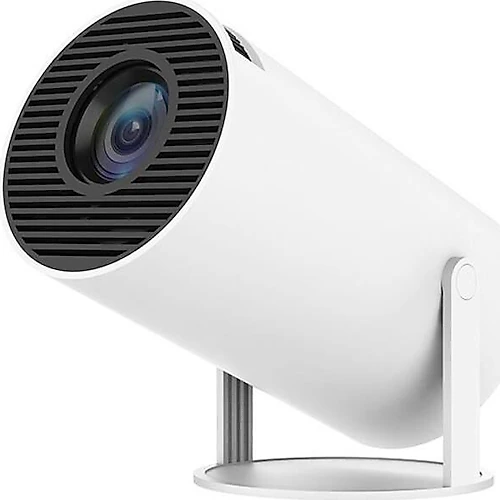
The Torima HY300 Pro is a compact projector for people who don’t want to keep their TV in one fixed place and would like to move their viewing experience to whichever room they need. Its 180-degree rotating body, Android-based smart features, and wireless connectivity make everyday entertainment easier. For the best results, think of it not as a replacement for a screen in a bright living room, but as a portable cinema option for an environment where you can control the light.
A design that adapts to your room
The HY300 Pro’s most distinctive feature is its 180-degree rotating body, which makes it easy to change the direction of projection. With many projectors, you need to adjust a table, shelf, or separate mount to get the image where you want it. With this model, you can turn the body to change the projection direction toward a wall or ceiling. Watching content on the ceiling while lying down is one of the most enjoyable ways to make use of this flexibility; projecting cartoons onto a child’s bedroom wall or setting up a temporary viewing space are just as practical.
Its portability means the device isn’t tied to the layout of a single room. You can take it to the living room for a movie night, to a workspace for a presentation, or outdoors when conditions are suitable. However, projection requires a flat, sufficiently large surface and a suitable place to position the device. If you plan to project onto the ceiling, consider the image orientation and your seating position in advance. Turning the device makes placement easier, but it can’t change the physical constraints of the room.
Picture quality and setting the right expectations
The model’s catalog specifications list a resolution of 1920×1200 pixels, Full HD format, LCD display technology, and a contrast ratio of 1,500:1. This resolution provides a useful foundation for watching films, TV shows, and videos, as well as following presentation text on a large image. When assessing the picture from a device that uses LCD technology, keep in mind that ambient light and the projection surface become more influential as the image gets larger. A flat, light-colored wall or a projection screen can help produce a more consistent image.
The 120 ANSI brightness is the specification that matters most in setting expectations. This level isn’t intended for anyone expecting an image bright enough to replace a TV during the day in a room filled with light. It’s better suited to watching films and TV shows in the evening, with the curtains drawn, or in a dim room. Projecting a very large image also spreads the brightness across a larger surface, so balance the viewing distance and screen size whenever possible. People who understand these conditions and make use of its portability are more likely to appreciate the product.
A 1,500:1 contrast ratio is a technical measure that helps describe tonal separation in dark scenes, but by itself it doesn’t guarantee a cinematic picture in every environment. Reducing ambient light makes blacks and shadow detail easier to see. That’s why the HY300 Pro makes more sense for someone who wants a large image in a suitable setting, while a brighter projector or TV may be a better choice for a main screen in a consistently bright living room.
Smart content and connectivity
Introduced with the Android 14 operating system, the HY300 Pro shouldn’t be thought of only as a device for projecting from an external video source. It offers ways to access streaming services and watch content from a phone or computer on a larger image. Wi-Fi makes it practical to use online content, while Bluetooth makes it easier to pair with compatible wireless audio devices. This reduces the need to set up long cable connections before every viewing session.
HDMI and USB connections also mean you aren’t limited to using the device wirelessly. Connect sources such as a computer, game console, or external storage device to switch between different types of content. Playing console games, opening a presentation, or watching a downloaded video are examples of where these connections come in handy. Games can feel more immersive on a larger image, but since performance measures such as input lag aren’t provided, don’t treat it as a dedicated gaming projector for competitive games where response time matters.
The built-in speaker is a convenient starting point for everyday use. For a fuller sound during movie nights, you can connect a compatible speaker or sound system via Bluetooth. Keep in mind that audio and video synchronization may vary depending on the devices you use for wireless audio. This lets you retain the convenience of the compact, portable design while upgrading the audio separately when you need to.
Setup and buying decision
The first step in setting up is positioning the device in relation to the projection surface and reducing the light in the room. When choosing the image size, consider the width of the surface and your viewing distance; a bigger image doesn’t always mean better results. The product description also lists automatic keystone correction. This feature can help correct the image shape when the device isn’t facing the surface directly. Even so, positioning it at as suitable an angle as possible simplifies setup by reducing the need for correction.
Lamp life is listed as 50,000 hours. This offers a long-use perspective for people who don’t expect the lamp to need replacing soon, even with frequent use; actual service life may depend on usage conditions. Its portable design is also a space-saving option for people who want a large image without creating a permanent TV area. You can put it away when you’re not using it and move it to another room when needed.
The strongest reasons to choose the Torima HY300 Pro are its rotating body, which accommodates different projection directions; its combination of smart features and connectivity; and its portability. If it’s competitively priced against fixed projectors with similar features, and you’ll mostly use it in the evening in rooms with reduced lighting, these features can offer a good balance of value. If you need higher brightness, a strong image in a bright environment, or a model suited to large rooms for business presentations, paying extra for a brighter class of projector may make more sense. The HY300 Pro’s strength isn’t delivering the brightest picture in every condition; it’s making it easy to take the big-screen experience to different places.