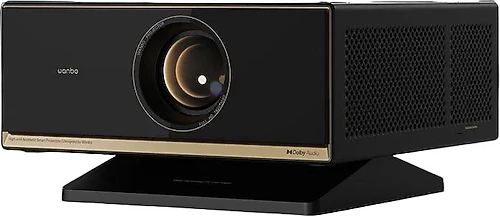
The Wanbo X7 Pro Max is a Full HD projector for anyone looking to enlarge their TV screen or turn a wall into a convenient home cinema for movie nights. Its 1500 ANSI lumens, Android operating system, and 20 W Dolby Audio sound system make it more than just a projector that displays content from an external device, turning it into a more complete home entertainment option. It’s a noteworthy combination, especially for anyone who wants a large image in a room where the light can be controlled.
Full HD picture and a big-screen experience
The 1920 × 1080 pixel resolution provides a Full HD foundation that’s sharp enough to show detail in movies and TV shows. The 3,500:1 contrast ratio also helps distinguish light and dark areas in dim scenes. With LCD imaging technology and an LED light source, the projector supports an image size of up to 180 inches. That’s ambitious enough to turn a wall into a genuinely large screen, but keep in mind that the image spreads over a wider area as it gets bigger, making room lighting more of a factor.
The 1500 ANSI lumens make the projector well suited to use in dim or darkened rooms. It’s best not to expect an image as bright and contrast-rich as a TV in a sunlit room during the day; closing the curtains or watching in the evening can make a noticeable difference. That makes the X7 Pro Max a particularly good fit for a living room or dedicated media space where you can reduce ambient light during movie and TV time. You can use a wall as a screen, but a smooth, light-colored surface will help produce a more even-looking image.
Space and placement matter during setup
Support for a maximum image size of 180 inches doesn’t mean you need to use that size in every room. Consider viewing distance, wall width, and seating arrangement together; a smaller image may be more comfortable in a compact room. The product is 150 mm tall and weighs 4.1 kg. That makes it possible to move between rooms, but it’s not in the pocket-sized mini projector category. For the best experience, place it on a stand or stable surface and plan the cable routing in advance.
Before setup, work out the distance between the projector and the projection surface, as well as where the device will sit in relation to viewers. Since the available information doesn’t mention optical zoom or lens shift, it’s safer to assume you’ll adjust the frame by changing the projector’s placement. If you’re planning to mount it on the ceiling or move it between spaces often, check that the mounts and image adjustment options suit your setup before buying.
Android and connectivity make everyday use easier
Android can reduce the need to connect a computer or external player every time you use the projector. Wi-Fi provides a convenient starting point for accessing online content; access to apps and the interface experience may depend on the Android version and app support. For wireless use cases such as mirroring content from a phone or computer, check how the connection options work with your devices.
There’s an HDMI 2.1 input for wired sources. Connecting a game console, computer, or media player is straightforward, but remember that the HDMI version alone doesn’t guarantee gaming performance at any particular resolution or frame rate. USB also provides an option for compatible external storage or peripherals. Bluetooth 5.0 lets you use compatible wireless audio devices, while the AUX input is there for anyone who prefers a wired audio connection. Checking the inputs and outputs on your devices in advance can help avoid setup surprises.
Built-in sound may reduce the need for extra equipment
With 20 W of audio power and Dolby Audio support, it’s easy to get started without setting up separate speakers for everyday uses such as watching TV shows or following the news. If you want more immersive sound throughout the room for movie nights, you can also connect an external sound system via Bluetooth or AUX. This lets you start with a simple setup and upgrade the sound later if you wish.
The 30 dB noise level is a reminder that fan noise is also worth considering while the projector is running. Placing the device at a suitable distance rather than right next to viewers may improve both setup flexibility and listening comfort. Audio needs also depend on the room: the built-in speaker may be enough in a small space, while an external sound system makes more sense in a large living room or for a more cinematic experience.
Who should consider it?
The X7 Pro Max is a good fit for users who want a larger image than a TV can provide, watch movies and shows in a room that can be darkened, and value having Android and wireless connectivity in one device. Connecting a console or computer via HDMI, playing content from USB, and sending audio out via Bluetooth or AUX also make it useful beyond home cinema. It can also be considered for situations where a large image is useful, such as presentations or photo viewing, though controlling ambient light and finding a suitable surface remain important.
Since no price is provided, it isn’t possible to make a definitive price-performance ranking against a particular competitor. When comparing it with similar Full HD projectors, consider not just image size but also the 1500 ANSI lumens, built-in Android, HDMI 2.1 connectivity, and 20 W Dolby Audio sound system. If these features reduce the need for an external player and speakers, any price difference may be more worthwhile. On the other hand, if 4K picture quality, heavy use in bright rooms, or a very lightweight, easy-to-carry device is your priority, options in a different category may suit you better.
The main reason to consider the Wanbo X7 Pro Max is that it brings Full HD to the big screen while also including Android, wireless connectivity, and built-in sound in one setup. It’s a comprehensive option for anyone looking to make movie nights at home bigger, provided the room and placement are right. The most important thing to consider before buying is your room’s lighting and the space you can set aside for the projector, before focusing on the 180-inch target.