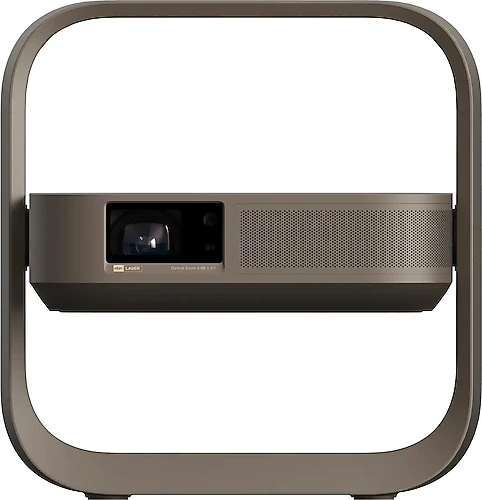
The Xgimi Elfin Flip 4K is built around the idea of taking a big picture from room to room without being tied to a fixed television. Its 1.5 kg weight, 4K image format, laser light source, and Wi-Fi connectivity make it appealing, especially for people who want to watch movies, shows, and presentations on a large screen and put the device away when needed. For the best experience, you’ll need a dark room or one where you can control the light, as well as a suitable spot where you can position the projection surface correctly.
Portability and easy setup
At 255 mm wide, 244 mm high, and 75 mm deep, the Elfin Flip 4K has a design that’s easier to move than conventional living-room projectors. Its 1.5 kg weight makes it easy to take from a home office to a bedroom or bring along when traveling. However, that doesn’t mean it’s a battery-powered device that can run without a cable: its power consumption is listed at 120 W. When moving it to a different location, you’ll need to plan for a power outlet and a suitable projection surface.
Automatic keystone correction helps adjust the shape of the image when you can’t position the device directly in front of the surface. This feature doesn’t guarantee a perfect setup every time, but it can reduce the need for manual adjustments when you want to start a movie or presentation quickly. For the clearest picture, choose a flat wall or projection screen and place the device on a stable surface close to the projection area. The projector supports image sizes of up to 200 inches, giving you plenty of screen options, but reaching that size requires enough distance and the ability to control ambient light.
4K image and laser light source
The Elfin Flip 4K combines DLP image technology with a 3840x2160-pixel resolution format. This resolution can help fine details remain clearer in a large image, particularly in high-resolution movies and shows or presentations with text and graphics. The picture also depends on content quality, screen size, and setup conditions. The 4K label alone doesn’t guarantee the same result with every kind of content; your source device and the content you’re watching also need to be suitable.
Its 1600 ANSI brightness is one of the standout features for a projector of this size. Still, projectors are less suited to bright surroundings than televisions: in a sunlit room, a larger screen can make the image look more washed out. Dimming the lights for an evening movie or pointing the screen toward a wall that isn’t in direct sunlight can help you get more from the brightness and contrast. The manufacturer lists a contrast ratio of 20,000:1. This figure, which can contribute to the perceived distinction between blacks and whites in dark scenes and games, should also be considered alongside room conditions and image settings.
The laser light source is one of the model’s defining features. It helps make the Elfin Flip 4K more than just a compact projector, offering a way to bring a large screen to different spaces. HDR support is also designed to make use of a wider range of brightness and color with compatible content. Since the impact of these features depends on the content being watched and the room’s lighting, you’ll get the best results in a dark room with a high-quality image source.
Connections for movies, presentations, and gaming
Wi-Fi and the Google operating system make the Elfin Flip 4K a more independent option than a display that only works when connected to an external player. Phone compatibility can also make sharing content more convenient. Streaming over a wireless connection or casting an image from a compatible device can reduce cable clutter in a living-room setup. For presentations, connecting a computer over HDMI is useful when wireless transmission isn’t possible or latency could be an issue.
The HDMI 2.1 connection makes it easy to connect devices such as a game console, computer, or media player. However, the connection standard alone doesn’t promise a particular frame rate or latency performance in games; your gaming experience depends on how the console, game, and projector work together. If you’re considering it for gaming, it’s worth checking details such as the picture mode you care about and input latency before buying.
Bluetooth 5.2 offers the option to connect compatible headphones or speakers wirelessly. The built-in 7 W audio output is enough to get started without carrying an external speaker for everyday viewing or quick setup. Dolby Audio and Dolby Digital Plus support can be useful with compatible audio content. If you want fuller, more expansive sound for movie nights, you can use an external sound system; eARC support also lets you connect a compatible audio device over HDMI. This gives you the option of using the projector’s own speaker for convenience and a separate sound system for a more considered viewing setup.
Everyday comfort and what to consider
The 28 dB noise level is intended to keep the fan from becoming distracting in the room. Sensitivity to fan noise during quiet scenes varies from person to person, so it’s a good idea to place the device a little away from your listening position rather than right beside it. Although automatic keystone correction speeds up initial setup, aligning the projector more closely with the screen instead of placing it far to one side can help preserve image quality.
The Elfin Flip 4K makes the most sense as a device that can deliver a large 4K image when you need one, rather than as a replacement for a fixed television. Its features may appeal to people who watch movies in different rooms at home, give presentations occasionally, or want to project a game console’s image onto a large screen with a portable device. By contrast, if you’re looking for a screen to use like a television all day in a bright room, or powerful built-in sound is a must, you should compare your expectations with what it offers.
Compared with portable projectors in a similar class, the Elfin Flip 4K’s standout combination is its 4K format, laser light source, 1600 ANSI brightness, and portable 1.5 kg design. A simpler, smaller projector may meet occasional video-watching needs at a lower cost. The Elfin Flip 4K’s feature advantage matters for those who want more detail on a large screen, a range of connection options, and the flexibility to use it in different rooms. When comparing its price with similar options whose features matter to you, whether the difference is worth paying depends on how often you’ll use it. If you regularly need a large screen, its flexibility is more worthwhile; if you’ll use it rarely, a simpler model may be enough.