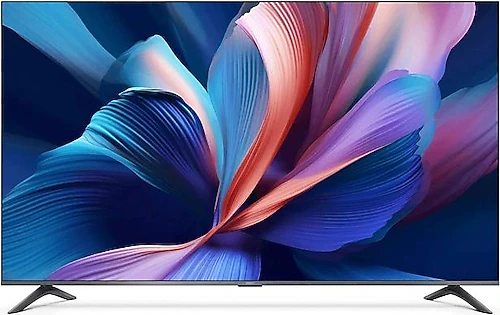
The Xiaomi A Pro brings together a 65-inch QLED panel, 4K resolution, and Google TV for anyone who wants a large, sharp screen in their living room. The built-in satellite receiver simplifies everyday setup, while three HDMI inputs provide room to connect different devices. It’s an appealing option for anyone looking for a big screen for films and TV shows, but gamers who prioritize a high refresh rate will need to account for its 60 Hz limit.
What 4K and QLED bring to a large screen
At 165 cm, the screen can make viewing more immersive in spacious living rooms where a smaller TV would feel inadequate. Its 3840 × 2160-pixel resolution provides ample detail for 4K broadcasts and films in a suitable resolution. Rather than sitting very close, adjusting your viewing distance to suit the room and seating arrangement can help you enjoy this screen size more comfortably.
QLED and Quantum Dot technology are key distinctions in the TV’s picture capabilities. The technology produces colors using a quantum dot layer in an LCD screen, so this model is not an OLED TV, nor does it have a structure that turns off pixels individually. For viewers who value vivid colors in films, TV shows, and live broadcasts, QLED may be a meaningful reason to choose this TV. However, the technology name alone isn’t enough to draw firm conclusions about brightness, black levels, or results under different viewing conditions; these also depend on the screen’s overall design.
HDR10 and HDR10+ support aim to present brighter and darker areas of the picture with greater richness when watching compatible content. The presence of HDR content alone doesn’t guarantee the same effect in every scene; results depend on the content as well as the screen’s picture processing. Still, support for these formats provides a useful foundation for anyone considering the TV for current streaming and film content.
Use Google TV to bring content and devices together
Google TV makes the TV more than just a screen for watching broadcasts. You can access streaming apps, online videos, and other smart TV features through the same interface, and explore content through the TV’s discovery area rather than searching across apps individually. Wi-Fi provides wireless internet access, while the Ethernet port lets you connect the TV to your router with a cable. A wired connection may be more practical, especially if Wi-Fi is unstable where the TV is located.
The quad-core processor and 8 GB of internal storage allow smart features and apps to run on the TV. Since storage isn’t unlimited, it’s worth considering your usage habits if you plan to install many apps. Bluetooth 5.0 can make it easier to connect compatible headphones, speakers, or other peripherals wirelessly. Screen mirroring is also useful for sharing photos and videos from your phone, or compatible content, on the big screen. Since device and app compatibility can affect wireless screen mirroring, check compatibility if you plan to use this feature with a particular device.
Broadcasts, consoles, and external audio setup
The built-in satellite receiver reduces the need for a separate receiver to watch satellite broadcasts. This can help keep your TV setup tidier, with fewer boxes and cables. Three HDMI inputs offer flexibility for connecting a game console, streaming device, and another video source. If you need to connect more devices than there are inputs, you may need an additional HDMI switch. The USB port can be used to connect a compatible USB device to the TV; if you plan to use multiple USB devices at once, check the number of connections beforehand.
For gaming, the 4K resolution and large screen can create an impressive viewing experience across different genres, from single-player adventures to sports games. However, the 60 Hz refresh rate is a limitation to consider if you especially want fast-paced gaming at high frame rates. Compared with TVs that prioritize higher refresh rates, the Xiaomi A Pro is more focused on films, broadcasts, and general home use. That doesn’t make it unsuitable for every console user; what matters is whether you prioritize the smoothest possible gameplay or a large 4K picture and everyday versatility.
The TV’s audio output is rated at 20 W RMS. You can start with its built-in speakers for everyday broadcasts and dialogue; if you want fuller sound or a stronger cinematic effect, an external audio system may be worth considering. The optical audio output provides another option for connecting a compatible audio system to the TV. Before buying an external device, check that the connection types on both products match to avoid surprises during setup.
Installation: dimensions and priorities
For a 65-inch TV, consider not only whether the screen will fit, but also how you’ll transport and position it. Its stated dimensions are 1445 mm wide, 900 mm high, and 391 mm deep; it weighs 13 kg. Before installation, check that these measurements fit your existing furniture or wall space, with room left for cables and nearby devices. For wall mounting, you’ll need a bracket compatible with the 300 × 300 mm VESA support. Ensuring that the wall and mounting bracket can support the TV’s weight is also part of a safe installation.
The energy class is listed as G. When buying a TV that will be on for long periods, factor in this rating and your own viewing habits; screen size or picture technology alone isn’t enough to assess running costs. The intended use also matters: the advantages of a 65-inch screen are more apparent in a spacious room, for family viewing, or when you want to combine smart content and satellite broadcasts on one screen. In a smaller room, the TV’s position and viewing distance will determine whether the large screen is enjoyable or feels too imposing.
Who should consider it?
The Xiaomi A Pro’s main appeal is that it combines a large 4K QLED screen, Google TV, and a satellite receiver in one device. Anyone looking to reduce the number of separate broadcast boxes, bring popular smart TV features to a large screen, and have multiple HDMI inputs for a console or other video sources may benefit from this combination. QLED and HDR10/HDR10+ support also give users who care about picture features concrete reasons to consider it.
When comparing it with other 65-inch TVs in a similar class, look beyond a single feature and consider the overall package and price difference. If an alternative offers a significantly higher refresh rate and gaming is central to your needs, paying extra may be worthwhile. On the other hand, if your priority is to combine a large 4K screen, Google TV, Quantum Dot, and a built-in satellite receiver in one product, the Xiaomi A Pro’s combination makes more sense. Since prices can change, rather than making a definitive price-to-performance judgment, consider how valuable these features are for your use and compare the price difference with similar options.