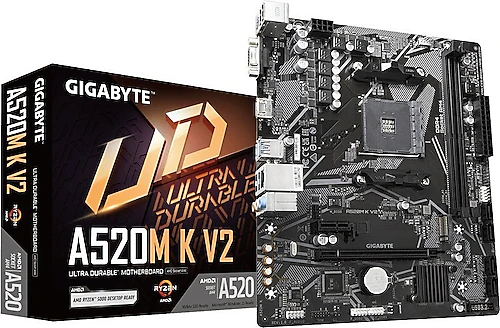
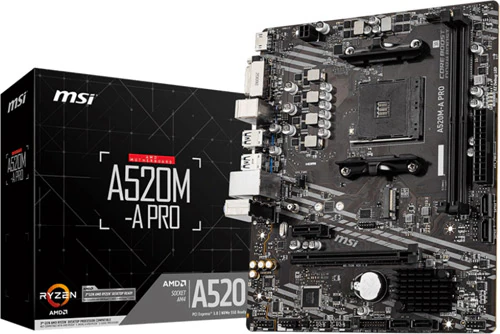
The Gigabyte A520M-K-V2 and MSI A520M-A Pro are two Micro ATX motherboards aimed at users looking to build a straightforward, compact desktop around an AMD AM4 processor and DDR4 memory. Both use the AMD A520 chipset and provide a similar foundation with two RAM slots, support for up to 64 GB of memory, one M.2 slot, four SATA 3 connections, and six USB ports. As a result, the choice is shaped less by raw connection counts and more by practical details such as the physical layout of the system and monitor connectivity.
Shared platform: a balanced setup for basic AM4 systems
Both models are built around AMD processors with the AM4 socket and DDR4 memory. They provide the core infrastructure needed for everyday use, a home office PC, media consumption, or an entry-level gaming system with well-balanced components. The A520 chipset's approach also suits these use cases: the goal is to bring together essential parts in an orderly way rather than offer extensive expansion options.
On the memory side, both motherboards having two DIMM slots and a maximum capacity of 64 GB means the decision does not change here. This capacity can provide a sufficient framework for multitasking, office applications, daily productivity work, and many home-use scenarios. On the other hand, the two-slot layout makes it important to plan RAM purchases from the start. Once both slots are occupied, upgrading to a higher capacity may require replacing the existing modules. Therefore, when choosing between these two boards, the initial module configuration matters more than memory capacity.
No clear difference in storage planning
For users looking to build a fast, tidy system drive with an M.2 SSD, both models provide one M.2 slot. The addition of four SATA 3 connections provides enough flexibility for users who want to add SATA SSDs or hard drives alongside the M.2 drive. Both boards support the same basic plan in a system that uses an M.2 SSD for the operating system and SATA storage for archives and larger capacity.
The shared limitation is the presence of only one M.2 slot. There is no advantageous option between the two products for users planning to use multiple M.2 drives directly on the motherboard. However, in a straightforward computer built with one M.2 SSD and several SATA drives, the storage figures are so close that brand preference alone does not determine the choice in this area.
Monitor connectivity can change the choice
The clearest difference between the two motherboards appears in their display outputs. The Gigabyte A520M-K-V2 offers VGA output alongside HDMI. The MSI A520M-A Pro includes a DVI connection in addition to HDMI. This distinction is particularly important for people building a system around an existing monitor.
If a current monitor with an HDMI input will be used, both models are equally practical options. However, for those who want to connect an older display with a VGA connection directly to the system, Gigabyte is the more suitable match. Users who want to use a monitor with a DVI input without an adapter may lean toward MSI. The choice between these two products should therefore be based on which cable the existing display supports rather than on a connection that may appear newer in theory.
To use the motherboard display outputs on either board, the selected AMD processor must offer integrated graphics. In a system with a dedicated graphics card, the monitor will generally be connected through the graphics card, making the VGA and DVI difference less important. In contrast, if an office or everyday-use PC will be built without a graphics card and with a compatible processor, this connectivity preference can directly affect ease of use.
The same basic level for USB and peripherals
On the USB side, both motherboards offer an equal setup: of the six USB ports in total, two are listed as USB 2.0 and four as USB 3.2. This arrangement may be sufficient for everyday use with common peripherals such as a keyboard, mouse, printer, and external drive. While it makes sense for users with many USB accessories to consider how six ports will be allocated before building the system, there is no advantage between Gigabyte and MSI that would change the decision in terms of port count or USB generation.
Case dimensions and layout priorities
Since both models are in the Micro ATX class, they can be considered for systems targeting a compact case. The Gigabyte A520M-K-V2 is listed with a width of 19.8 cm, while the MSI A520M-A Pro measures 20 × 23.6 cm. The difference in width does not appear large enough to be decisive in everyday case selection; for both products, the key point is choosing a case with Micro ATX support.
That said, if you are building a desktop with a size-limited case or a specialized layout plan, it is necessary to assess the motherboard area in the case together with the space required by other components, rather than looking only at the form factor. A smaller motherboard does not mean that the graphics card, cooler, and storage components will fit equally comfortably in every case.
Which users are each model better suited for?
The Gigabyte A520M-K-V2 is the more sensible choice for users who want to keep using a VGA monitor or prefer to have this older connection available alongside HDMI. It brings together the essential connections in a balanced way for a compact home or work PC built around AM4, DDR4, one M.2 SSD, and several SATA drives.
The MSI A520M-A Pro is better suited to users who want to use a display with a DVI connection directly. Its HDMI and DVI combination can be practical, especially for a straightforward system that will work with monitors from different generations. Beyond that, its memory, storage, and USB infrastructure being at the same level as Gigabyte makes MSI not a more comprehensive option, but an alternative with a different display-output priority.
Quick decision
Rather than looking for an overall winner in this comparison, it is more accurate to prioritize monitor connectivity and case planning. Those with a VGA display should choose the Gigabyte A520M-K-V2, while those with a monitor featuring a DVI input should choose the MSI A520M-A Pro. In a standard AM4 system using HDMI, one M.2 SSD, and basic peripherals, the core infrastructure offered by the two motherboards is largely the same; the choice should be based on the model that works most smoothly with the existing components.