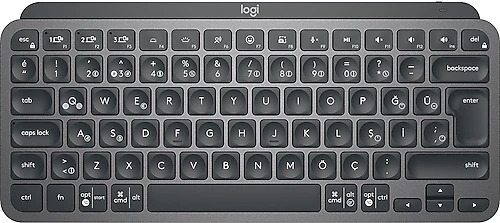
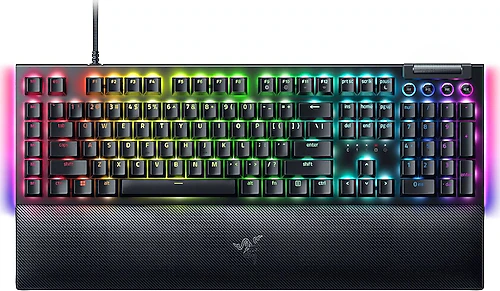
The Logitech MX Keys Mini and Razer BlackWidow V4 Green Switch are two Q-layout keyboards that approach the same need from different angles. Logitech is a compact option that takes up little desk space, works via Bluetooth, and offers a quiet typing character. Razer, meanwhile, is aimed at a more permanent gaming desk setup with its mechanical Green switches, wired connection, RGB lighting, and wrist rest. The key factor in the decision is less about where you use the keyboard and more about the key feel and workflow you expect.
Compact freedom of movement or a fixed desk setup?
The MX Keys Mini’s tenkeyless body frees up space for those who want to work with their mouse closer to the keyboard. This design offers a direct advantage on small desks, alongside a laptop, or on days when you need to carry the keyboard in a bag. Its Bluetooth connection also reduces cable clutter and suits the idea of wireless use with desktops, laptops, and other compatible devices. Its rechargeable built-in battery also eliminates the routine of replacing batteries.
The BlackWidow V4, on the other hand, is designed more for stationary use than portability. With its 467 mm width, 153 mm depth, and wrist rest, it requires a noticeable amount of desk space. In return, it offers a more comprehensive desktop setup for people who game or work on the same computer for long periods. Its two-meter USB cable provides connection flexibility in setups where the computer case is positioned under the desk or slightly farther away. Its wired operation is also a straightforward choice for those who do not want to monitor battery status.
Here, being smaller does not automatically make Logitech superior, nor does being larger make Razer superior. Those who move around frequently, want a more open desk, or prefer to keep more room for mouse use may feel closer to the MX Keys Mini. Those who do not separate their keyboard from a dedicated gaming or work desk may find the BlackWidow V4’s larger body and wrist rest more meaningful.
Key feel and sound character are decisive
The biggest difference between these two models becomes apparent in their keystrokes. The MX Keys Mini leans toward a low-profile, quieter typing style. Its keycaps, designed to help center your fingers, may suit users who want a steady rhythm when writing long texts. Its quiet-friendly design is better suited to shared workspaces, libraries, or environments where you want to type at home without disturbing others.
The Razer BlackWidow V4’s Green switches, by contrast, have a much more distinctive character with a tactile and audible click. This feedback is appealing for gamers who want to clearly register every keypress and for those who enjoy a mechanical typing feel. It also provides a more physical, rhythmic experience while typing. However, the natural trade-off is higher noise. In quiet settings or scenarios where people nearby may be affected by noise, Logitech’s approach will be more comfortable.
Therefore, a mechanical design is not automatically the better choice. If receiving a clear, audible response from each keypress gives you motivation and control, Razer is the right direction. If you are looking for a lower-profile keyboard that draws less attention while writing emails, documents, class notes, or code throughout the day, the MX Keys Mini will be a more natural companion.
Lighting and everyday controls
Both keyboards feature lighting, but their purposes differ. The MX Keys Mini’s key backlighting focuses on making characters easy to see in low light. It provides practical convenience for those who want to type in the evening without increasing the overall lighting in their workspace.
On the BlackWidow V4, RGB lighting is not only about visibility but also part of personalizing the desk setup. Razer offers more room for expression for those who want a more eye-catching look that matches a colorful gaming system. In addition, the Caps Lock indicator helps you quickly see the status of that key.
Both models include function keys for shortcuts. Razer’s multimedia keys add extra convenience for those who want more direct control over volume and similar functions. If it is important to keep these controls at hand through physical keys during gaming or desktop use, the BlackWidow V4 offers an advantageous layout. If basic function access is sufficient on a simpler, compact keyboard, the MX Keys Mini’s approach avoids unnecessary clutter.
Numpad, ergonomics, and usage priorities
The MX Keys Mini does not have a numpad. This is the natural trade-off for compactness in text-focused work and may not be an issue for most users. However, those who enter large numbers throughout the day, work in spreadsheets, or do not want to give up the numpad habit should carefully assess this layout according to their own workflow. The BlackWidow V4’s larger design, meanwhile, does not aim for the desk-space savings expected from a compact keyboard without a numpad, making desk dimensions more important.
In terms of ergonomics, Razer including a wrist rest in the box is a clear difference. For those who want support in front of the keyboard over long periods, it is an element that completes the setup. The MX Keys Mini does not include a wrist rest. Its low profile may fit some users’ desk arrangements well; still, those who need extra support during extended use should plan for it separately.
Final recommendation
If your keyboard needs to fit in your bag, be used via Bluetooth with multiple compatible devices, and remain quiet while typing, the Logitech MX Keys Mini is the better choice. If you do not need a numpad, its compact design, lighting, and rechargeable battery create a setup focused on everyday productivity.
If key feel is central to your gaming desk, you want clicky mechanical Green switches, and you have room on your desk for a larger keyboard, the Razer BlackWidow V4 Green Switch is the better fit. Its RGB appearance, multimedia controls, and wrist rest also complete this fixed desktop experience. In short, Logitech appeals to a portable, quiet work rhythm, while Razer is suited to a desk setup with distinct feedback and visual customization.