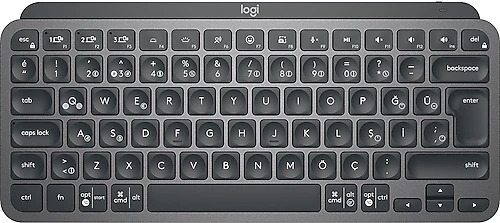
The Logitech MX Keys Mini 920-010504 is a wireless keyboard that takes up less desk space without forcing you to settle for a laptop keyboard when typing. With its Q layout and no numpad, backlit keys, and rechargeable battery, it’s designed especially for people who type frequently, work across different devices, and want to take their keyboard with them.
Compact design, at your desk and on the go
The MX Keys Mini’s small footprint leaves more room for a mouse on your desk, and when you put it in your bag, you don’t have to carry the bulk of a full-size keyboard. It’s practical for students and professionals who move between shared workspaces, as well as for people who keep a dedicated desk at home. Bluetooth reduces cable clutter and lets you use the keyboard wirelessly with a desktop computer, laptop, or another compatible device.
The absence of a numpad is the model’s most notable trade-off. If your work mainly involves text, email, coding, and everyday office tasks, this layout is usually sufficient; it may even make it easier to keep the mouse closer to the keyboard. If you enter numbers intensively all day, work with accounting spreadsheets, or are used to having a numpad, you’ll notice it’s missing. Before buying, it’s also worth checking that the Q layout, the characters printed on the keys, and your computer’s keyboard language meet your expectations.
Typing and backlighting
The MX Keys Mini is for those who prefer a low-profile, quieter typing style over the tall, pronounced feel of mechanical keyboards. The shape of the keycaps, which helps center your fingers, can make it easier to find the keys when typing long passages. Its quiet operation is also an advantage when typing in an open-plan office, library, or at home around other people. The backlit keys make the characters easier to see in dimly lit environments, so you can work in the evening without turning up the room lights.
Function keys provide quick access to everyday actions and shortcuts. That’s useful not only for editing documents and online meetings, but also for tasks such as software development, taking class notes, and typing on a tablet. If you plan to switch the compact keyboard between multiple computers or compatible devices, consider in advance how Bluetooth pairing works with your devices and whether the operating system shortcuts suit your needs.
Battery, connectivity, and buying decision
The built-in lithium battery is rechargeable, so you charge the keyboard rather than replace its battery. The listed usage information specifies up to 10 days on a single charge. How often the backlighting activates and how heavily you use the keyboard can affect actual battery life. A wrist rest is not included; if you type at a desk for long periods, you may want to consider a wrist rest suited to your posture or a higher-profile keyboard.
Compared with traditional full-size office keyboards, the MX Keys Mini offers a more portable option and a tidier desk setup, while focusing on a lower-profile, quieter typing experience than mechanical alternatives. For example, compact mechanical models such as the Keychron K3 may be more appealing if you’re looking for a mechanical key feel and customization; Logitech is a better fit for those who want backlighting, a rechargeable battery, and everyday typing comfort in one keyboard. If you don’t need a numpad, value the convenience of Bluetooth wireless connectivity, and prefer a more compact layout for portability, the MX Keys Mini is a compelling choice. It’s worth choosing if the price difference feels justified by the backlighting, rechargeable battery, and convenience of its compact design.