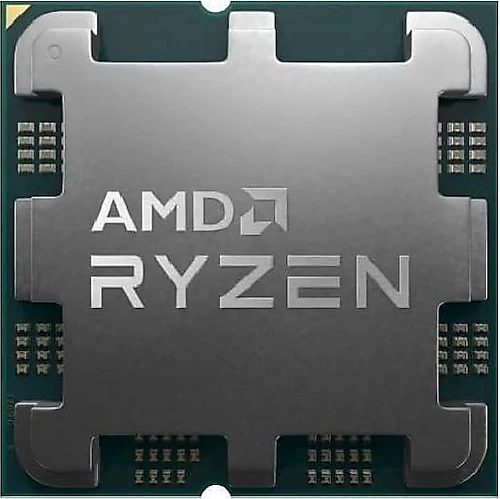
The AMD Ryzen 5 7500F targets gaming and everyday-use systems with 6 cores and 12 threads on the AM5 socket. With a 3.70 GHz base clock, a maximum turbo clock of up to 5 GHz, and 65 W power consumption, it aims to help keep the processor budget in check when building a computer that prioritizes the graphics card. However, choosing this model means planning for a graphics card and cooler from the outset: it is sold without a fan, and it also has no integrated graphics.
A balanced foundation for gaming systems
The Ryzen 5 7500F’s 6 cores and 12 threads can handle modern games while also running supporting programs such as a browser, chat app, and recording software. Its turbo clock of up to 5 GHz can also be an advantage in games where single-core performance matters. The main benefit here is avoiding an unnecessary concentration of the budget on the processor at the expense of the graphics card: paired with a mid-range graphics card, it is a reasonable starting point for a balanced gaming system.
The 32 MB cache helps the processor access frequently used data quickly. Designed to support responsive performance in games and various productivity tasks, this configuration does not, by itself, guarantee a specific FPS figure. Gaming performance also depends on the graphics card, memory settings, resolution, and the game itself. So when choosing the 7500F, it makes more sense to consider how the total system budget is allocated between the graphics card and memory, rather than focusing only on the processor name.
Upgrade potential with AM5 and DDR5
The AM5 socket, DDR5 memory support, and PCIe 5.0 compatibility make the 7500F part of a new-generation desktop system. Support for up to 128 GB of RAM also leaves room to increase memory capacity for virtual machines, working with many applications, or larger projects—not just gaming. Of course, PCIe 5.0 support does not mean that every installed SSD will operate at that speed; actual transfer speeds depend on the motherboard and components used.
Virtualization support is useful for anyone who wants to run different operating systems or testing environments on their computer. The 12 threads also support tasks such as code compilation, multitasking, and light content creation beyond gaming. This processor is not intended to replace higher-end models with more cores for demanding professional workloads, but it offers a flexible setup for people who use their computer for both gaming and everyday productivity.
Don’t forget to plan for a graphics card and cooler
The Ryzen 5 7500F has no integrated graphics. That means a separate graphics card is required to use the system for display output; building a computer with only the processor and connecting it to a monitor is not enough. This is an important distinction for troubleshooting or for anyone planning to buy a graphics card later. If you also want built-in display output, you could consider nearby alternatives with integrated graphics, such as the Ryzen 5 7600.
The processor is sold without a fan, so you’ll need to choose a CPU cooler separately. Don’t assume a cooler is included in the box; check that the cooler is AM5-compatible and that it fits your case and airflow setup. While its 65 W power consumption makes it a suitable basis for a desktop build with reasonable power use, it does not eliminate the need for cooling. Since the maximum temperature is 95°C, choose a cooler with your preferred noise level and the case’s airflow in mind, rather than looking only at that limit.
The motherboard must have an AM5 socket. If you’re upgrading from an existing system, check processor support and BIOS compatibility for your specific motherboard model; having the same socket may not be enough. DDR5 memory is also required, so include the cost of a motherboard and memory in your overall budget if you’re moving from an older DDR4 platform. The processor supports overclocking; anyone who wants to use this feature should plan for a suitable motherboard, cooling, and stable memory settings together.
Compared with the Ryzen 5 7600 and similar options
The Ryzen 5 7600 is one option to consider alongside the 7500F. Its integrated graphics make it possible to get display output without a graphics card, and can provide basic display output in the event of a graphics card failure. If you don’t need this feature and there’s a meaningful price difference between the two processors, the 7500F could leave more of your budget for a graphics card or a better cooler. If the price difference is small, the 7600’s integrated graphics may make it more appealing.
Similarly, processors with more cores can offer an advantage in sustained multi-core workloads, but may require a larger processor budget. If your priorities are gaming, general use, and moving to a new AM5 system at a reasonable cost, the 7500F’s 6-core design is a strong balance. If you frequently do heavy video processing or other demanding workstation tasks, compare alternatives with more cores as well.
Who is it for, and when does it make sense?
For users who are already planning to buy a graphics card, want to build a new AM5- and DDR5-based desktop, and are looking to keep processor costs in check, the Ryzen 5 7500F’s main appeal is its combination of turbo speeds up to 5 GHz, 6 cores, and 12 threads with support for a modern platform. Alongside gaming, it also makes room for everyday tasks, multitasking, and virtualization.
When making your decision, consider the total cost—including a compatible AM5 motherboard, DDR5 memory, a separate graphics card, and a cooler bought separately—not just the processor price. If the lack of integrated graphics isn’t a problem and you can put the savings compared with options such as the 7600 toward another part of the system, the 7500F is a sensible choice. If you want to use the system without a graphics card or expect a cooler to be included in the box, another model or a different package may be a better fit.