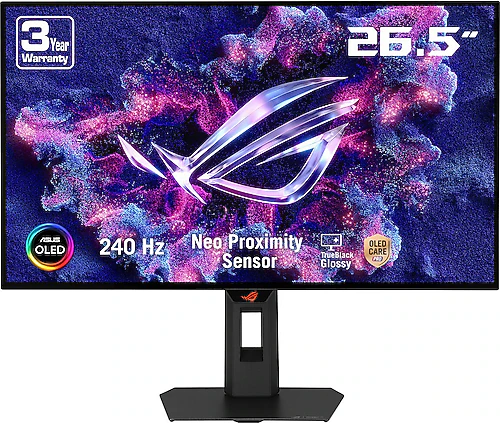
The Asus ROG Strix OLED Gen2 XG27AQDMGR is aimed at people who don’t want to give up speed in competitive games or the deep contrast of OLED visuals in single-player games. It pairs a 26.5-inch, 2560×1440 panel with a 240 Hz refresh rate and a 0.03 ms response time. That means you can target the benefits of a high refresh rate without moving up to 4K and its heavier graphics-card demands. Its pivot stand also makes it flexible for work.
Sharp, smooth visuals for fast-paced gaming
A 240 Hz refresh rate means the screen updates more frequently, particularly noticeable in fast-paced shooters and racing games. When tracking a target with your mouse or quickly changing the camera angle, motion looks smoother; in moments where quick reactions matter, that can make it easier to follow the action. Of course, your computer also needs to reach high frame rates in a game to take advantage of this refresh rate. The 2560×1440 resolution is a balanced choice here: it delivers a more detailed image than 1080p without the heavy graphics workload of 4K.
Because each OLED pixel produces its own light, blacks look deep in dark scenes, and the distinction between bright objects and dark backgrounds stands out. This is useful in atmospheric games played in a dim room, as well as in competitive games with lots of night scenes and shadows. The 10-bit color depth can also help color transitions look richer. Typical brightness is listed as 400 cd/m², so it’s worth considering the surrounding light when using the screen in a very bright room.
OLED advantages and everyday use
The 0.03 ms response time is designed to reduce trails and blur in moving images through fast pixel transitions. This figure alone doesn’t tell you the game’s latency or the frame rate your computer will produce, but combined with a 240 Hz refresh rate, it clearly shows that the monitor prioritizes fast visuals. Support for G-Sync, Adaptive Sync, and FreeSync Premium Pro also helps reduce screen tearing and stuttering at variable frame rates. You can manage frame-rate fluctuations more comfortably by using the synchronization option compatible with your graphics card.
These features are useful beyond gaming, too. The 26.5-inch, 16:9 screen provides a practical amount of space for working with windows side by side, watching videos, and viewing photos. OLED contrast can make dark scenes especially striking when watching films and TV shows. However, this model’s main distinction is that it combines high resolution and color advantages with a 240 Hz refresh rate. If your priorities are just office documents and a spacious work area, a larger monitor or one with a lower refresh rate may suit you better.
Desk flexibility and connections
The height-adjustable stand makes it easy to position the screen at eye level, while pivot support lets you turn the panel into portrait orientation. Portrait mode can be practical when scrolling through long documents, code, chat windows, or web pages. For people who use the same monitor for gaming and work, these adjustment options may reduce the need for a separate vertical display. VESA compatibility also gives you the option to mount the monitor on a suitable desk arm or wall bracket. The monitor weighs 6.6 kg, so check the arm’s weight capacity when choosing one.
For connections, there are two HDMI 2.1 inputs and one DisplayPort, as well as a headphone output. You can keep multiple computers or game consoles connected and switch inputs as needed. Before setting it up, check which resolution and refresh rate are available over each connection, taking into account the specifications of your device and cable. The DisplayPort version isn’t specified, so it wouldn’t be right to assume a particular version. If you’re considering a VESA mount, check that the bracket is compatible; if you plan to use the stand on a desk, consider how much space it will take up.
Things to consider before buying
Getting the most out of 240 Hz at 2560×1440 in games may require a powerful graphics card, especially with high graphics settings. The types of games you play and the frame rates your computer can realistically deliver will determine how much you benefit from this monitor. Even in more relaxed single-player games, a high refresh rate can make the desktop and gaming experience feel smooth; but if you’ll need to upgrade your graphics card to reach 240 Hz, factor in the total system cost as well.
Your usage habits also matter when choosing OLED. A more cautious approach is to use the screen regularly and avoid leaving the image unchanged for long periods, such as when displaying bright interfaces, the taskbar, or the same in-game elements for hours. Details of the monitor’s OLED-specific protection features aren’t provided here, so you shouldn’t assume that it has any particular protective function. Flicker-Free is intended to reduce flicker, which is an advantage; even so, eye comfort varies from person to person.
Who is it a good fit for?
The most compelling reason to choose the XG27AQDMGR is that it brings OLED contrast, a high refresh rate, and a fast response time together in the same 26.5-inch 1440p screen. If you play competitive games but also want to use your monitor for films, videos, or everyday work, this combination is particularly appealing. The pivot function, height adjustment, variable refresh support, and HDMI 2.1 connections also broaden its uses.
The extra cost is worthwhile only if OLED image quality and 240 Hz really matter to you. More affordable IPS or VA monitors at the same resolution may be enough for everyday use and gaming; if OLED contrast and response advantages aren’t priorities, you could put the price difference toward other components. On the other hand, when comparing it with 1440p OLED alternatives with higher refresh rates, consider not just the panel type but also the connections, stand ergonomics, and your budget. This model is a strong option for anyone who wants speed and distinctive image quality in one screen; if you’re looking for 4K detail or a larger display area, you’ll need to reconsider your priorities.