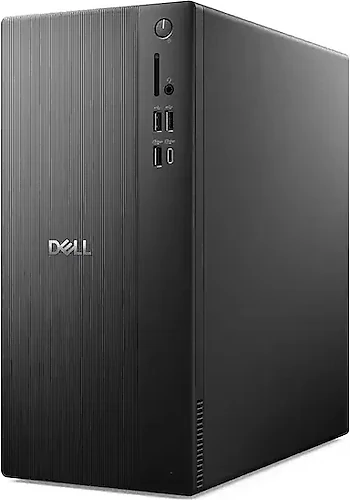
The Dell Tower ECT1250 is a ready-to-use desktop system for people who prioritize processor performance and a responsive everyday experience. Its Intel Core i7-14700, 16 GB of DDR5 memory, and 512 GB SSD are well suited to office work, running many applications at once, and working with large files. On the graphics side, however, it uses shared Intel UHD Graphics 770, so this model is focused on fast, flexible general-purpose computing rather than gaming or intensive 3D work.
Where does the processor make a difference?
The Core i7-14700’s 2.10 GHz base frequency doesn’t tell the whole performance story: the processor’s multiple cores are its main advantage when you’re handling several tasks at once. When you’re working with large spreadsheets and detailed presentations, keeping many browser tabs open, joining video meetings, and running apps in the background, this system offers more processing capacity than a typical office computer. It’s also a good fit for workflows involving code compilation, data organization, and multitasking.
That power isn’t limited to the workplace. It also makes for a comfortable desktop setup at home, whether you’re organizing a photo archive, editing documents, attending online classes, playing media, or keeping other applications open at the same time. It can also meet the everyday needs of different users in a family planning to use the computer for years: someone can work or study while another person joins a video call or browses the web. In these scenarios, the SSD’s fast storage helps make everyday tasks like starting the computer and opening applications feel more responsive.
The benefits of DDR5 memory and an SSD
The system’s 16 GB of DDR5 memory is a balanced starting point for general office tasks and typical home use. With several demanding applications open at once, it provides more breathing room than very basic configurations. However, workloads that use a lot of memory, such as large datasets, professional content creation, or virtual machines, can push the limits of 16 GB. If you’re choosing a computer for these kinds of tasks, check the available memory upgrades and supported configurations in advance.
The 512 GB SSD offers reasonable capacity and fast access for programs and work files. It may be enough for documents, presentations, applications, and everyday media files, but large game libraries, high-resolution video projects, or extensive photo collections will fill up the storage more quickly. If that’s how you plan to use it, factor in the need for an external drive or cloud storage. If you’re considering adding another drive, verify the internal expansion options and supported drive formats for the exact product configuration.
Graphics limitations and what the system is suited for
Intel UHD Graphics 770 is an integrated graphics unit that uses memory shared with the processor. It’s suitable for the desktop interface, watching videos, preparing presentations, and everyday applications with modest graphics requirements. Basic photo editing and light visual work are also possible. Since it doesn’t require a separate graphics card, users who don’t need a computer for demanding graphics work can benefit from its processor capacity in a system that meets their needs.
On the other hand, UHD Graphics 770 may not be the right choice for new, graphics-intensive games, professional 3D modeling, or video production that relies on GPU acceleration. Shared graphics memory is no substitute for a powerful discrete GPU with its own video memory. Gamers and people who regularly work with GPU-intensive tasks would be better served by a model with a separate graphics card. When evaluating the ECT1250, don’t treat the “i7” name alone as an indicator of gaming performance; this system’s clear strength lies in its processor.
Setup, operating system, and desktop arrangement
This version is listed as a ready-to-use system without a monitor. Be sure to include a display, keyboard, and mouse in your purchase plans; if you already have peripherals, it will be easier to add the computer to your workspace. Setting aside a spot on or under your desk where airflow won’t be blocked, and arranging the cables and power connection, are also part of setting up a desktop. It’s a good idea to check that your monitor’s connections are compatible with the computer’s video outputs using the product’s exact connection list.
The operating system information for this model should be verified in particular: Ubuntu appears in the product name, but the technical specifications list FreeDOS. Ask the seller to confirm which operating system will be installed when the computer is delivered. If it’s the FreeDOS configuration, you may need to install your preferred operating system and obtain a license separately if required. If it comes with Ubuntu installed, check that the software you use for work has Linux versions and that your peripherals are compatible. This distinction may affect the purchase decision if you want to use the computer right out of the box.
Who should consider it?
Office users who run many applications, people working from home, students, and anyone who needs processing capacity for everyday tasks are the groups most likely to benefit from the ECT1250. The combination of processor power, a fast SSD, and 16 GB of DDR5 memory aims to deliver a balanced experience for office productivity, online meetings, getting started with software development, and general home use. For those planning to keep their computer for a long time and looking for a processor that won’t quickly be outgrown by basic needs, the Core i7-14700 is a meaningful reason to choose it over entry-level systems.
Its value for money depends on how much more it costs than comparable models and whether you really need an i7 processor. If your use is mostly browsing, email, and light office work, a more affordable desktop with a Core i5 may be enough. But if you have demanding multitasking needs, use processor-intensive applications, and plan to keep the computer for a long time, paying extra for the i7 may make more sense. Rivals with discrete graphics cards may be better suited to graphics-intensive work; the ECT1250 is a better fit for people looking for a ready-to-use desktop without a monitor that prioritizes the processor and makes do with shared graphics. Before buying, clarify the operating system discrepancy and your upgrade needs to determine whether this Dell is really right for your use.