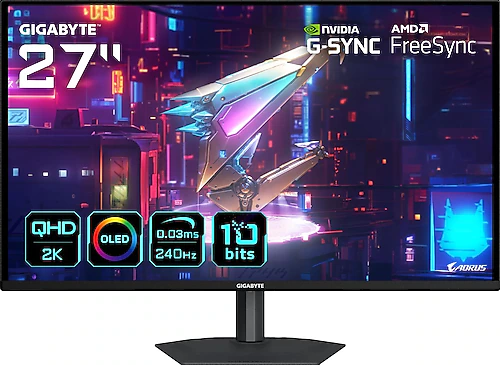
The Gigabyte GO27Q24A is a 27-inch monitor for those who want a high refresh rate for fast-paced games alongside OLED’s strong contrast. Its 2560 × 1440 resolution, 240 Hz refresh rate, and 0.03 ms response time make it suitable for a wide range of uses, from competitive games to single-player titles. Its height-adjustable stand with pivot support also lets you position the screen not just for gaming, but for your everyday work setup too.
OLED’s benefits go beyond fast-paced gaming
The most noticeable benefit of an OLED panel comes through in dark scenes. A 1,500,000:1 contrast ratio helps blacks look deeper and makes bright and dark areas stand out clearly within the same scene. This can make images feel more vivid not only in atmospheric games, but also when watching movies or working with dark interfaces. The 27-inch screen and 2560 × 1440 resolution also provide a balanced workspace for gaming, video, and productivity.
A 240 Hz refresh rate allows a compatible computer to update the image on screen more frequently when producing high frame rates. In competitive games where quick camera turns and sudden target tracking matter, motion looks smoother, and it can be easier to follow the image in response to mouse movements. Of course, to benefit from this smoothness, your computer needs to reach high frame rates in the games you play. The 0.03 ms response time complements the panel’s design, which is aimed at fast pixel transitions. This figure alone does not promise better gaming performance; your system, game settings, and connection also shape the experience.
A more consistent image with variable refresh rate
G-Sync and FreeSync Premium support help match the display’s refresh rate to the frames produced by a compatible graphics card. This can reduce screen tearing and the feeling of stutter when the frame rate varies. This support is useful for anyone who wants to benefit from a high-refresh-rate screen without having to target a steady 240 FPS in every game. Since the result depends on your computer’s capabilities and the game’s frame rate, the monitor’s 240 Hz capacity does not guarantee the same level of smoothness in every situation.
The monitor has two HDMI 2.1 inputs and one DisplayPort connection. This lets you keep multiple devices connected and switch between a desktop computer, game console, or another video source. Before choosing which resolution and refresh rates to use with a particular device, it’s a good idea to check its video output and connection requirements. The headphone jack is also a convenient connection option for anyone who listens directly through headphones.
Gaming at your desk, portrait orientation for work
The GO27Q24A’s pivot feature lets you rotate the screen into portrait orientation. This can be useful for people who work with long documents, code, chat windows, or vertical video content; switching the screen back to landscape for gaming is easy. Height adjustment also makes it easier to position the screen closer to eye level and tailor your desk posture. If you plan to mount the monitor on a wall or a separate arm, VESA compatibility gives you another option; be sure to check the arm’s weight capacity and mounting dimensions as well.
This flexibility makes the product suitable for a wider audience than just people looking for a gaming monitor. Someone who games, watches online content, and works at a computer at the same desk can use the 27-inch screen for everyday tasks and switch to a portrait setup with pivot when needed. Flicker-Free support is also among the monitor’s features. The specifications provided here don’t explain which settings are covered by the functions described as AI-powered, so it’s better not to treat a specific automatic image enhancement as a reason to buy.
Consider your desk and habits before buying
A 27-inch screen takes up a certain amount of desk space, and you’ll also need room around it to move when using it in portrait orientation. The stand’s height adjustment and pivot movement offer installation flexibility, but your desk depth, viewing distance, and the compatibility of any monitor arm you use still matter. The monitor offers HDMI and DisplayPort connections, but planning for cable and device compatibility before buying can help avoid surprises when trying to reach your target refresh rate.
OLED’s high contrast enhances the viewing experience, but it’s also worth considering how you use the screen when interface elements remain unchanged for long periods. If you spend hours with the taskbar, game HUD, or windows constantly visible, it can be helpful to follow general OLED usage practices, such as using a screen saver and power-saving settings. The typical brightness of 400 cd/m² is also worth considering if you plan to use the screen in a very bright room. Adjusting the monitor’s brightness and position to suit your workspace affects comfort.
Who should consider it?
The GO27Q24A’s strongest selling point is its combination of OLED contrast and a 240 Hz refresh rate at 27 inches and 2560 × 1440 resolution. This combination makes sense for users who want smoothness in fast competitive games as well as rich images in dark scenes. G-Sync and FreeSync Premium support also give players more flexibility if they want a steadier image at variable frame rates. Pivot and height adjustment add to the monitor’s usefulness for work beyond gaming.
High-refresh-rate LCD gaming monitors with a similar size and resolution may be a better fit for users who prioritize price over OLED or keep static elements on screen for long periods. The GO27Q24A’s price premium is easier to justify when you’ll actually make use of OLED’s contrast and the fast 240 Hz panel. If your priority is only basic office work or continuous use in a bright room, you may get less value from the extra cost of OLED and a high refresh rate. On the other hand, if bringing gaming, movies, and desktop work together on one screen—and having the flexibility to switch between landscape and portrait orientations—is important to you, the GO27Q24A is a strong and versatile contender.