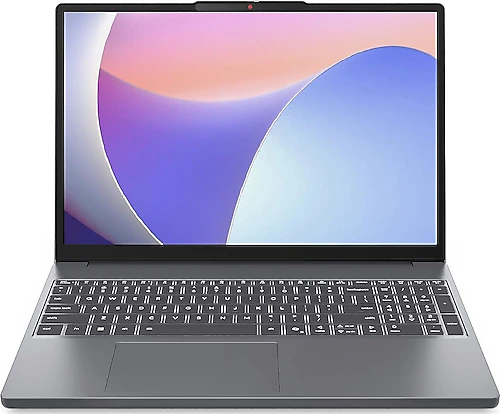
The Lenovo IdeaPad Slim 3 15ARP10 is aimed at people who want to comfortably handle everyday tasks, studies, and productivity apps on a large-screen laptop. Its eight-core AMD Ryzen 7 170, 16 GB of DDR5 memory, and 512 GB SSD provide a solid foundation for smooth multitasking, while the 15.3-inch 16:10 display offers more vertical space for documents and web pages. At 1.63 kg, it is also easy to carry in a bag for a computer of this size.
A spacious display and comfortable workspace for everyday tasks
The display’s 1920 × 1200 resolution provides a taller workspace than standard Full HD screens. The 16:10 aspect ratio is especially useful for long documents, spreadsheets, and web pages: you can see more rows or content at once with less scrolling. The IPS panel helps keep the image more consistent when viewed from different angles, while the anti-glare surface reduces distracting reflections in brightly lit environments. Since the display runs at a 60 Hz refresh rate, it is geared more toward studying, office work, content consumption, and everyday use than high-speed gaming.
The 15.3-inch panel offers a more spacious area than 14-inch-class laptops for people who work with multiple windows at once. For example, you can keep class notes or reference materials open on one side while writing on the other, or switch between a document and a presentation during a meeting. The trade-off is that it takes up a little more room in a bag than a smaller laptop. However, at 1.63 kg, the Slim 3 remains reasonably portable for anyone who wants to use it away from a desk.
What do the Ryzen 7 170 and 16 GB of memory offer?
The eight-core Ryzen 7 170 is the computer’s main advantage for tasks involving several applications at once and demanding multitasking. The 16 GB of DDR5 memory provides a suitable capacity for keeping office apps, video calls, and music running together while many browser tabs are open. The DDR5 memory’s 4800 MHz frequency also indicates that the system is based on a current memory standard. This setup is useful for assignments, presentations, remote work, online meetings, and everyday photo editing.
The 512 GB SSD speeds up the startup of the computer and applications compared with a traditional mechanical drive, while providing a reasonable starting amount of storage for files. It is worth considering your storage needs in advance if you expect to accumulate large video archives, extensive game libraries, or work files. The device supports PCIe Gen4; that does not necessarily mean the SSD inside runs at Gen4 speeds, so storage performance should not be assumed based on that specification alone.
Radeon 680M: everyday graphics and light gaming
The Radeon 680M is an integrated graphics unit that shares resources with the processor. It is no substitute for a gaming laptop with a dedicated graphics card, but it handles everyday viewing, video playback, and basic graphics tasks without requiring a separate graphics card. Older or less graphically demanding games may also be an option at suitable settings. Keep expectations moderate for new, demanding games or professional 3D work: this model prioritizes a portable, all-purpose computer with a spacious display over high graphics performance.
This distinction matters when choosing between models with similar processors and memory capacities. If gaming or 3D production is your top priority, a laptop with a dedicated graphics card—typically heavier and bulkier—may be a better fit. But if your use consists of documents, browsing, online classes, video, and light creative work, the Radeon 680M’s integrated graphics provide a simpler solution.
Portability, connections, and setup
The 60 Wh battery provides the capacity to work away from an outlet; actual battery life will vary with screen brightness, application load, and connectivity, so it is best not to expect a single fixed runtime. The backlit keyboard makes the keys easier to see in dim environments. Bluetooth 5.3 helps connect wireless headphones and similar accessories, while the card reader can make it easier to transfer files from compatible memory cards. If you plan to use an external display or other peripherals, check before buying that the model has the physical ports you need; the listed specifications do not cover all of its ports.
One important purchasing note is the operating system: this IdeaPad Slim 3 configuration comes with FreeDOS. In other words, you should not expect a ready-to-use Windows installation straight out of the box; you will need to obtain and install the operating system you plan to use, then install the necessary drivers. This may involve extra time or cost. If you would rather not handle the installation yourself, factor the total cost of the operating system and installation into your decision before buying.
Who should consider it?
This configuration is a strong candidate for students, office workers, and remote workers who want a large display with extra vertical space. The eight-core processor and 16 GB of memory comfortably handle everyday tasks such as working with many tabs, joining meetings, and switching between documents. Practical details like the card reader, backlit keyboard, and Bluetooth also make it more than just a collection of basic components. At 1.63 kg, carrying it between home, school, and the office remains manageable.
Compared with 14-inch laptops in a similar class, which typically offer a more compact bag-friendly experience, this Lenovo prioritizes workspace with its larger 15.3-inch display. Models with dedicated graphics cards may offer better graphics performance; this computer instead takes a lighter, all-purpose approach. So your choice should depend not just on the processor name, but on whether your priority is portability, screen space, or gaming and 3D performance.
When comparing its price with alternatives offering similar specifications, consider the 16 GB of DDR5 memory, eight-core processor, WUXGA IPS panel, and portable weight together. If these features suit your everyday workload and you are prepared to handle the FreeDOS setup, the Slim 3 can be a well-balanced work computer. If you want a preinstalled operating system, a high-refresh-rate display, or dedicated graphics, it makes more sense to look at alternatives that offer those features.