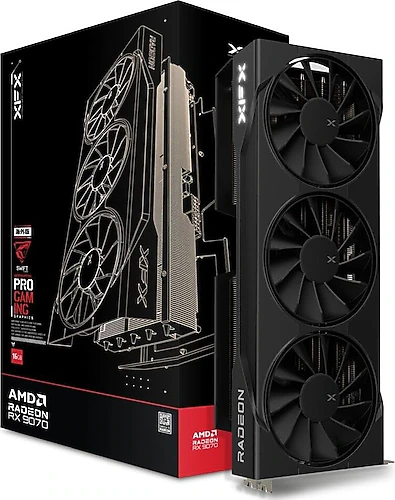
The XFX RX 9070 XT Swift Gaming Edition OC is designed for people who want to play games at high settings and use their new graphics card for several years without worrying about memory. With 16 GB of GDDR6 memory, a 256-bit interface, and a listed boost clock of up to 2970 MHz, it aims to be a strong option, particularly for 1440p gaming. Triple-fan cooling and FreeSync support round out the package.
A strong foundation for 1440p gaming
A card in the RX 9070 XT class is aimed at players who want to enjoy modern games with high image quality. It can be a worthwhile upgrade for those seeking high settings and smooth visuals at 1440p; compared with previous-generation mid-range cards, it aims to deliver a more comfortable experience without needing to lower graphics settings. 4K gaming is also within its scope, but rather than expecting the same settings and smoothness in every game, you should be prepared to adjust graphics options on a game-by-game basis. Its performance in specific games cannot be summed up with a single FPS figure; results vary depending on the game engine, resolution, and settings chosen.
16 GB of memory provides headroom in games that use high-resolution textures and when multiple graphics applications are open at the same time. This capacity is an advantage not only for today’s games, but also for newer releases that make greater use of memory. Along with the 256-bit memory interface, it completes the card’s gaming-focused hardware; of course, memory capacity alone does not guarantee performance, as the GPU’s overall power and game optimization are also important.
Triple fans, overclocking, and FreeSync
The Swift Gaming Edition OC’s triple-fan design provides a substantial cooling setup to dissipate heat under load. This helps manage the card’s operating conditions during long gaming sessions, but the number of fans alone does not promise quiet operation or a specific temperature. Case airflow and the placement of other components also affect cooling.
The model is listed with a standard clock of 1660 MHz and a boost clock of 2970 MHz, and it supports overclocking. Its high listed boost clock indicates that the card is positioned for performance at its factory settings. Don’t assume this figure is a fixed operating speed that will be sustained in every game; actual frequencies can vary with load, temperature, and power conditions. When paired with a FreeSync-compatible monitor, it can help reduce screen tearing by synchronizing the display’s refresh rate with the GPU’s output. HDMI and DisplayPort connections offer different setup options with compatible monitors.
Where else can it be useful?
A powerful graphics card is useful for more than just a gaming PC. It can also be considered for video editing, working with high-resolution content, and creative applications that benefit from GPU acceleration. 16 GB of VRAM provides room for large graphics projects or tasks that process multiple visual elements in the same scene. However, performance and feature support in professional software depend on the application; if your regular workflow relies on CUDA or other specialized tools in particular software, check its AMD GPU support before buying. Support for DirectX 12 Ultimate and OpenGL 4.6 also lets it work with modern graphics APIs in compatible games and applications.
Don’t skip checking your case and power supply
The most important practical step before buying is confirming that the card will physically fit in your case. The product information lists a height of 150 mm and a width of 65 mm, but also check the card’s length on the manufacturer’s product page and compare it with your case specifications. Front-mounted fans, a radiator, or a drive cage can reduce the available space. The triple-fan cooler also makes it important to check clearance from nearby components, especially in compact cases.
Don’t choose a power supply based only on the card’s name, either. Check XFX’s power supply recommendation for this model, the power connectors on the card, and the cable configuration of your existing PSU. Updating the drivers when installing the new card and connecting the monitor cable to the graphics card rather than the motherboard are also basic setup steps. You can use whichever of the HDMI and DisplayPort options your monitor supports.
How does it compare with its rivals?
When choosing among GeForce models in the same performance class, consider gaming performance alongside ray tracing, upscaling technologies, application support, and price differences. The RX 9070 XT’s standout features include its 16 GB of memory and support for AMD upscaling technologies such as FSR. Alternatives from Nvidia may be more appealing depending on the applications you use and your preference for ray-tracing-heavy games; which model makes more sense in return depends on current prices and the games you play. So instead of deciding based only on the brand or a single feature, use the games you play most often and the software you use as your criteria.
The most compelling reasons to choose this XFX version are wanting 16 GB of VRAM, a high clock target, a triple-fan design, and FreeSync support in one card. If its price is close to that of alternatives in a similar class and your case and power supply are compatible, it can be a strong gaming-focused choice. If the price gap widens significantly, base your decision on the memory capacity the card offers and the graphics performance you want in your own games.