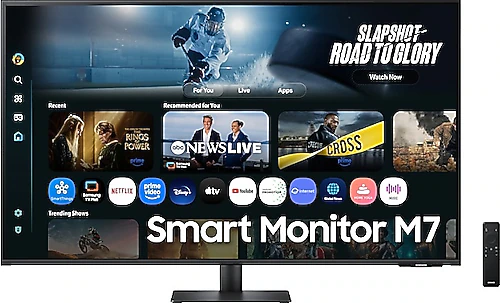
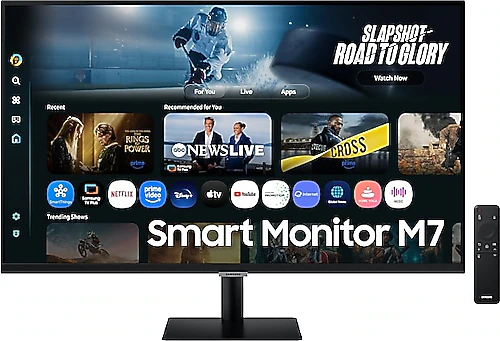
These two versions of the Samsung M7 offer a similar approach to use in different sizes: 4K resolution, smart features, and a single screen for both everyday work and entertainment. The 43-inch model stands out with a larger viewing area and higher contrast ratio, while the 32-inch version takes up less desk space. Both have a 60 Hz refresh rate, so screen size and where you plan to use it matter more than gaming speed.
The biggest difference: screen size and placement
The 43-inch Samsung M7 spreads its 3840x2160 resolution across a larger surface. This size may be useful if you want to keep multiple windows side by side, work with large spreadsheets, or view content from farther away. The wide viewing area can also come in handy for presentations or videos. In return, you’ll need to consider your desk depth and viewing distance: 43 inches may be more than you need in a small workspace.
The 32-inch version also offers the same 4K resolution, but is easier to fit into a more limited desk space. It still gives you a roomy screen for work documents, browser windows and video, while leaving more space on the desk for a keyboard and other equipment. If 4K interface elements seem too small, you can use the scaling settings. In short, choose 43 inches if you want to maximize your workspace; choose 32 inches if you want a large screen while keeping your desk setup easier to manage.
Picture characteristics: similar basics, different contrast
Both monitors have a VA panel, LED display technology, a 16:9 aspect ratio, 300 cd/m² typical brightness and 4K resolution. These shared features provide a similar foundation for everyday office tasks, web browsing and watching content. The notable difference in the specifications is the contrast ratio: 5000:1 for the 43-inch model and 3000:1 for the 32-inch model. If contrast in dark scenes matters to you, the 43-inch version may be preferable for this reason; however, it wouldn’t be right to assume that this number alone guarantees a better picture experience for everyone.
Since the brightness ratings are the same, consider the screen’s position relative to windows if you plan to use it in a very bright room, regardless of size. Both are suited to horizontal use and have Flicker-Free technology. Screen comfort matters if you spend long hours at your desk, though factors such as ambient light and personal sensitivity also play a role.
Connectivity and smart features are largely the same
Both models have two HDMI 2.0 inputs, a Type-C connection, built-in speakers and VESA compatibility. Smart and AI-powered features are also available on both versions. So if you want to connect devices beyond a computer, listen to everyday content without separate speakers, or use the monitor for more than just a computer display, you won’t find a major difference between the two in their core feature sets.
Set your expectations for what the Type-C connection can do, such as video transfer or charging, based on the features of the device you plan to connect. Don’t assume that the connection name alone means one cable will meet all your needs. Both models also support VESA mounting. Still, it’s important to check the mount’s load capacity: the 43-inch version weighs 10.6 kg, while the 32-inch version weighs 6.5 kg. The lighter 32-inch model puts less demand on a compatible arm or mount.
Set the right expectations for gaming and motion
Both M7 models have a 60 Hz refresh rate and 4 ms response time. These provide a reasonable baseline for office use, video and casual gaming, but may not meet the expectations of competitive gamers who prioritize a high refresh rate. The larger size doesn’t make the 43-inch model a faster gaming monitor; the 32-inch version has the same refresh rate limitation. If gaming is your priority, focus less on the screen size and more on whether 60 Hz suits your needs.
Which one should you choose?
The Samsung M7 LS43FM700UUXUF is the better choice if you value a wider workspace, viewing from farther away and the higher contrast ratio listed for the 43-inch version. You’ll need enough desk space and a suitable viewing distance. If your workspace is more limited, the lighter and easier-to-position 32-inch Samsung M7 LS32FM700UUXUF offers the same 4K resolution and smart features in a more compact size.
When making your final decision, think about how much screen space you want rather than focusing on connectivity and smart features, which are largely shared by both models. If you have room for a wide screen, choose 43 inches; if you want a more balanced desk setup with a still-roomy 4K viewing area, 32 inches makes more sense. In either case, 60 Hz is a shared limitation for anyone looking for a high refresh rate.