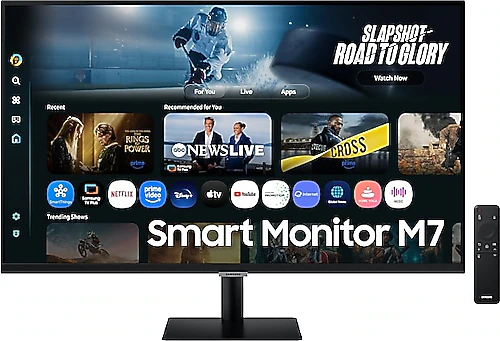
The Samsung M7 LS32FM700UUXUF is aimed at people who want a spacious, sharp display on their desk and plan to use the same monitor for work and everyday entertainment. Its 32-inch 4K panel, smart features, built-in speakers, and USB-C connection make it a more flexible option than a traditional monitor that simply connects to a computer. On the other hand, the 60 Hz refresh rate is the main point that anyone focused on fast-paced gaming should consider when making a choice.
4K on a 32-inch screen: more room to work
The 3840x2160 resolution makes text and images look noticeably detailed on the 32-inch, 16:9 display. You can divide up the screen more comfortably when working with large spreadsheets, multiple documents, and browser windows. The sharpness of 4K is also immediately noticeable for tasks such as photo editing, preparing presentations, and watching high-resolution video. It offers a useful desktop workspace for anyone who wants to create content while keeping reference documents open on the same screen.
To get the most out of its 32-inch size, it’s important to position the monitor at a comfortable viewing distance on your desk. On a small desk, the screen may end up too close; a larger desk makes it easier to position the display and leave room for a keyboard and other equipment. If interface elements look too small at 4K resolution, you can use your operating system’s scaling settings. This lets you make text comfortably readable while still benefiting from the detail that high resolution offers.
VA panel contrast makes a difference in everyday content
The VA panel and 3000:1 contrast ratio help give images more depth in movies and TV shows with darker scenes. With LED backlighting and a typical brightness of 300 cd/m², this screen is suited to most indoor-use scenarios. If you plan to use it in a very bright room or opposite a window, it’s worth thinking about where you place the screen; brightness alone won’t eliminate reflections.
The 16:9 format, designed for landscape use, provides a familiar viewing area for desktop computers, video content, and games. The 4 ms response time and 60 Hz refresh rate work well for everyday use as well as casual gaming where smooth visuals matter. However, if you’re used to high refresh rates for competitive gaming, 60 Hz may feel more limiting. This model’s strength lies less in offering the fastest gaming performance and more in making a large, detailed screen useful for a range of purposes.
Smart features and connectivity: fewer devices on your desk
The M7’s smart features are intended to take it beyond use as a screen connected to a computer. Choosing a smart monitor lets you think of your desk as a space for everyday content as well as a computer workstation. The product is described as having AI-powered features, but that description alone doesn’t specify the scope of any particular app or function. Before buying, it’s a good idea to check how the features you’re interested in work in the product’s software and with the devices you plan to use.
Two HDMI 2.0 inputs make it convenient to connect a game console or another video source alongside your computer. Switching between sources can reduce the need to swap cables at your desk. The USB-C connection is also useful for setting up a tidier workspace with compatible laptops. However, functions such as video transmission or charging a laptop over USB-C depend on the capabilities of both the product and the device; don’t assume that a single cable will handle all of these tasks. Check in advance that your computer’s USB-C output supports display transmission and provides the functions you expect from the connection.
The built-in speakers are a practical plus for anyone who doesn’t want a separate sound system on their desk. You can get audio without setting up additional speakers for video calls, short videos, or everyday viewing. Those looking for richer sound or higher volume may prefer an external audio solution. Flicker-Free is another feature that takes eye comfort into consideration during long workdays in front of a screen; appropriate brightness, ambient lighting, and regular breaks remain important too.
Setup and use cases
At 6.5 kg, this monitor’s 32-inch screen will take up a fair amount of desk space, so plan accordingly. VESA compatibility gives you the option of mounting it with a compatible arm or wall mount. When choosing a mount, check both the monitor’s mounting dimensions and the mount’s weight capacity. This may make it possible to position the screen at eye level or free up more desk space. The contents of the box and the stand’s adjustment options may also affect your setup preferences, so it’s useful to check the details of the package you’re buying.
This model is a sensible option for people working from home, those looking for a large viewing area for study or office work, and anyone who wants to use a computer and entertainment sources on the same screen. 4K resolution gives users who frequently switch between documents, web pages, videos, and images more room and detail. Smart features and speakers may also make the monitor useful for everyday activities that don’t require turning on a computer. However, if you need it for professional color work, you should assess criteria such as color accuracy and color gamut separately; resolution and panel type alone aren’t enough to make a definitive decision.
Who should choose it, and who should consider other options?
The most compelling reason to choose the Samsung M7 LS32FM700UUXUF is that it combines a large 4K workspace with smart features and connected use in a single screen. Two HDMI inputs, USB-C, and built-in speakers can simplify the setup for people who use different devices at the same desk. The VA panel’s contrast also suits those who prioritize movies and general content. If these features fit your everyday routine, it may be a more capable choice than models limited to basic display functions.
On the other hand, when weighing the price difference, consider whether you’d be paying for smart functions or connections you won’t use. If you’ll mostly use a similar-sized 4K screen connected to a computer and won’t make use of the smart features, a simpler model may be enough. If you want a high refresh rate for fast-paced gaming, it’s better to look at options designed for that need rather than settle for 60 Hz. The Samsung M7’s advantage isn’t that it offers the highest value in every area; it’s that it combines a 32-inch 4K display with smart features, a variety of inputs, and built-in audio. The extra cost makes sense only if the features you’re paying for are ones you’ll actually use.